


Telecom Regulatory Authority of India i.e. TRAI Launches DND App on Apple App Store. Back in 2016 TRAI already launches a DND app for Android. You can grab the iOS version for here. This app will help users from getting a lot of spam calls and advertisement from Telemarketers. However, the First user has to sign up in this app.
To register in this App a user has to give their mobile number, however, the DND Services activation takes at least a week.
In Step 1 the App asks users if they want to active DND for all calls and SMS, or some selected categories.
Next, In Step 2 User have to enable some app settings by going to his/her photo settings. In their phone app, they have to enable the DND.
Finally, In Step 3, the app also gives them the facility to report a spam number. To report a spam number, simply open your phone app and right swipe on a number. Then select the report button to report spam.
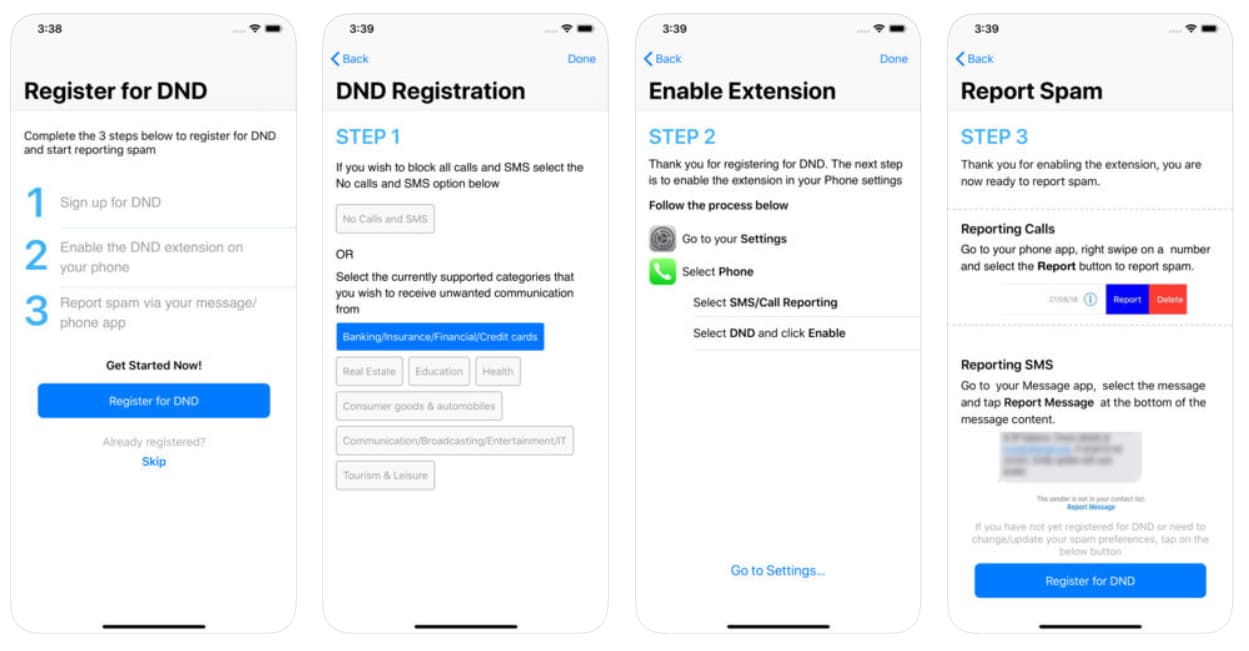
Similarly, User can also report a spam message. They Just have to select a message then click on the report button present at the bottom of the message content.
TRAI says they will not block any authentic business which a user subscribes to, like banks, taxi, food apps etc. Moreover, the complaint SMS is sent to the toll-free number 1909.
Read also: How to Filter Spam Calls in your Phone by using Google Phone App?
