


Before you book a repair
Identify the affected display. Leave the cover layer in place and get a written assessment. Compare verified US service fees, protect your data and check the completed repair.
Key Takeaways
- Start iPhone Duo screen repair with a visual check. Is the screen damaged, or is it blank but intact?
- Apple has separate service fees for three parts. These are the cover layer, outer display and inner display.
- Do not peel the inner screen’s cover layer or try to press a crack flat.
- Get a written assessment, protect your data and check the repair before you leave.
iPhone Duo screen repair starts with one question: what has gone wrong? A surface crack needs one check. A dark display or a loose cover layer needs another. Repair charts cannot tell you which part needs work.
If the glass has cracked, stop using the phone and seek service. If the phone looks intact but a screen stays dark, Apple has a separate set of restart steps. Use this guide to choose the right path. Read the US repair fees and plan for service.
We checked Apple’s support pages on October 24, 2026. We also used its live US cost tool that day. This is a source-based guide. We have not tested a damaged Duo or inspected the devices in those owner reports.
iPhone Duo Screen Crack: What the Reports Tell Us
An owner in Australia posted on Reddit that their inner screen cracked after about six hours of use. They said an Apple Store replaced the phone. The site’s moderators said they had seen more photos and service records. They also said this did not prove the cause.
That distinction matters. A broken device can be real. That alone does not tell us how often a fault occurs. One owner’s result cannot predict yours. Another phone or country may have a different outcome.
Take note of a report. But do not treat it as a test of your own phone. Do not use votes, shares or the number of news headlines as a failure rate. Several stories can refer to the same owner.
For your own case, describe what you saw. For example: the display went white when you opened a photo, or a dark line appeared near the fold. Those details help a technician more than a claim that every Duo has the same fault.
Also keep the sequence clear. Did a mark appear before the screen stopped working? Did touch fail on one side? Was the phone open or closed? Record what you know. Leave the cause open until someone checks it.
Choose the Safe First Step
Apple’s safety guide says to stop using an iPhone if you suspect damage to the device or battery. It also says not to use a phone with cracked glass. A trained technician should handle service.
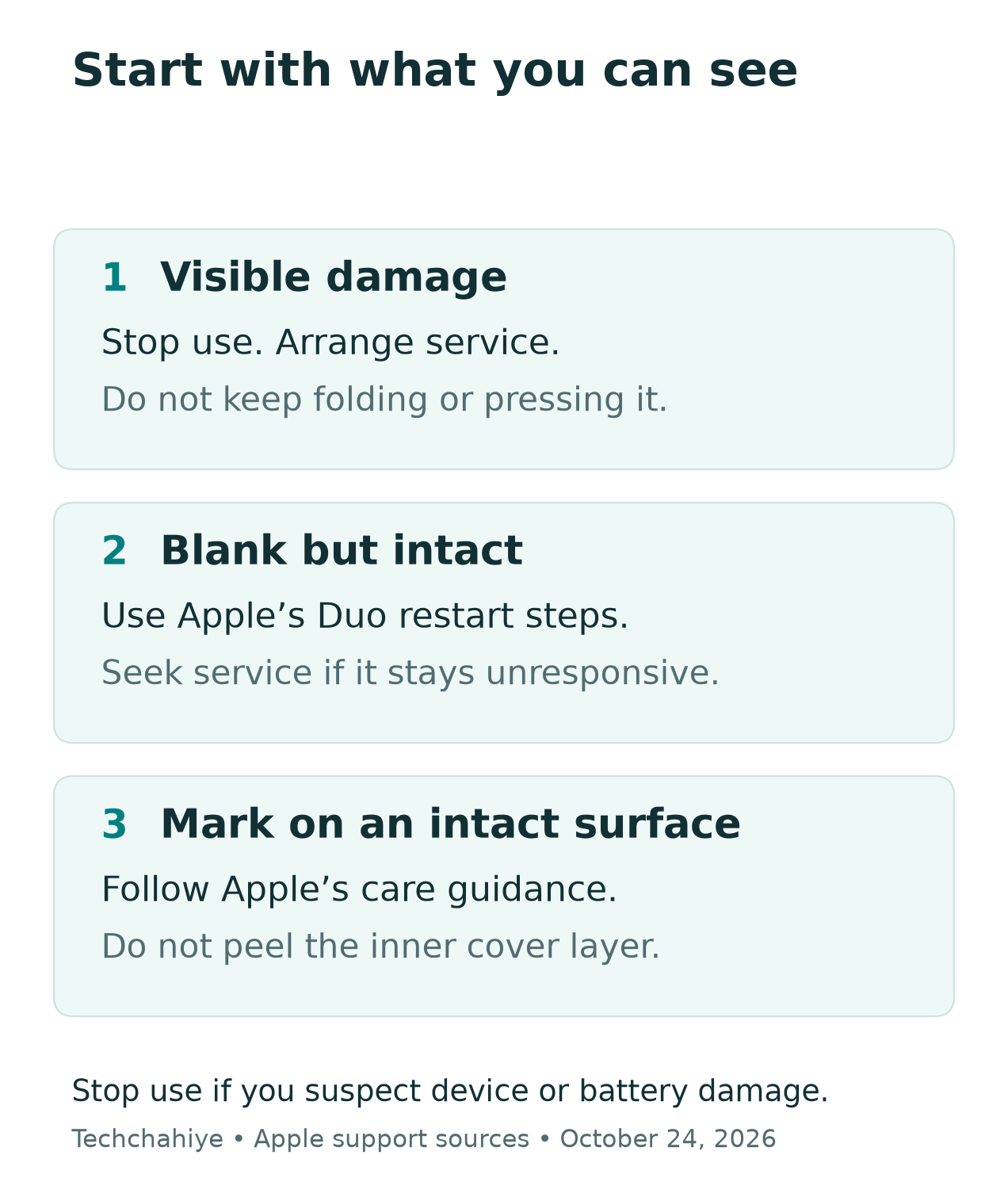
Do not keep folding a damaged screen to see if the line spreads. Do not press on it to make a photo look clearer. A support photo should show the phone as it is. It should not need a stress test.
The restart steps later in this guide apply to an intact phone with a blank screen. Do not use them to test a phone that looks damaged. Stop if you suspect a battery problem too.
| What you notice | First step | What to tell support |
|---|---|---|
| A crack or visible damage | Stop use and arrange service | Where the mark is and when it appeared |
| A dark screen with no visible damage | Follow Apple’s blank-screen guidance | Which display works, if either |
| A mark on an intact surface | Check the official care guidance | Whether the mark changes the image or touch |
Take a breath before you book a repair. Leave the phone as it is. Give support a clear record. You do not need to solve the cause at home to ask for help.
If you cannot safely use the phone, stop at that point. Tell the service team which steps you cannot do. Do not force a damaged display to work. You do not need to tick every box.
iPhone Duo Screen Repair Costs in the US
Apple’s US estimator showed these amounts when we selected iPhone Duo. They are estimates, not a quote for your phone. Tax and possible shipping can affect the total. Apple inspects the device before setting the final fee. Authorized providers can set their own out-of-warranty prices.
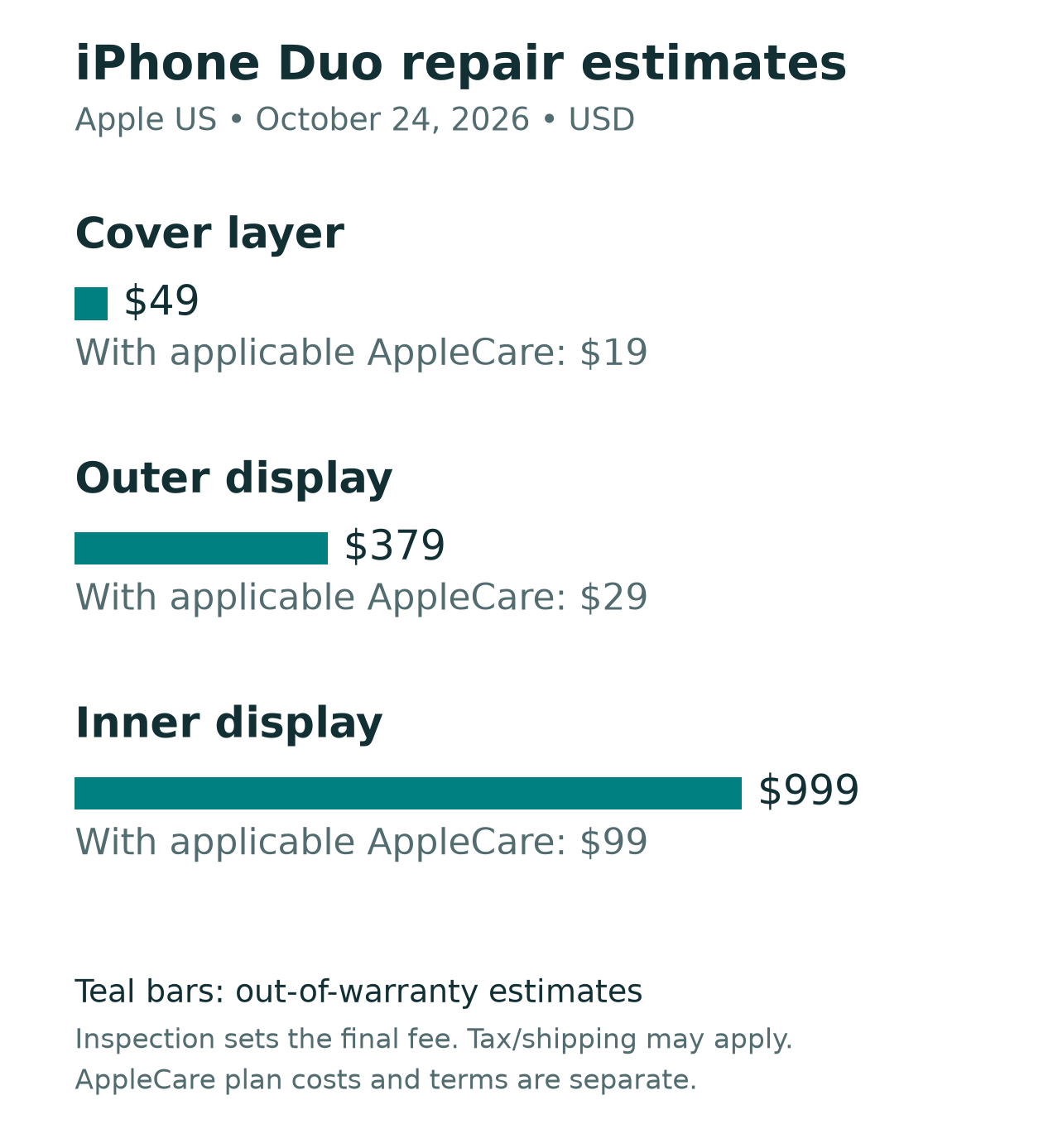
| Service category | Without coverage | With applicable AppleCare coverage |
|---|---|---|
| Cover layer damage | $49 | $19 |
| Outer display damage | $379 | $29 |
| Inner display damage | $999 | $99 |
Source: Apple’s US screen-service estimator, checked October 24, 2026. The AppleCare column shows fees for covered service. Buying a plan costs extra. Eligibility and terms apply.
The useful question is not which row looks cheapest. It is which row the repair team has assigned to your device, and why. Ask for that answer before you approve work.
An example helps. Suppose you describe a surface mark as a broken screen. The repair team may need to check two things. One is the layer above the display. The other is the display itself. Calling both things a screen does not make their service scope the same.
Likewise, a screen that lights up is not proof that only the surface needs work. A photograph cannot settle the part choice or coverage. Let the written assessment guide the decision.
Keep a copy of the estimate for your iPhone Duo screen repair. Ask whether it covers the whole fault. What could change after the check? How will the provider tell you about a new total? This gives you a clear point at which to approve or decline the work.
The Cover Layer Is Not a Peel-Off Fix
Apple says the Duo’s inner display has a nano-texture cover layer that forms part of the display. Do not try to remove it. Apple’s handling guide also says an added screen protector can affect display performance.
A separate cover-layer service category does not make this a home replacement task. The part name tells you what work may be needed. It does not tell you to lift an edge with a fingernail or tool.
If an edge looks raised, take that description to support. Leave it in place. Do not use a generic foldable-phone video as proof that the same method applies to your Duo.
Is the phone intact but dirty? Apple’s cleaning guide says to unplug the cables and turn it off. Use a soft, slightly damp, lint-free cloth. Keep moisture out of openings and avoid compressed air. Cleaning is not a repair for cracks or failed pixels.
Before you clean, be clear about the problem. A fingerprint on a working screen is one thing. A sharp line through an image is another. If you are unsure, describe the mark and ask support which care steps are suitable.
Avoid a cycle of rubbing, pressing and reopening the phone while you search online. One clear record is more useful than more tests. Those tests could change what you are trying to show.
iPhone Duo Black Screen: Apple’s Restart Steps
For an intact Duo with one working display, Apple says to open Control Center on that display. Touch and hold the power control at the top right until it vibrates, then drag the slider to turn the phone off. Turn it on again.
If both displays are black, Apple’s Duo-specific sequence is:
- Quickly press and release the volume button closest to the side button.
- Quickly press and release the other volume button.
- Hold the side button until the Apple logo appears, which can take about ten seconds.
If it still will not start, Apple says to charge for an hour and retry. For a low-charge icon, its guide says to check the hardware and charge for 30 minutes or until it starts. Seek service if it still will not respond.
Stop if you see damage or suspect a battery problem. The steps above are for the blank-screen path, not the cracked-screen path. A restart cannot join broken glass or establish that a display is sound.
After a restart, note the result once. Did both displays return? Was touch working? Did the fault recur during the same normal task? You do not need to repeat the sequence all evening to make the report more credible.
When you contact support, distinguish a black screen from a phone that is fully off. Say which controls still respond, if you can observe that without further testing. Keep the account short and factual.
Make a Clear Repair Record
Before you call about iPhone Duo screen repair, write a short note. It helps you recall useful details. You can also check that the proposed work matches the fault.
Record the date, the affected display and the first symptom. Add the task you were doing at the time. If you know the iOS version, include it. If you do not, say so instead of guessing.
Describe any known drop, impact or liquid contact accurately. Do not hide it. Also, do not claim that one event caused the fault without evidence from the check. A timeline can include facts without turning them into a theory.
Use this short template in your own notes:
- Device and affected part: inner display, outer display or surface mark.
- First noticed: date, time and normal task.
- Current state: image, touch and which display still responds.
- Actions already taken: one restart, no restart or service advice received.
- Requested outcome: assessment, written estimate and expected next step.
Use another device to take a photo of the fault. Do this only if it is safe. Do not post a full receipt or support screen in a public forum. Keep serial numbers, account details and private photos out of shared images.
Save the case number and the written estimate together. After a call, add one line about what the adviser asked you to do next. This helps with a later call. You will not need to retell every message.
Keep support photos private
Crop account details and serial numbers out of public screenshots. Remove private photos and receipt data too. Keep the original in your own repair notes.
Protect Your Data Before Service
If the phone is safe to use, check the backup before you hand it over. In Apple’s iCloud guide, the path is Settings, your name, iCloud, then iCloud Backup. Choose Back Up Now and stay on Wi-Fi until it finishes. The same screen shows the last backup’s date and time.
Do not confuse starting a backup with finishing one. Read the status and timestamp. If an error blocks it, read that message first. Ask support about your options before you erase anything.
Plan for the time your phone is away. Make a short list: a way to receive calls, access to work, travel details and account recovery methods. Use a device you already trust to check those needs.
This is planning, not a reason to share your credentials with a repair shop. Apple’s service guide says to keep your login details private. Never share your Apple Account password, device passcode or account security details. If software support requires you to enter a code or password, remain present.
If the screen is unusable, do not assume the data has vanished. Also do not assume a repair will preserve it. Explain that you cannot confirm a fresh backup and ask what the proposed service will mean for the data.
Before an iPhone Duo screen repair, make a plan for your data. Keep that decision apart from the hardware quote. You may need time to check an existing backup or arrange a spare phone. Get a clear answer before you agree to an erase. First, know what you have saved.
Prepare the Phone for the Service You Booked
Apple’s guide asks you to back up and check iCloud syncing. Remove Wallet cards and passes. Turn off Apple Cash where it applies. Bring the phone, relevant accessories, a receipt if possible and identification. Check whether you need an appointment.
Follow the instructions for your actual booking. Do not borrow a mailing checklist for an in-person visit or use a years-old video as the final guide. Keep the booking email and case number on another device too.
For eligible service on iOS 27 or later, Apple now has Ready for Repair or Trade In. It can keep Find My enabled during the process. Apple or its authorized service team tells you whether the service qualifies.
The path is Find My, select the device, More, Repair or Trade In, then Enable. Follow the on-screen steps yourself. Apple says the technician marks the work complete. The mode then turns off on its own.
This is why a blanket instruction to turn off Find My can be out of date. Use the latest service steps for your device, software and repair. If a step does not match what you see, ask before changing it.
Before leaving, ask how the team will contact you. Ask how you will approve any extra work. Ask how you will collect the device and which record to keep. These small details matter when your usual phone is out of reach.
iPhone Duo Inner Display Repair: Check the Handover
Before you accept the phone, read the work record. Compare it with your first report. The key question is whether the repair addressed the fault you described. Ask about any part or step you do not know.
Use a brief normal-use check with the repair team’s guidance. View text on each display, try touch in the areas that failed and open a photo. Check the camera and the unlock method you use. This is a handover check, not a durability test.
Do not fold the phone dozens of times in the store to prove it will last. Check the same fault in the same way. If a line, dark area or missed touch remains, show it before you leave.
Ask whether the repair is fully complete in software as well as hardware. Apple’s Repair Assistant uses calibration data after a part replacement. Its Duo support list includes both displays and the inner display assembly.
To run Repair Assistant, Apple lists three requirements. These are Wi-Fi, more than 20 percent charge and the latest iOS. The repair status is in Settings, General, About, then Parts and Service History. Ask the repair team to finish any pending step. Do not assume the message will clear on its own.
Finally, save the service record alongside your first case note. Keep the part name and date. Save any follow-up steps too. If the same fault returns, that note can help. It gives the next adviser a clear starting point.
What Owners in India Should Check
The amounts above come from the US estimator in US dollars. They are not Indian quotes. Do not convert them into rupees and treat the result as a local service price.
Ask the service team in India for a local written assessment and total. If you bought the phone abroad, tell the provider where you bought it. Confirm the service route for that exact device and your location.
Ask which part needs work. Which coverage applies? When will you need to approve the work? Also ask where the device will go and how you will receive updates. Avoid assuming a US owner’s store experience will match your case.
Still choosing a phone? Our Duo price and Fold8 buying guides can help. Find them in References. This repair guide addresses what to do after a fault. It does not replace the broader decision about whether a folding phone fits your day.
Did You Know?
A physical part swap may not be the last repair step. Apple says an unfinished repair leaves the Duo’s camera unavailable. This also applies if you restore the phone before you finish the repair. Ask the service team to check the final software steps before you rely on the phone again.
Conclusion
Start iPhone Duo screen repair with a clear check of the fault. Separate a damaged surface from an intact phone with a blank display. Leave the cover layer in place, keep a useful record and get the service category in writing.
Then protect your data and follow the latest booking steps. Check the returned phone with the repair team. A calm, specific account of what happened will help more than a guess based on a viral photo.
FAQs
How much does iPhone Duo screen repair cost?
The US amount depends on the part and coverage. Apple’s estimator lists three service groups in the table above. Ask which category applies. Get a final cost estimate after the repair team checks the phone. Do not assume the lowest listed fee applies to every screen mark.
Does an iPhone Duo screen crack prove a widespread fault?
No. An owner report can describe a real failure without showing how common it is or what caused it. The Reddit report discussed here does not establish a failure rate. A technician still needs to assess your phone on its own facts.
Can I remove the inner screen’s cover layer?
No. Apple says it forms part of the inner display and warns against removing it. Leave a raised edge or damaged surface in place and seek service. A cover-layer service fee does not make the layer a peel-off part.
What should I do about an iPhone Duo black screen?
First check for visible damage or reasons to suspect a battery problem. Stop use and seek service in that case. For an intact phone, use Apple’s Duo-specific restart steps above. Record the result and contact support if the display still will not respond.
What should I check after an iPhone Duo inner display repair?
Check the work record against the fault you reported. With the repair team, check normal image and touch use on both displays. Ask whether all final software steps are complete. Keep the service record and raise any remaining symptom before you leave.
References
- Apple — US iPhone screen-service estimator and AppleCare service fees
- Apple — If your iPhone Duo screens are black
- Apple — Important handling information for iPhone
- Apple — Important safety information for iPhone
- Apple — How to clean your iPhone
- Apple — Prepare for a service appointment
- Apple — Back up your iPhone with iCloud
- Apple — Ready for Repair or Trade In
- Apple — Use Repair Assistant to finish a repair
- Reddit — Original owner’s screen-crack report and moderator caveat
- Techchahiye — iPhone Duo price in the US
- Techchahiye — Galaxy Z Fold8 vs iPhone Duo
