

First steps
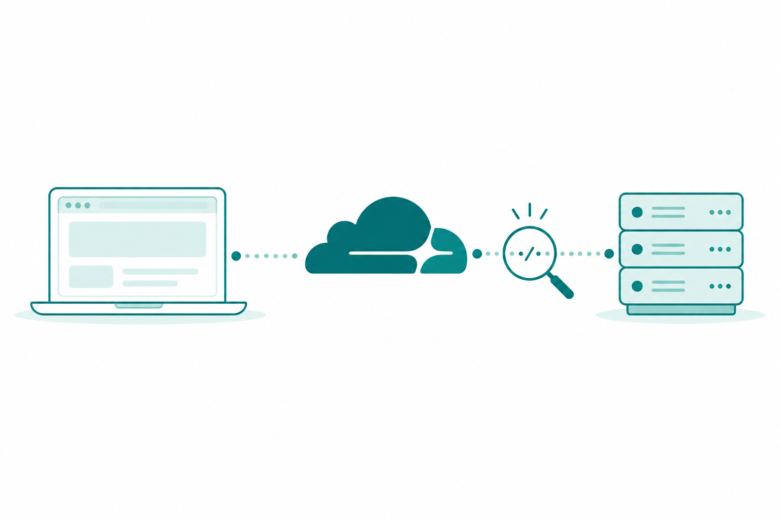
Check the official status page. Read the incident’s time and affected service. Do they match your error? Then test one browser or network change at a time and save the result.
Key Takeaways
- Start a Cloudflare outage check on the official status page. Do not start by blaming your phone or router.
- One site error does not prove a wider Cloudflare outage.
- Save the exact error, time, time zone and page address for support.
- A site visitor and a site owner have different ways to get help.
To check a Cloudflare outage, start with its official status page. Read the current notice, the affected service and the incident’s time. Compare that with the error on your own screen. A Cloudflare logo on an error page does not prove a global failure.
We checked on October 24, 2026. The official page reported no known service issues. It listed recent incidents as resolved. That is a dated snapshot. It cannot promise the service state when you read this. Use the live status link in References for a fresh check.
This guide helps you work out what to check next. It covers one failed site, several failed sites and common Cloudflare error codes. It also shows what to save for support. You can begin without changing DNS or resetting your phone. There is no need to pay for a new tool.
Is Cloudflare Down? Read the Current Notice First
Open the official Cloudflare status page yourself. Read its live overview. Do not rely on an old search snippet. Next, open the incident that seems relevant. Read its date, service and location. Do they match your own error?
Cloudflare’s status guide explains that the page covers its services and network. It also has a locations view. A Re-routed location may be out of the network for maintenance. That work can be planned or unplanned. That label alone is not proof that every site has failed.
Keep three questions in view. Does the notice cover the same time as your problem? Which named service could be relevant? Is the latest update still about an active problem?
A resolved incident from last night is one example. It does not show why a site fails this afternoon. A history entry records that event. It cannot diagnose every error that appears later.
Likewise, a service notice can be real without affecting everything you use. Keep the alert in context. One location or product notice does not mean the whole internet is down. Keep the scope in your notes.
What the Recent Incident Records Show
Two official records illustrate why dates and scope matter. These are historical examples from the latest research check. They are not a claim of an ongoing Cloudflare outage.
The Ashburn record starts at 01:01 UTC on October 24. It marks resolution at 03:09 UTC that day. The record describes network performance issues in Ashburn, Virginia, and names affected services. We calculated 128 minutes between those entries. We used the published start and end times.
A separate North America record started at 15:47 UTC on October 23. It marks resolution at 18:43 UTC. We calculated 176 minutes between the listed start and end. We used the same method. Cloudflare described congestion and slower service for some customers. It rerouted traffic during the response.
Neither calculation measures how long every person lost access. The record shows the incident’s full time window. One user’s failed request is a different measure. Do not treat the full window as a measured outage for your own device.
If you discuss one of these events, use its title and date. Avoid a screenshot that hides the resolved label. Someone who sees only the headline may think the incident is still active.
Cloudflare Outage Check: One Site or Your Connection
First, see whether the problem affects one site or several. Google’s Chrome guide makes this point near the start of its checks. It says to check the address and reload. If several sites fail, check the internet connection.
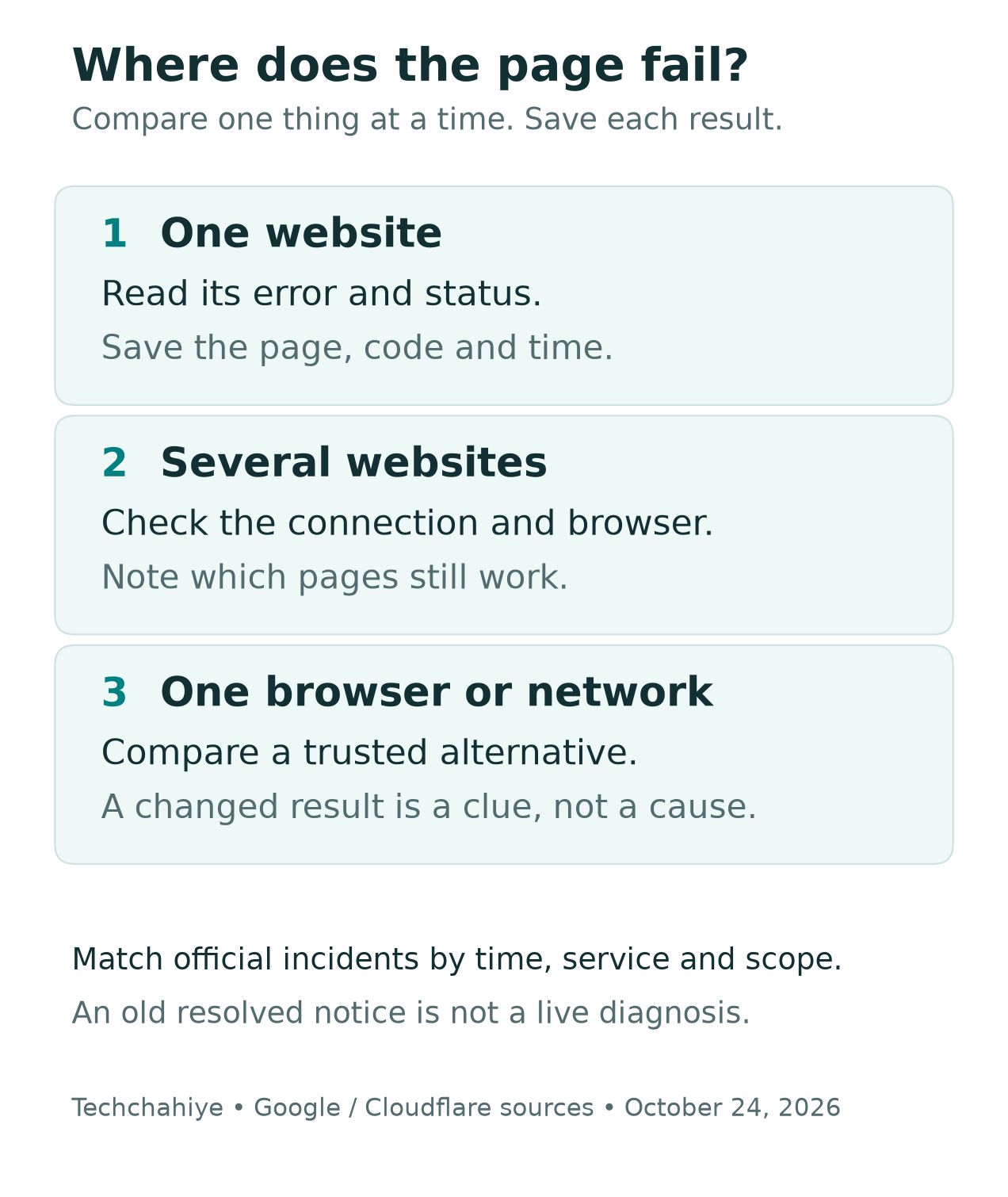
Choose a few normal pages you already trust. You are checking whether they load, not running a speed test. A working page is useful evidence. It does not prove that every part of the network is healthy.
| What you see | A useful next check | What to record |
|---|---|---|
| One site fails, others load | Read that site’s error and status | Address, code and time |
| Several sites fail | Check your connection and browser | Which sites work or fail |
| One browser fails | Compare with another trusted browser | Browser and exact result |
| One network fails | Compare a permitted alternate connection | Wi-Fi or mobile data |
Keep a Cloudflare outage check small. Change one thing, try the same page and note the result. Do not change the browser, network and DNS at once. A new result will be hard to explain.
The table is a sorting aid. It does not establish a cause. A page may work on mobile data. That gives support a clue about the path that worked. It does not prove which company or device caused the first failure.
What a Cloudflare Error Page Can Tell You
Read the number and words on the page. A screenshot of a cloud logo leaves out the part that helps support choose a path. Keep the full code, such as 520, 522 or 524. Do not call every screen a server error.
In these guides, the origin is the site’s own web server. Cloudflare’s guides describe faults in that exchange. Its network cannot get the expected reply from the server. The code helps narrow the failed step. It does not let a visitor inspect the site’s server.
Also distinguish a browser error from an HTTP error page. Did the browser say it cannot reach the site? Or did a page load with a Cloudflare code? Record which one you saw.
Do not assume that a familiar logo makes every button on a page safe. For support, open the site’s known help route yourself. There is no need to install an unknown browser extension to copy an error number.
Cloudflare Error 522: A Connection Timed Out
Cloudflare says error 522 means it timed out contacting the origin web server. Its current guide describes two points where that can happen. Before a connection forms, it may wait for the server’s reply. The listed limit is 19 seconds. After a connection forms, it waits for the server to acknowledge the request. The listed limit is 90 seconds.
Those are different phases. They are not a pair of numbers to add into a fix deadline. They also do not say that your Wi-Fi has been slow for that exact period.
For a visitor, the useful task is to save the code and contact the site owner. If you own the site, give your host the record. Cloudflare lists several possible causes. The server may be too busy. A firewall may block its traffic. A technician needs evidence to choose among them.
Do not jump from a 522 screenshot to an exact cause. A screenshot cannot settle the cause. The host may be offline, or a rule may have rejected traffic. Repeating that guess as a fact can send the support team down the wrong path.
Cloudflare Error 524: Connected, Then Too Slow
Cloudflare error 524 describes a later stage. Its guide says it connected to the origin. But the server did not send an HTTP response before the read timeout. The default read limit listed is 125 seconds.
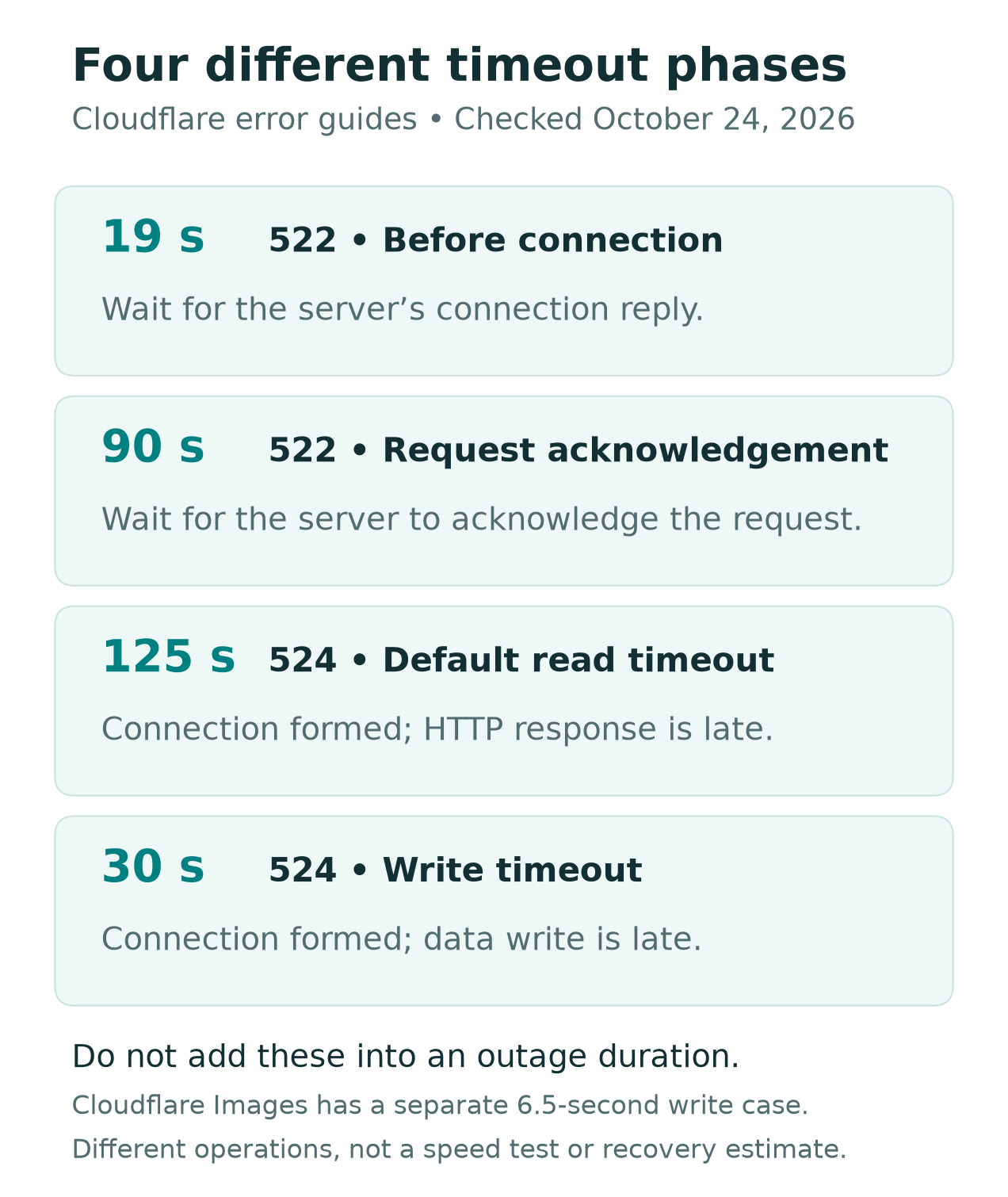
The same guide also describes a write timeout of 30 seconds. Cloudflare Images has a separate 6.5-second write case. These are different operations and contexts. The visual shows the general read and write cases. It does not rank speed or predict a recovery time.
The distinction between 522 and 524 helps when you report a fault. In one case, the contact or request acknowledgement timed out. In the other, a connection existed but the response or write did not finish in time.
As a visitor, you cannot change those server-side limits from your browser. Keep your report tied to what you saw. If you run the site, ask the host or developer to check. They need the slow request and the right logs.
Error 520 Does Not Name One Universal Cause
Cloudflare describes 520 as an empty, unknown or unexpected response from the origin. Its guide lists several possible causes. These include server faults, blocked traffic and malformed responses.
That makes 520 a reason to gather details, not proof of one specific bug. Do not copy a fix from a forum merely because the number matches. Two sites can show the same code for different reasons.
If you own the site, ask the host to review the request and server-side evidence. If you are visiting, report the affected page to its owner. Keep that distinction even if you have a Cloudflare account for a different site.
You do not need a technical theory to make a useful report. A clear page address, code and time can help the right person investigate. A long list of unrelated settings you changed often makes that harder.
Use a Short Browser Check Before a Reset
For a browser-specific problem, Google’s guide includes an Incognito check. It also covers updating and restarting Chrome. Does the page work in Incognito? The guide then points to extensions or browsing data as the next checks.
Treat that as a clue. It does not prove that the site never had a fault. Keep the results from the same period, since a service can recover between two tests.
If you test an extension, make one change at a time. Restore it after the test. Do not weaken your browser’s security to get past an error. Ask your IT team before changing managed browser settings on a work device.
Avoid starting with a full phone reset or clearing every site’s data. Those broad changes can create more work before you have defined the problem. Begin with the smallest check that can answer your next question.
For example, a hypothetical reader may find that one page works in a second browser. The useful note is which browsers worked and when. It is too early to claim a global Cloudflare outage caused the first result.
DNS, WARP and Website Service Are Different Checks
Cloudflare also runs the public DNS resolver 1.1.1.1. Its guide explains what a resolver does. It turns a domain name into an IP address, a network address. The device then knows which server to contact. That is a different task from serving a site’s page.
The resolver’s guide treats name lookup and network problems as separate issues. It suggests comparing resolver results when a name does not resolve. Those are diagnostic checks, not proof that switching DNS fixes every site error.
If you already use a DNS or WARP app, note that in your support record. Do not install a new one merely because the error page says Cloudflare. A brand name shared by several products does not make their faults interchangeable.
Techchahiye’s older report on 1.1.1.1 for Families gives background on that product. Find it in References. It is a 2020 launch report. It cannot show today’s service state or give a current outage fix.
If a workplace manages your network, keep its setup in place and ask IT. A comparison on a personal device can be useful. Do not change a work device’s network policy on a guess. That can make the first problem harder to track.
Save a Useful Cloudflare Outage Report
Cloudflare’s 5xx guide asks for the code, message, time with time zone and the page address. It says visitors should report to the site owner. Its support team assists the domain owner with resolution.
Save your Cloudflare outage notes in private. Fill it from your own screen rather than copying a sample. You do not need to publish personal details to show that a page failed.
- Page address and exact error code.
- First failure time, time zone and most recent check.
- Device, browser and connection type.
- Other pages that worked or failed during the same check.
- Any Ray ID shown, plus a safe screenshot of the error.
A Cloudflare Ray ID is a request identifier, according to its documentation. It can help the site team look for matching activity. Cloudflare says different requests can share a Ray ID. Pair the ID with the time and page. It is not a full report on its own.
Before sending a screenshot, remove account details and private content. A page address can also contain personal data or a sign-in token. Send the needed details through the service’s official private support route. Do not post a full signed-in address in a public comment.
Before sharing an error screenshot
Remove account data and private page content. Use the service’s official support route for details that should stay private.
Cloudflare Outage Checks for Site Owners
If the affected site is yours, start with the same evidence a visitor would save. Then add the host, affected path and changes made near the first error. Keep a record of what changed and when, without assuming the latest change caused it.
Cloudflare’s general 5xx guidance says to contact the host or site administrator first. It says to check more than the origin server logs. Logs from load balancers, caches, proxies or firewalls may help too. A missing entry in one log does not settle the case.
Give one person responsibility for the next check. For example, your host might review the failed request. Your developer could check a slow page action. Keep those roles clear. Two people should not change the same setting at once.
Avoid a broad fix that removes protections before you understand the failure. Some official checks involve changes to site settings. Those need context and an owner who can assess the effect. A visitor guide cannot choose those changes for your site.
After your team makes a change, test the same failing page again. Keep the original error and the new result together. A working homepage alone does not show that a failed upload or checkout now works.
Cloudflare Outage Times: Keep the Date and Zone
For a Cloudflare outage report, include a named time zone or UTC. A number such as 8:30 is not enough. Include the full time and zone. Support should not have to guess which clock you used.
The October 24 Ashburn record’s 03:09 UTC resolution corresponds to 08:39 IST that day. The North America record lists 18:43 UTC on October 23 as resolved. That is 00:13 IST on October 24. These are conversions using IST’s UTC plus five hours and 30 minutes.
In the US, the zone depends on your location and the date. Keep the displayed time and zone together, or use UTC for the report. Do not label one US local time as if it applies to every state.
This matters when you compare screenshots from US and Indian readers. Two different calendar dates can describe the same moment. Check the conversion before you conclude that one person saw a second incident.
After a Page Starts Working Again
Record when your Cloudflare outage check first succeeds. Keep it separate from the time the vendor marks an incident resolved. Both can be useful, but they measure different things.
For a normal read-only page, try the same address and the action that failed. If the page loads but a specific tool still fails, report that remaining symptom. Do not assume every part of a service has recovered from one successful page view.
Did a payment or form fail? Check its status with the service before you repeat it. An error screen alone does not tell you whether the service recorded the action. Keep any confirmation or reference number and ask the provider if the result is unclear.
You can also follow official status updates. Cloudflare’s guide describes a status-page notification system that operates independently of its infrastructure. Account-based Incident Alerts are a separate option. Choose only the notices useful to you; this article does not subscribe you to anything.
Did You Know?
Cloudflare’s guide says its status-page alerts use an independent delivery system. They can still fire when Cloudflare itself is down. It has separate feeds for incidents and maintenance too. Planned work and unexpected failures have separate records. Both can appear in the same status service.
Conclusion
Start a Cloudflare outage check with the official status page. Next, read your exact error. Match the time, service and scope. Separate one failed site from a wider network or browser problem.
Keep the next check small and save its result. Visitors should report to the site owner. Owners should work with their host and the right logs. Clear evidence helps more than a reset. Avoid an unverified fix that changes several things at once.
FAQs
How can I tell if Cloudflare is down right now?
Check the live official status page and its latest incident update. Read the affected service, location and time. Then compare those details with your own error. We give a dated research snapshot here. Use the live page for the status when you read this.
Does error 522 prove a global Cloudflare outage?
No. Cloudflare error 522 describes a timeout while contacting the site’s origin server. It does not establish a global failure. Save the page, code and time, then check official status. A visitor should report the error to the site owner. Do not guess which server setting caused it.
How is Cloudflare error 524 different from 522?
Cloudflare error 524 means a connection formed. A response or write then failed to finish within its limit. Error 522 covers a timeout during contact or request acknowledgement. Their timing phases differ. Neither code is a countdown to when the service will recover.
Should I change DNS to fix a Cloudflare outage?
Do not assume that will fix it. A DNS lookup problem and a site’s origin error need different checks. Save what the browser shows before changing settings. If work or school manages the network, ask its support team to guide the next step.
Who should a site visitor contact about the error?
Contact the site’s owner through its official help route. Cloudflare says its support team assists the domain owner. Include the page, code, time zone and any Ray ID. Keep account data and signed-in links out of public posts. Share needed details with the service in private.
References
- Cloudflare — Live system status
- Cloudflare — Network Performance Issues in Ashburn, October 24, 2026
- Cloudflare — North America network connectivity incident, October 23, 2026
- Cloudflare — Status page, locations and notification options
- Cloudflare — Troubleshooting 5xx errors and required support details
- Cloudflare — Error 522
- Cloudflare — Error 524
- Cloudflare — Error 520
- Cloudflare — Ray ID reference
- Cloudflare — 1.1.1.1 DNS resolver
- Cloudflare — DNS resolver troubleshooting
- Google Chrome Help — Fix connection and loading errors
- Cloudflare — Official press kit and logo reference
- Techchahiye — Cloudflare’s 1.1.1.1 for Families launch
