

At a glance
The iPhone Duo starts at $1,999 in the US. See prices for all four storage sizes. Learn how buying and leasing differ. This guide covers service costs, extras, India prices, eSIM, trade-ins and returns. Prices checked October 24, 2026.
Key Takeaways
The iPhone Duo price starts at $1,999 in the US. Compare storage, monthly payments, trade-in costs and the price in India before you buy.
- The 256GB iPhone Duo costs $1,999 in the US as of October 24, 2026.
- The 2TB model costs $1,200 more than the base model. Buy space you will use.
- Buying, paying over time and leasing lead to different costs and ownership terms.
- Check your current storage, carrier rules and total budget before you order.
- India has its own prices. A dollar-to-rupee conversion is not a full import budget.
The iPhone Duo price starts at $1,999 in the US. That buys the 256GB model at Apple’s listed price when you choose to connect to a carrier later. The main buying question is what your full bill will look like once you add storage, service and extras.
A low monthly figure can hide a choice you did not mean to make. You may be renting the phone rather than buying it. Or a carrier offer may need a plan you would not otherwise choose.
This guide helps you compare those choices. It uses Apple’s published prices and terms, checked on October 24, 2026. We have not tested the phone. The advice below is a buying framework, not a hands-on review or a claim that this model is right for everyone.
iPhone Duo Price by Storage Size
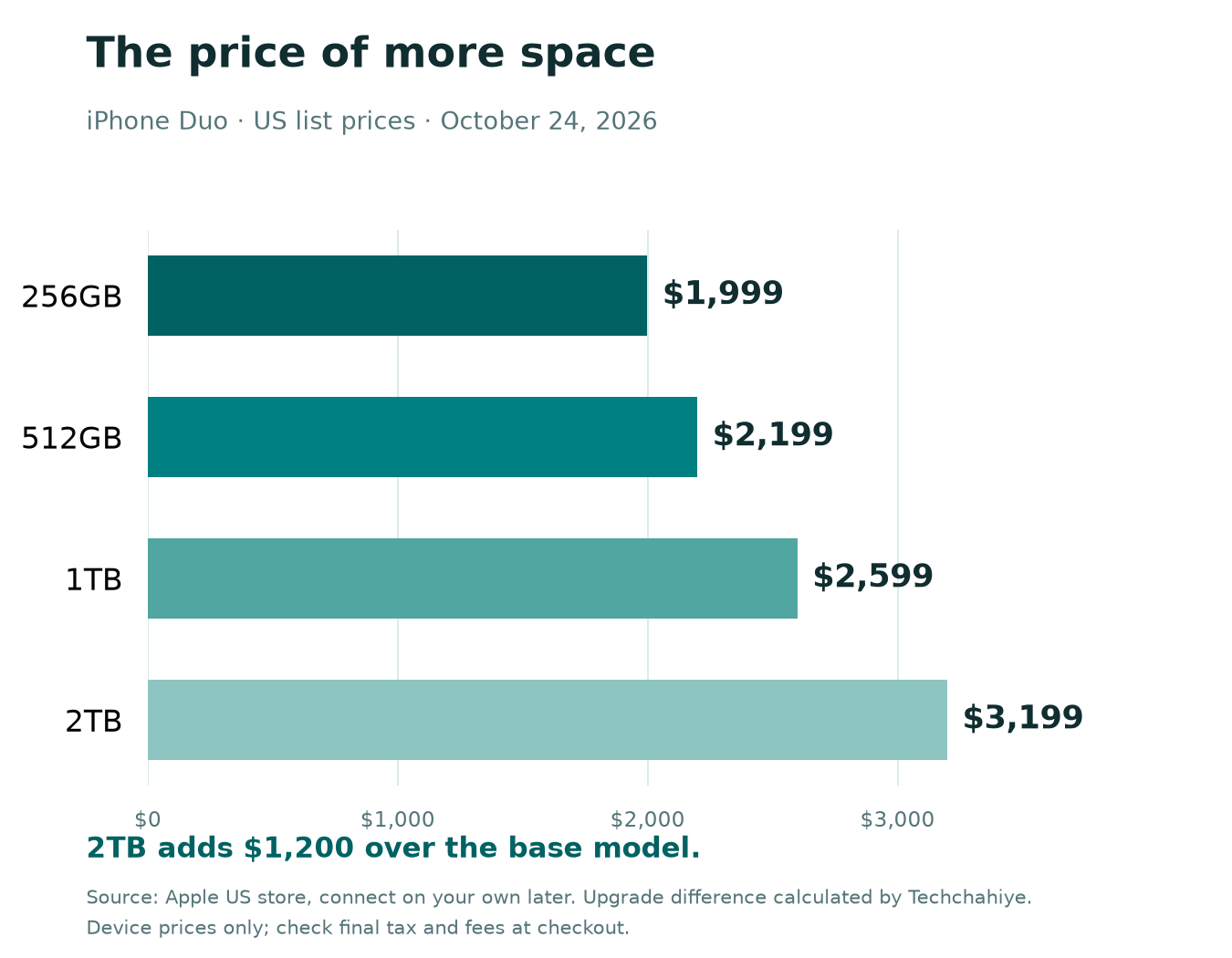
Apple’s US store lists four storage sizes. The table shows the price for each when you choose to connect on your own later. Read the final checkout total for your address and chosen offer.
| Storage | US price | Extra over 256GB, calculated |
|---|---|---|
| 256GB | $1,999 | — |
| 512GB | $2,199 | $200 |
| 1TB | $2,599 | $600 |
| 2TB | $3,199 | $1,200 |
We calculated each upgrade by subtracting the $1,999 base price. The move from 256GB to 512GB adds $200. Moving from 512GB to 1TB adds another $400. The final step from 1TB to 2TB adds $600.
As a result, the top model costs about 60% more than the base model. That is a calculation: $1,200 divided by $1,999, then multiplied by 100. It measures the price increase, not a gain in speed or quality.
Treat the table as a way to set your spending limit. Start with the storage you need. Then see whether that model fits your budget. Start with your needs, then look for a way to pay. A monthly deal can make a large spend feel small.
iPhone Duo Storage Prices: Choose Your Size
Choose iPhone Duo storage from the files you keep. Your current phone is a better starting point than a guess about future use. Apple’s storage guide says to open Settings, choose General, then choose iPhone Storage. You can see the space in use and which apps take up the most room.
Next, look at what makes up that number. For example, a large video folder is not the same as a few games you no longer play. Apple also explains two choices. Offload an app to keep its data. Delete it to remove its related data. Review files before you remove them.
Start With 256GB When Your Needs Are Modest
The base model deserves a look if your current files fit with room to spare. Think about the photos, apps, music and downloads you keep on the device. Do not assume you need more space because the phone costs more than your last one.
Also, leave room for new files and updates. There is no single spare-space rule that fits every user. You may stream most of your media. In that case, you may need less local space. A traveler who keeps large files for offline use may need more.
Pay More When You Have a Clear Use for It
The 512GB, 1TB and 2TB options make more sense when you can name the files you plan to keep. That may include a growing local video library, large work files or games you use often. These are examples of needs, not claims about how much storage each app uses.
So write down what you use now and what you expect to add. If the only reason for the top model is fear of choosing wrong, pause. Compare the upgrade cost with a better file routine before you spend it.
Cloud storage also needs a budget. It may help you manage files, but a paid plan adds a recurring bill. It does not remove the need for enough room for the apps and files you want on the phone itself.
iPhone Duo Monthly Payments vs Full Price
Apple lists US iPhone Duo monthly payments from $83.29. This is for a 24-month term in its September 2026 launch notice. Its Apple Upgrade page lists a 24-month lease from $57.99 per month. These starting figures show different ways to pay.
| Route | Main question | What to compare |
|---|---|---|
| Pay upfront | Does the full bill fit now? | Checkout total and cash left for other needs |
| Pay over time | What must I pay for the full term? | Total payments, interest, fees and carrier terms |
| Lease | Do I want to return it or keep it? | Lease total, return rules and the buyout price |
A lease gives you use of the phone under its terms. It does not mean you own the device at the end. Apple’s Apple Upgrade page describes return and buyout choices. Read those choices before you compare a lease with an outright buy.
For any monthly offer, ask for the full amount you will pay. Include the upfront payment and all monthly bills. Add any sum due to keep the phone. Find taxes and extra fees in the actual offer.
Also ask what happens if your plans change. You may want to leave the carrier, pay early or upgrade before the term ends. A bill that fits today is only part of the choice. The exit rules matter too.
For this reason, keep a copy of the terms you accept. A screenshot of a headline discount is less useful than the order summary and the rules that explain it. Compare written terms side by side before you sign.
iPhone Duo Cost: Build a Full Budget
Your full iPhone Duo cost includes more than the device. A good budget separates the phone from the costs around it. Use the iPhone Duo price for your chosen storage in the first row. Write each extra cost on its own line. Mark whether it is a one-time charge or a monthly charge. That keeps a small recurring fee from disappearing into the total.
| Budget item | What to enter | Check before paying |
|---|---|---|
| Device | Chosen storage price | Exact model and buying route |
| Tax and fees | Amount at checkout | Your delivery address and offer |
| Mobile plan | Required monthly bill | Whether your current plan can stay |
| Extras | Case, charger or cover | What you already own and can use |
| Optional cover | Quoted cost | Service fees, limits and renewal terms |
| Trade-in | Confirmed credit | Conditions and timing of the credit |
A Worked Example, Not a Live Offer
A worked example, not a live offer
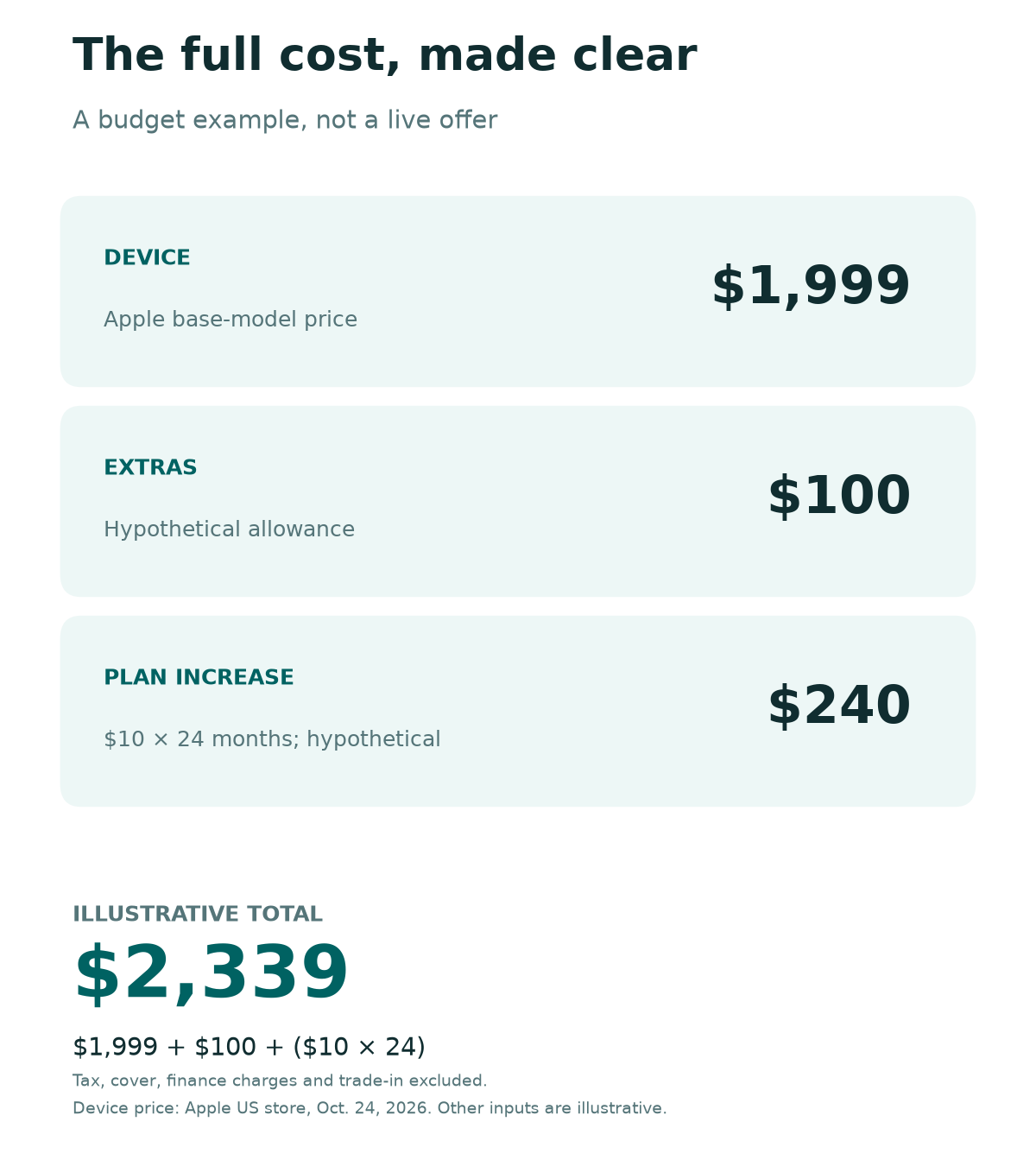
Imagine a buyer chooses the $1,999 base phone. In this example, they set aside a made-up $100 for extras. They also consider a plan that costs $10 more each month than their current plan, for 24 months.
The extra plan spend is $10 multiplied by 24, which equals $240. The example total is $1,999 plus $100 plus $240, or $2,339. This calculation excludes tax, cover, finance charges and any trade-in. The $100 and $10 inputs are made-up planning figures, not quoted deals.
The lesson is to compare the cost of the change. You already pay for a mobile plan. That bill may stay the same with either phone. If so, do not count it as new spending. Count any increase due to the new phone. Show your regular bill on its own line.
Use the same period for each offer. A 24-month comparison and a 36-month comparison answer different questions. If the terms differ, show both full commitments rather than hiding the extra months.
iPhone Duo Price With Carrier Deals
A carrier discount is useful only if its rules fit your plans. This guide does not rank live carrier promotions. Those offers can change. Your account may have terms that differ from a general ad.
Use this checklist on the offer you can actually accept:
- Confirm the exact phone and storage size included.
- Check whether the offer needs a new line or a move from another carrier.
- Find the required plan and its normal monthly price.
- Read the trade-in model and condition rules.
- Check whether savings arrive at once or over a billing period.
- Ask what happens to the discount if you leave early.
- Save the final order total and full terms.
Do not count an advertised top saving as your saving until you qualify. A trade-in offer may look generous but still lead to a higher total bill if you need a more costly plan. Use the worksheet above to compare that change.
Apple’s US store also has a lock-policy warning. It names payment plans from AT&T, T-Mobile and Verizon. Under those plans, the phone stays locked to the carrier until you pay in full. Read the policy that applies to your exact order.
Pay special attention if you travel or plan to switch networks. A good discount today may be a poor fit for a change you already expect to make. Ask the carrier to explain that case in writing.
Check eSIM and Travel Plans First
The iPhone Duo uses eSIM rather than a physical SIM card. Apple’s US store says the model needs a carrier that supports eSIM and a service plan. Confirm support with your carrier before you order, even if you already use an iPhone.
Ask about your line type as well as the network name. A work account, a prepaid account or a plan managed by someone else may need a different setup process. These are checks to make, not claims that any particular account will fail.
For travel, make two separate checks. First, can the device use the service you want? Second, does your chosen plan cover the trip at a cost you accept? An unlocked phone does not give you free roaming or a local data plan.
Budget for a mobile service plan on top of the iPhone Duo price. Keep access to your current number while you set up the new phone. Think about bank codes, work logins and other services that send a code by text. Plan the move at a time when you can reach your carrier if you need help.
Do not erase your old device at the start of the transfer. First confirm that the new one can make calls, receive texts and use mobile data. Try your key sign-ins too. This is a setup checklist, not a promise that every app transfers in the same way.
Is the Foldable iPhone Price Worth It?
The reason to pay for this model is its folding design. A price table cannot tell you whether you will use that design each day. If possible, try it in a store with the tasks you care about.
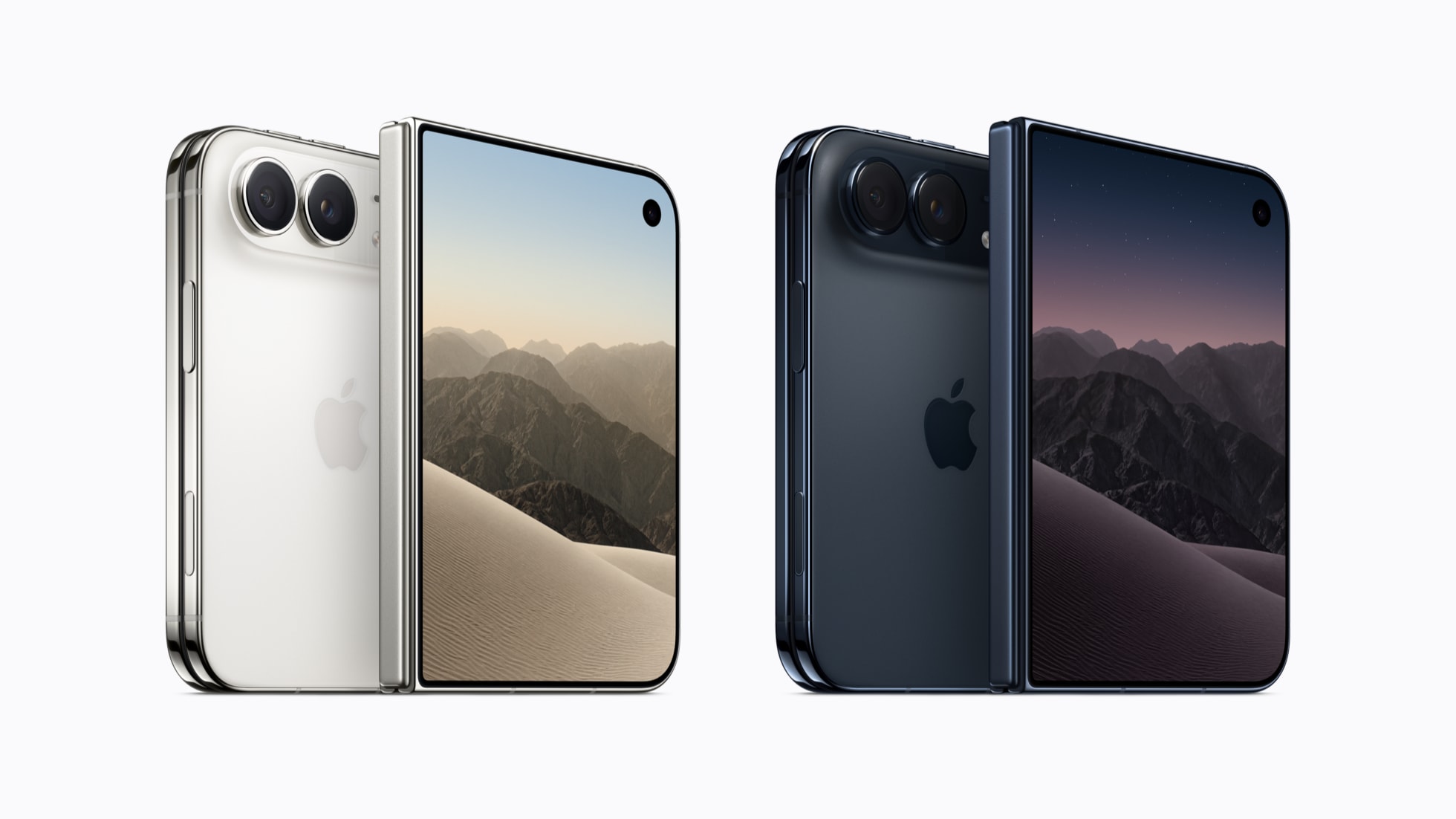
Apple’s technical specifications list a weight of 254 grams. They also list a folded depth of 11.3 millimeters. Those figures give you context, but they do not tell you how the phone will feel in your hand or pocket.
Try a short routine instead of looking only at the open display:
- Read a page with the phone closed, then open it.
- Type a message while standing.
- Hold it during a short video call demo, if available.
- Check the controls you reach most often.
- Try putting it in the pocket or bag you normally use.
Treat a store demo as a fit check. It does not prove long-term battery life, durability or app quality. We have not run those tests and do not assign a score for them here.
Then ask one useful question: what will the larger screen replace or improve in your day? Reading, maps and work documents are possible examples. If you cannot name a task, the folding design may be a costly feature you admire more than you use.
iPhone Duo Trade-In: Know the Real Credit
An iPhone Duo trade-in can reduce what you pay. But an estimate is not the same as a final credit. Apple’s trade-in page says the quote depends on your device’s condition. It must match the details you gave. The value can change after Apple checks it.
Apple sets a time limit for an online trade-in. Your old device should arrive within 14 days after you get the new one. That helps keep the quoted estimate. The stated condition rules still apply. Check the instructions attached to your own order for the exact steps and deadline.
Before you accept a quote, compare it with the value of keeping the old phone. A spare device can still be useful. Selling it yourself is another option, but that takes time and has its own costs and risks. Do not assume the highest quoted price is the easiest route.
Keep your order record and any shipping receipt. Check when the credit should appear and how it will be paid. If you are comparing offers, show the trade-in on each one only once. Do not subtract it from the device price and again from the final total.
Before you send the phone, follow the official return or trade-in steps. Back up what you need and confirm the new device works. Clear the old device only when you are ready to hand it over under those instructions.
iPhone Duo Cost With Cases and Chargers
Apple lists what comes in the box in its tech specs. You get the iPhone Duo and a one-meter USB-C charge cable. The list does not show a power adapter. Look at the accessories you already own before you add another charger to the order.
For any case or cover, check the exact model name. A similar product name or a similar screen size does not prove a case will fit. Read the maker’s guide to the item. Look at access to buttons, charging and the folding parts.
First, make a short list of what each extra solves. A case may help you carry the phone with more confidence. A stand may suit desk use. Those are personal needs, not reasons every buyer must buy the same bundle.
Leave optional items out of the first budget pass. Then add them back one at a time so you can see their cost. This also makes it easier to compare a retailer bundle with buying only the items you need.
If you add cover, read the service fees and what the plan leaves out. The name of a plan is not enough to compare it with another one. Save the full cover terms beside the device receipt so you can find them later.
iPhone Duo Price in India
The iPhone Duo price in India starts at ₹2,99,900. Apple’s India store lists the following prices as checked on October 24, 2026. These are local listed prices, not a conversion of the US table.
| Storage | India price |
|---|---|
| 256GB | ₹2,99,900 |
| 512GB | ₹3,24,900 |
| 1TB | ₹3,74,900 |
| 2TB | ₹4,49,900 |
If you live in India, compare the offer available to you in India first. Compare the final price, service terms, carrier support and payment rules. US monthly offers should not be treated as offers for an Indian buyer.
Buying abroad needs its own budget. A currency conversion alone does not account for every cost or condition. Read the rules for your trip or shipment. Include any taxes and import rules in that check. We have not worked out an import saving in this guide.
Also plan how you would get help if a problem occurs. Read the service terms for the country where you buy and the country where you will use the phone. Do not infer cross-border service from the Apple logo alone.
Techchahiye has an Android and iPhone guide. Use it to review storage, battery and safety habits. Its mobile plans guide covers India-focused plan questions. Find both guides in References. Use the one that helps with your next step.
Use the Return Window to Check Everyday Fit
Apple’s US returns page sets a standard 14-calendar-day window for direct buyers. It starts when you receive the item. The policy’s other terms also apply. This is a US Apple return rule. It should not be applied to every seller or to orders in India.
Read your seller’s policy before you order. Find the deadline, required condition, packaging rules and return process. Save that page or the terms sent with your receipt. Set a reminder early enough to act rather than waiting until the last evening.
During the first days, check normal use. Confirm calls, messages and your key apps. Try the tasks that made you want the foldable screen. Note anything that feels awkward while you still have time to decide what to do.
Keep the box and included items while you assess the phone. Apple’s US policy calls for the original contents when returning a product. Follow the exact instructions for your order rather than sending only the device.
A phone return and a mobile service cancellation are separate matters. Apple’s US returns page makes this clear. Returning an iPhone does not cancel the wireless account. Contact the carrier about service and charges if you decide to return the phone.
iPhone Duo Price: Buy Now or Wait?
Buy Now if the Main Checks Are Clear
Start with your storage need and full budget. Check the carrier terms too. These checks make the choice easier. You should also have a clear use for the folding screen. That gives the spend a purpose beyond owning the newest model.
Before checkout, explain your choice in one sentence. For example: you need more space for local files and want a larger screen for reading on a train. This is a made-up example, not a claim from a tested buyer. Your own reason may be different.
Wait if the Main Reason Is Still Unclear
Waiting is sensible if your current phone works and you are unsure about the new shape. It also gives you time to compare real user reports and hands-on tests from sources you trust. That does not guarantee a future price drop.
Do not rush because you fear missing a deal you have not priced in full. A short time limit can make a weak offer feel urgent. If the budget, terms or use case is unclear, resolve that point before choosing when to buy.
Did You Know?
Apple’s September 2026 launch notice lists a 5.4-inch outer display and a 7.6-inch inner display. The idea is to carry one folding device and open a larger screen when needed. Whether that helps you depends on the tasks you do, not the screen number alone.
Conclusion
The iPhone Duo price is the start of the decision. Choose storage from your real files. Compare the full payment cost. Check how you will use the folding screen. Add the costs of service, extras and cover before you settle on a route.
Your next step is simple: check storage on your current phone and fill in the cost worksheet. Then try the device if you can. If the benefits do not justify the total for you, keeping your current phone is a sound choice.
FAQs
When Did the iPhone Duo Go on Sale?
Apple’s launch notice says pre-orders began on October 16, 2026. Sales began on October 23 in the first group of markets, including the US and India. Those dates do not confirm stock at a specific store. Check your selected model’s current delivery estimate before you order.
Does the iPhone Duo Have Face ID?
No. Apple’s product page says the iPhone Duo uses Touch ID in the side button. You use a fingerprint to unlock it with the device open or closed. Try the button placement in a store if the way you unlock a phone is a key part of your choice.
Does the iPhone Duo Support MagSafe?
Yes. Apple lists support for MagSafe and Qi2 25W wireless charging. Check the exact charger and case you plan to buy. Do not assume every accessory suits this model. This spec describes the supported standard. It does not mean every setup charges at the same speed.
Can You Use an Apple Pencil With It?
Apple lists support for Apple Pencil USB-C on the iPhone Duo product page. Confirm the exact Pencil model. You may own a different version. Think about whether you will take notes or draw often enough to justify that extra cost.
Is AppleCare Included in the Listed Phone Price?
Treat cover as a separate item to verify. Apple’s Apple Upgrade page offers AppleCare as an added choice. Check the cost, covered events, service fees and term in your selected offer. Compare those details with your needs. Do not assume the device price includes the cover you want.
References
- Apple — Shop iPhone Duo (US)
- Apple — Apple unveils iPhone Duo
- Apple — iPhone Duo
- Apple — iPhone Duo Technical Specifications
- Apple — Apple Upgrade
- Apple Support — How to Check the Storage on Your iPhone and iPad
- Apple — Trade In
- Apple — Returns & Refunds (US)
- Apple — Buy iPhone Duo (India)
- Techchahiye — Android and iPhone Guide: Updates, Battery and Safety
- Techchahiye — Mobile Plans, Telecom and OTT Guide for India
