

Give each line its own job
Compare travel eSIM coverage, timing and cost. Pick the right data line and check the home carrier's rules before using your main number abroad.
Key Takeaways
- An unlocked phone with suitable Dual SIM support can use a travel eSIM for data while your main line stays available for calls and texts.
- Before you pay, check each stop, when the plan starts, how long it lasts and which services it includes.
- Choose the travel line for mobile data and turn off automatic switching if you want to keep data off the home line. Check its call and text rates separately.
- Save your provider’s setup instructions and download maps before you leave. Test the new line when you land and check your settings again when you return.
You land after a long flight. The airport Wi-Fi wants a phone number, your ride is waiting and your account sends a sign-in code to the number you use at home. A travel eSIM can get you online in this moment. Keeping your main line available for the code is a separate choice.
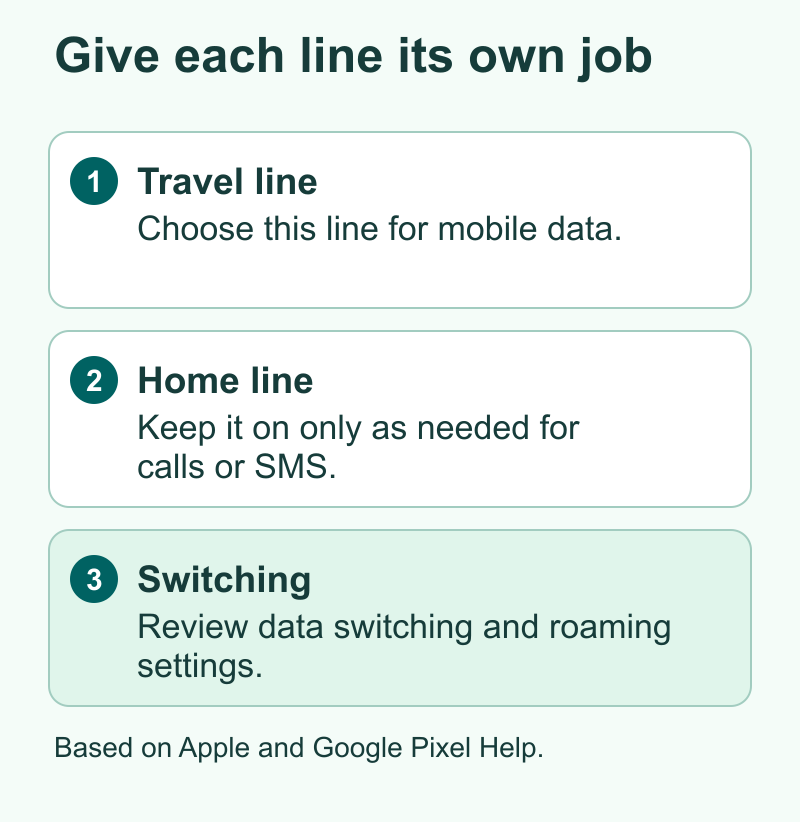
The simplest setup for many travelers is to let the travel eSIM handle mobile data and keep the home line on only if you need calls or texts. Then turn off data switching and check the home carrier’s roaming terms. Those terms still matter because the home line can be registered with a network abroad while another line provides the internet.
Start with one question. Which would cause more trouble on this trip, losing internet access for an hour or being unable to receive a call or code on your regular number? The answer can point you toward a travel data plan, a home-carrier roaming pass or a local mobile plan with its own number.
Decide What Your Phone Needs to Do Abroad
List the things you will do in the first few hours. A map, ride-hailing app and hotel message may all work over ordinary mobile data. A call from your bank to your normal number and an SMS code from your employer use a different path. A data-only plan can help with the first list. Your regular carrier or another voice-capable plan is involved in the second.
Ask what other people need to do, too. If a driver plans to call the number on a reservation, check whether the booking app offers a message or internet call. If your host expects a local number, find out whether the travel provider gives you one that can actually receive a call. A number printed on an account screen can be a label for the mobile service. Check the included features before relying on it.
| You need | What to compare | Check before you leave |
|---|---|---|
| Maps, app calls and messages | Travel data eSIM and home-carrier data | Coverage at your stops, data allowance and start date |
| Calls and texts to your usual number | Home-carrier roaming, with or without travel data | Incoming call and text rules, coverage and daily pass triggers |
| A local number for calls or sign-ups | A local prepaid plan with voice or a travel plan with a number | Local calling, SMS, signup rules and number delivery |
| Data for a laptop or another phone | A plan that lets you share your connection | Hotspot allowance, speed limits and top-up options |
One person can need two of these rows. A traveler working abroad may want an Indian number for account texts and as much local data as possible for video calls. Someone meeting friends on a short U.S. visit may already have a home plan with enough service. Buy for the trip in front of you, including the internet and phone service your other devices already have.
Check the Exact Phone and SIM Combination
Start with the model that is in your hand. Apple’s travel eSIM guide lists the iPhones that work. It also lists cases where the country of sale matters. Google lists supported SIM combinations in its Pixel guide. A shop may use the same name for several models. Find the exact model and the country where the phone was sold. Check both if you bought the phone used or imported it.
On iPhone, Apple directs you to Settings, General and About to check Carrier Lock. If it says No SIM Restrictions, the phone is unlocked. If it shows a lock, contact the carrier. Installing an app or buying a travel plan does not lift a carrier lock. For other phones, confirm unlock status with the carrier that sold the handset as well as the manufacturer guidance.
Then check the pair of lines you want to run. You may have a physical home SIM and want to add an eSIM for the trip. Or you already have a home eSIM and want a second eSIM active at once. A phone can store more plans than it can run at the same time. On eligible iPhones, Apple supports two active eSIMs. Pixel combinations vary by model, market and carrier support.
If your phone cannot run both at once, decide which line you need during each part of the day. You could use the travel plan for most of the day and turn on the home line only for a planned call or text, subject to carrier rates. A second phone or a roaming pass on the main line may fit better when you need to be reachable all day. Work devices can have admin rules on which plans you can add, so check those before buying.
Compare Plans Against Your Itinerary
Write the trip in order. Include an airport stop if you expect to leave the terminal or need service while changing flights. Then read the exact list of places in the provider’s coverage policy. A regional label is a starting point. See whether it includes every country or region you need and which partner networks provide service. Coverage in the arrival city tells you little about a long drive or rail route elsewhere.
Next, find the start rule. Airalo says some plans start when the eSIM joins a supported network. Some packages start as soon as you install the eSIM. Read the rule for the one you plan to buy. Look for any separate deadline to activate the plan. Those details tell you whether to set up at home or closer to the trip.
Now check how usage counts. A fixed allowance may cover the whole stay. A plan that lists a daily high-speed allowance may reduce speed or ask you to add more data after you use it. Read a provider’s definition of a day and how the plan treats shared data. When a product page says unlimited, check the policy for phone use, hotspot use and any speed reductions that could affect a meeting or video call.
Compare the full cost of two plans
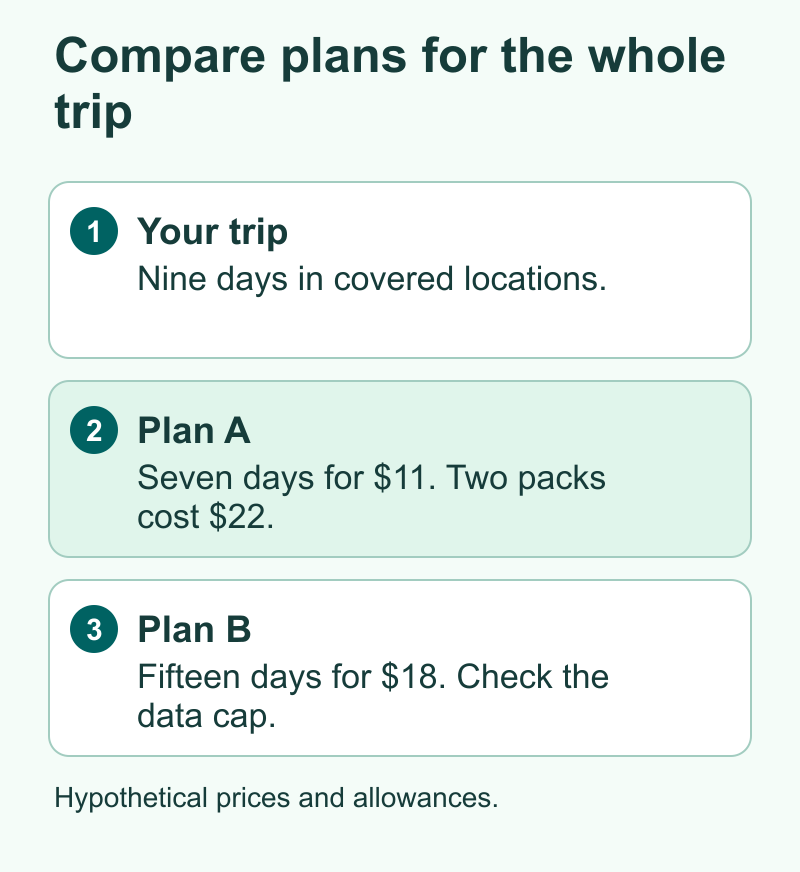
Here is a hypothetical nine-day trip. Plan A gives 3 GB for seven days and costs $11. Plan B gives 5 GB for 15 days and costs $18. If you buy a second $11 package to cover the last two days, Plan A becomes a $22 choice. Plan B would cover all nine days for $18 if the 5 GB lasts. If you expect to spend those last two days somewhere neither plan covers, there is a different problem to solve first.
Run the same math in rupees or dollars using the real checkout totals and an exchange rate you have checked. Include the payment fees and the cost of keeping the home line useful. A plan that looks inexpensive can leave you paying a separate roaming charge for calls. On a short trip, a home pass may be worth a bit more if you can use your regular number with less setup. On a long trip, compare the cost of each billable day or a pack with fixed dates against a travel plan that spans the trip.
For your data budget, start with a recent day of phone use. Look at what your mobile data screen shows and account for time you normally spend on home Wi-Fi. Your travel day might include extra mapping, several hours of music and more photos. Download a map and large files before leaving. Stop a big app update or cloud photo upload from taking your limited mobile allowance halfway through the day.
Keep Your Main Number Available on Purpose
If you want home calls or texts, check the carrier’s rules for your destination before you leave the line on. Ask what it costs to send and get texts. Check the rates to make or answer a call. If you use voicemail, call forwarding or Wi-Fi calling, check those too. Ask which actions can start a charge, and what happens when you run out of your allowance.
AT&T gives one example in its U.S. International Day Pass terms. The pass can start its 24-hour charge when you use data, send a text, or make or answer a call where the pass applies. If you use another carrier or plan, look up the terms for that line. Your home line can still place a call while the travel eSIM handles the internet.
For a trip from India to the U.S., check Jio’s roaming page. It says to activate your first roaming pack while you are on the Jio network. Its prepaid roaming FAQ says incoming texts are free. Confirm the pack and line you use. Test ordinary SMS if you can, and check other ways to sign in to the apps you need. Text delivery can depend on the carrier and the service as well as the billing rule.
If you can go without home-line calls and texts, a travel-only setup keeps the choices simpler. Tell the people who need to reach you how to contact you on a data-based app. Keep a backup route for account logins that will work if the home phone line is off. Think through that route before the flight, while you can still sign in easily and reach customer support if something is missing.
Set Up the Travel eSIM Before Takeoff
Save the receipt, support instructions and plan terms somewhere you can read offline. An activation QR code may grant access to the line. Keep it private, and if the provider requires scanning it, arrange to open it on a second trusted screen. Some providers offer direct app setup. Read the provider’s steps before you travel so you know which credentials, device or Wi-Fi connection you need.
Install at the right time for the plan. Your phone may separate adding the eSIM from turning the line on. Use a clear label for each line, such as Home and Travel. If instructed to leave the new line off until arrival, check which toggle disables that line. Your existing number can remain set up while you prepare the travel profile.
On a supported iPhone, Settings and then Cellular is where you can view lines and pick a cellular data line. Apple also offers a travel prompt with options for which lines stay active in some situations. On a Pixel, Google’s Dual SIM help shows where to choose preferences for calls, texts and mobile data. Menu names on other Android phones vary. Use the name you gave each line to verify the correct choice before closing settings.
Here are the settings to check if you plan to use travel data and keep your main number available.
- Turn on the travel line when your plan calls for it and select that line for mobile data.
- Follow your travel provider’s directions for Data Roaming on the travel line. Some travel eSIMs use a partner network and need that setting on.
- Turn off Data Roaming for the home line if you intend to keep its mobile data use off abroad. Turn off automatic cellular data switching as well when that option is present.
- Review which line will place calls and send texts. If the phone lets you choose each time, that can help you notice a chargeable call before it starts.
- Check which line stays on for incoming calls and SMS and confirm the applicable charges. Keep only the lines you intend to use active.
If your phone offers a choice to use mobile data while the other line is on a call, include that option in your check. A switch aimed at making a call more reliable can work against your intention to keep home-line data off. Your exact phone and carrier determine which switches you see. Save a screenshot of the working settings with private identifiers out of view so you can compare them later.
Test the Setup on Arrival
Wait until you are in the coverage area. Follow the provider’s activation instructions and give the phone time to register. With Wi-Fi off, load a small webpage. Check that the travel line is still selected for data and note the network or signal the phone shows. If you need a laptop connection, test the hotspot before you depend on it for a call.
Test the other service only if you have checked its costs. Ask a trusted contact to send an ordinary text to the home number if that is how you want to stay reachable. For work or banking, check whether an app, recovery code or other sign-in method is available. Keep the phone’s original account and number settings where you need them. You can use data from one line while continuing to use an app registered to a different number.
If you hit a problem, start with the smallest test that can tell you which line failed.
| What you see | First check |
|---|---|
| There are signal bars but nothing loads with Wi-Fi off | Verify the data SIM, remaining allowance, coverage and roaming setting required by the travel provider |
| Data works but calls to your normal number fail | Check whether the home line is on and supported at that destination |
| The new line is active but never finds a network | Recheck the coverage area and follow the provider’s network selection steps |
| Internet works on the phone but not on a tethered laptop | Check the plan’s hotspot allowance and whether the phone is sharing the travel connection |
| One account’s code fails but ordinary SMS works | Use that account’s sign-in alternatives or ask its support about text delivery |
When troubleshooting, keep the travel eSIM installed while you view the provider’s help. A plan can have limits on reuse of an activation code. Save its error message and whether it ever worked. That gives support more to go on than a description of weak signal. If you need Wi-Fi to contact support, use a network you trust and keep your offline maps handy.
Put Your Home Setup Back
Before you leave the last coverage area, see whether the travel provider renews the plan or offers a separate top-up. If you set up a renewal you no longer want, manage it in the provider’s account. Turning the travel line off on the phone may be useful when you are done, but it does not manage a subscription or cancel a charge with the provider.
Once you are home, check the main line is on and choose it for mobile data. Restore the call and text defaults you want. Make a call or load a page without Wi-Fi after you arrive. If you have trips coming up, ask the provider whether you can use the same profile on a future trip before you remove it. If you do delete an expired travel line, check its label twice so you keep the profile for your regular number.
It takes a minute to record what you actually used. Note how much data was left, which countries you visited and whether another line caused any charges. This is more helpful for your next trip than a generic plan comparison because it reflects your own habits and how many days you spent away from Wi-Fi.
Did You Know?
When your device and network support it, your phone can receive a call on your usual number while a second line handles data. Use the data setting for internet and the line settings for calls and texts. The home carrier’s billing rules still apply if you use that line abroad.
Conclusion
Buy a travel eSIM for the countries, days and services you need. Choose the travel line for data. If you keep your main line on, check what the carrier charges for calls and texts. Save the instructions and download maps before you leave. When you land, test the internet and the home line on their own. That helps you tell which part works.
FAQs
Can I receive texts on my main number with a travel eSIM?
You can on a supported Dual SIM setup if the home line is active and your carrier can deliver those texts where you are. Your home carrier’s rules determine cost and availability. Check reception and any account-specific sign-in rules before relying on a code at the airport.
Should I install a travel eSIM at home or after I land?
Check when the package’s validity starts. An eSIM that starts on the first connection to a covered network may be ready to install at home. A package that starts when installed may need later setup. In either case, keep the instructions and arrange for internet access at the point where you will install it.
Does a data-only travel eSIM provide a local phone number?
Choose a voice-capable plan if you need ordinary local calls or text messages. With a data-only plan, messaging and calling apps can use the internet. Confirm how that app signs you in if it needs a text to your regular number.
Can I get roaming charges if I select the travel eSIM for data?
Yes. A home line that is still active may incur charges based on what you do with it and its carrier terms. Check call and text rates, and review data switching and the home line’s Data Roaming setting if you want to restrict which line uses data.
Can I use a travel eSIM with a physical SIM in my phone?
Many eligible phones can use a physical SIM and an eSIM together. Check the exact model, unlock status and supported SIM combination before buying. A phone with a tray can still have carrier restrictions that affect a second provider.
References
- Apple Support on travel eSIM, iPhone compatibility and choosing active lines
- Google Pixel Help on Dual SIM and mobile data preferences
- Airalo Help on activation and package validity
- AT&T International Day Pass terms and billing triggers
- Jio international roaming information for travel to the United States
- Jio prepaid roaming FAQ on incoming text messages
- Techchahiye’s guide to mobile plans and telecom
