


Review the room before inviting people
Check the purpose, files and audience. Set each person’s role. Then check important answers against the original sources.
Key Takeaways
- ChatGPT shared projects bring a group’s chats, files and instructions together. Review the whole project before inviting someone.
- Give chat access to people who need to use the material. Reserve edit access for people who should change it.
- An invitation link and a single shared chat serve different purposes. Check which one you are sending.
- Keep an approved final document outside the chat. Review facts and sources before using AI output.
ChatGPT shared projects can help a group work from the same source material. They also make access choices matter. Before you invite a colleague, decide what that person should see and change.
Start with a small project that has one clear job. Add the files needed for that job. Then review the audience and the role for each person. A tidy project is easier to check than a folder full of unrelated work.
This guide uses OpenAI’s current documentation, checked October 25, 2026. The examples are suggested workflows, not results from a product test. Account plans and workspace rules can change which controls you see.
Decide Whether a Shared Project Fits the Job
Use a shared project when the work will return to the same context. That might be a weekly research brief, a club event or a product guide. The useful question is whether the next chat needs the same files and rules.
For a one-off question, a fresh chat may be simpler. Some documents need exact layout or a record of approvals. Keep the final document in its normal home. A shared AI workspace can support the process without becoming the only record.
OpenAI’s Learn guide recommends separate chats for distinct outcomes. Apply that idea within the project. A source review, an outline and a final accuracy check can have separate threads. Clear names help a teammate find the right stage.
Write the project’s job in one sentence. For example: prepare a weekly public product-update brief from approved sources. That sentence also tells you what to leave out. An unrelated customer export does not belong just because you have it nearby.
Understand Access in ChatGPT Shared Projects
OpenAI says project members can see project chats, files and the member list. All members can download project files. Chat access is therefore a useful working role, not a way to hide uploaded files from a member.
Think about the audience before the first upload. A file may be meant for only two people. Do not put it in a project shared with ten. Make a separate source set for that audience. Another sharing method may fit the task better.
A simple inventory can prevent confusion. List the filename, owner, date and reason it is needed. Mark material that needs approval before upload. Keep this inventory brief enough that someone will maintain it.
For a public research project, use public sources where possible. For internal work, follow your organization’s rules. You may have permission to read a file. That does not mean the whole group should receive it.
Choose Chat Access or Edit Access
OpenAI describes two member roles: chat and edit. Chat members can work with project content. Editors can also change instructions, add or remove files and invite people. The owner controls member removal and project management.
Give each person the role that fits their job. A reviewer may only need chat access. A source curator may need edit access. Avoid making everyone an editor simply to remove a small setup step.
| Person’s job | Suggested starting role | Question to ask |
|---|---|---|
| Read sources and ask questions | Chat | Do they need to change the shared source set? |
| Maintain files and instructions | Edit | Are they trusted to manage shared context? |
| Own the project and membership | Owner | Who reviews access when the work ends? |
| Read one finished answer | Separate approved output | Do they need the ongoing project at all? |
These are planning suggestions, not extra product roles. Discuss them before sending invitations. Review access when a person’s job changes. Do not leave an old choice in place without checking it.
Prepare a Clean Source Set
ChatGPT shared projects need a focused source set. Avoid a folder dump. Choose the documents that answer the actual questions. Remove obsolete drafts from the upload plan. Preserve the originals in their normal location so you can trace a later correction.
Give files clear names before adding them. A date and a short subject can be enough. Avoid filenames such as final-new-final if several versions may coexist. A teammate should know which file is current without asking an AI to guess.
Create a short source note in plain language. State who owns the material and the period it covers. Point out any missing pages or known gaps. A spreadsheet with only one month’s data should not become evidence about a whole year.
OpenAI’s upload guide supports tasks such as comparing documents and extracting details. Ask for those specific operations. A request to find changed dates is easier to verify than a broad request to understand everything in a file.
Write Instructions That a Teammate Can Audit
Instructions in ChatGPT shared projects should be clear. State the task, source rules and output shape. Keep them short enough to read. Several people may add their own preferences. Read the full set to find any conflicts.
Here is an example for a public research brief. Use approved source files. State dates and markets. Separate a reported fact from an estimate. Flag missing evidence. Ask before treating an assumption as a decision. End with a list of open questions.
Add a rule for uncertainty. For example: if two files disagree, name the conflict and ask which source controls. Do not instruct the model to fill every blank. A visible gap is more useful than a smooth sentence built on a guess.
Also decide what the project should not contain. A public technology brief may have no need for private contact details. Put that boundary in the team’s process as well as the instructions. A sentence in a prompt cannot undo a file upload.
A short source-review prompt to adapt
Use only the approved source set. Name conflicting dates or figures. Separate facts from assumptions. List the claims that need a human source check.
Set Up ChatGPT Shared Projects in a Deliberate Order
Use this sequence as a review plan. The exact controls depend on your account and client. OpenAI places New project in the sidebar and project settings in its options menu.
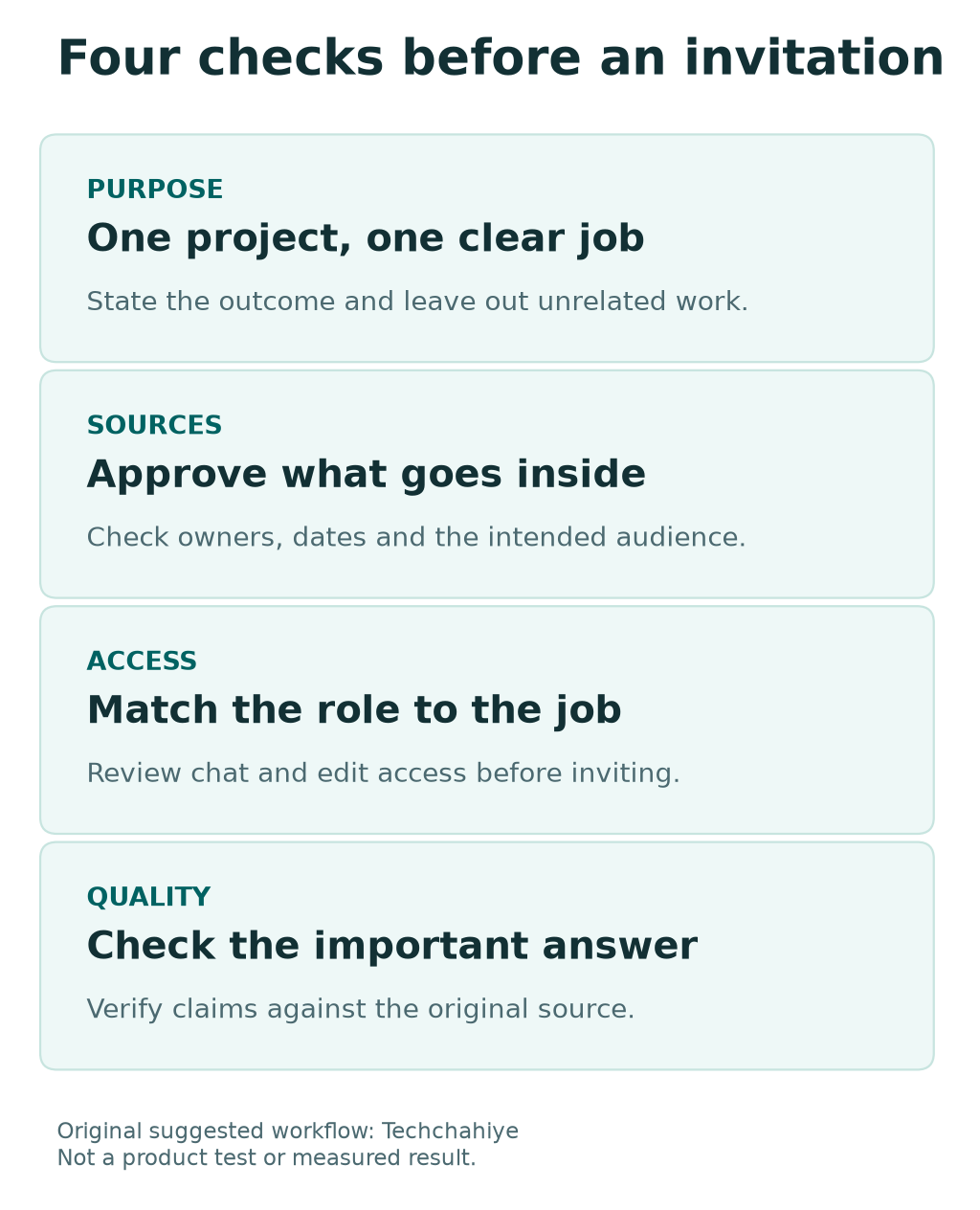
- Create a project with a clear name.
- State its purpose and intended audience.
- Add the approved source set.
- Write the shared instructions.
- Review the content as a whole.
- Open Share and select the intended people and roles.
- Check membership again after invitations are sent.
Do a small trial before the group uses it for real work. Choose a public sample document. Ask a question with a known answer. Check whether the response names the correct date and source. This is a suggested quality check, not a guarantee about later answers.
If the trial reveals a vague instruction, revise the instruction first. If it reveals a bad source, fix the source set. Adding more words to a prompt will not repair a document that contains the wrong figure.
Review Invitation Scope Before Sending a Link
OpenAI offers invited-only sharing and an anyone-with-link option where available. An open project link lets a logged-in ChatGPT user with that link join. Choose the narrow option when the project has a fixed audience.
Before sending any link, read its sharing pane. Check the project name, scope and member roles. Do not rely on an old screenshot from a different project. Similar-looking links can grant different kinds of access.
For a managed workplace, use the organization’s approved sharing path. If the expected person or group is absent, ask the workspace owner. Do not move the work to a personal account just to make an invitation easier.
An invitation is also a useful point to explain the project’s purpose. Tell the recipient which chat to start with and where the approved sources are. Explain which work is still a draft. Point new members to the approved plan.
Keep Memory, Training and Sharing Separate
OpenAI says shared projects use project-only memory. They do not draw on a member’s personal memories outside the project. This boundary concerns context. It does not mean members cannot read or download material placed inside the shared space.
Training controls answer another question. OpenAI explains training use in its Data Controls guide. Personal accounts have an Improve the model for everyone setting. Turning it off does not remove saved chats or hide them from their intended audience.
For managed business and education workspaces, the organization’s controls still matter. Check the rules that apply to your workspace. Do not infer a retention promise or an access rule from a setting that governs a different purpose.
Write three separate answers. Who can access this work? What context can the project use? Which data-use rules apply? Keep the answers in plain language. The same word privacy can otherwise conceal three different questions.
Handle Upload Limits Without Losing Source Quality
OpenAI’s file guide lists several limits. Project file counts depend on the plan. Separate limits can apply to file size, upload rate and stored data. A project with room for another file can still hit a different limit.
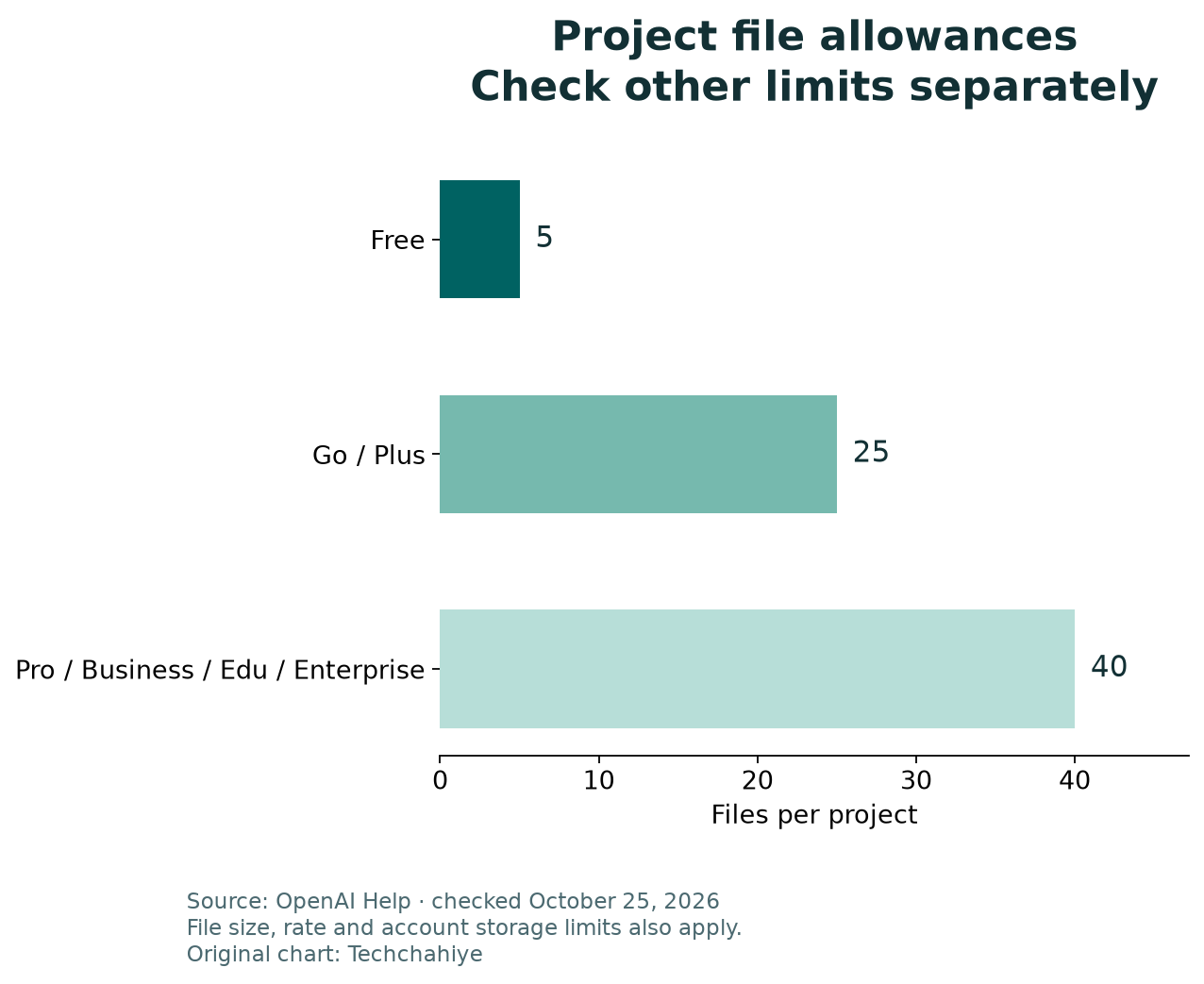
| Current project file allowance | Files per project |
|---|---|
| Free | 5 |
| Go and Plus | 25 |
| Pro, Business, Enterprise and Edu | 40 |
Those are documentation values checked on October 25, 2026. They are not a promise about every future plan. Check the current guide and the message on your account before changing your source plan.
Do not solve a limit by stripping all context from a source. First remove duplicate or out-of-scope uploads. If you combine files, preserve titles, dates and page boundaries. Keep a map back to the originals.
For a failed upload, note the message and retry time. The upload guide warns that failed attempts can count toward a rate cap. Repeatedly selecting the same file may add confusion without solving the cause.
Use a Review Loop for Each Important Answer
ChatGPT shared projects can make answers more consistent. Consistency alone does not establish truth. Ask which source supports a claim. Then open that source yourself before approving the claim.
For a numerical answer, check the units and the time period. A monthly figure should not become an annual total without a stated calculation. For a comparison, make sure each side uses the same market and product version.
For a document summary, sample the passages that matter most. Check names, dates, exclusions and conditions. A short summary can omit the very condition that changes the meaning of a policy or offer.
Give the reviewer a concrete task. Mark the claims that need review. Ask the reviewer to verify each one. Clear review questions make it easier to identify an unresolved issue.
When something is wrong, correct both the output and its source context if needed. A fix made only in a final document may not help the next person who asks the same question in the project.
Keep Branches and Final Decisions Easy to Follow
ChatGPT shared projects let members branch chats, according to OpenAI. They are not a shared chat that everyone edits at the same time. Treat a branch as a separate line of work with its own question.
Name the branch by the decision it explores. For example: compare two proposed release dates. State which source set it used and what remains unresolved. This is more useful than leaving several threads called another idea.
Choose a place for final decisions. That might be a maintained document with a named owner. Record the decision, date and supporting source. Keep a link or note in the relevant chat so a later reader can find the approved version.
A branch can preserve an earlier line of thought without making every answer final. Explain this to new members. Otherwise, they may quote an old draft that the team considered and rejected.
Work Through a Small Team Example
Consider a made-up three-person technology newsletter team. Maya owns the project. Arun checks public sources. Lee reviews the finished outline. This example illustrates a process; it does not report a measured productivity gain.
Maya starts with public product notes and a source index. Arun has edit access because he maintains the source set. Lee starts with chat access. Reviewing an outline does not require changes to shared files.
They create separate chats for source changes, the outline and fact review. When a launch date differs between two sources, Arun records the conflict. Maya chooses the current official source and updates the index. Lee checks the resulting claim before it goes into the newsletter.
At the end of the issue, the approved article stays in their publishing system. The project holds working context for the next review. The team checks access when a guest reviewer leaves. The audience should fit the current work.
Plan the Exit Before the Project Grows
Decide who reviews membership and when. A sensible trigger is a role change, a finished assignment or a handoff to another team. The interval can match the work; it does not need to be a daily ritual for a small stable group.
Tell the group where the approved record will live. Do this before removing shared material. A project may no longer need a file. The team may still need it for its normal records. Treat those as separate decisions.
OpenAI’s retention guide distinguishes a chat from a file saved in Library. Deleting one does not necessarily remove the other. Review where each copy lives. Do not assume one Delete button covers every copy.
Do not use deletion as an access experiment. Some actions are permanent. Read the current confirmation, preserve required records and use your organization’s process. If the goal is only to stop future access, first review the relevant sharing controls.
Did You Know?
OpenAI says a custom project icon can hide the usual shared-project sidebar indicator. If you want to know who has access, open Share and review the members. The absence of that small indicator is not proof that a project is private.
Conclusion
ChatGPT shared projects work best when the purpose, sources and audience are clear. Start small. Give each person the role they need. Keep source review and final approval visible.
Before the next invitation, open the sharing pane and review the whole project. Then check the first important answer against its sources. Those two steps protect both the group’s access choices and the quality of its work.
FAQs
Can a person with chat access download project files?
Yes. OpenAI says all project members can view and download added files. Use a source set that fits the full audience. Do not use chat access as a substitute for keeping a file outside that shared project.
Is a shared project link the same as a shared chat link?
No. They serve different purposes. Check the scope in the product before sending either link. Someone may only need an approved answer. Ask whether they need the ongoing project at all.
Does project-only memory mean our answers need no review?
No. A context boundary does not verify a fact. Check important claims against the original source. Confirm dates, units and conditions. Keep a named reviewer for output that will guide a decision or be published.
What should I do when a project upload fails?
Record the exact message, account plan, file type and retry time. Check file and storage limits separately. Avoid repeated attempts if the service tells you to wait. If the issue persists, contact OpenAI Support. Provide a clear record of the problem.
Should I delete the project when the work ends?
Decide based on your record and access needs. Preserve required final work first. Review where files are saved and which rules apply. Read deletion confirmations carefully. Keep a separate copy of approved work. Do this before removing its working space.
