


Which price is your baseline?
Use an AI shopping assistant to compare tech deals, then verify the model, seller, price history, return terms and checkout total in the U.S. or India.
Key Takeaways
- Use an AI shopping assistant to narrow the list and find facts to verify. Check the product page and checkout before you buy.
- Compare offers for the same model, storage, condition, seller terms and warranty coverage.
- Check the price history where it is available. A sale badge uses a reference price that may differ from the price shoppers usually paid.
- Decide on a price ceiling and the features you need before you open a deal feed.
The headphones you saved last week are on sale. The page says 35% off and the timer is running. The shopping assistant says they fit. Take a closer look. The price may be for a fixed-up pair. The discount could use the old list price. Check the return rules too, since another seller may have made the offer you first saved.
An AI shopping assistant can help you spot a bad tech deal by surfacing a price chart, lining up features and telling you what to check. Give it a specific product and budget. Then verify three things yourself before you pay. Check the exact item, the final cost and what happens if you need to return it.
There is a reason to try this now. Amazon began rolling out Alexa for Shopping in India on November 12, 2026. Amazon’s U.S. Black Friday Week starts November 19, according to the company’s event guide. These are separate markets and events. The same comparison method works at either checkout and stays useful after the sale signs come down.
Give the Shopping Assistant One Job at a Time
Start with the problem you need to solve. A student who needs a light laptop for classes can get useful options by stating a maximum weight, their budget and the apps they run. Someone who needs a second monitor for two work computers can ask for the right inputs and an adjustable stand. Each question gives the assistant a way to rule out products.
Next, give the assistant the market and currency. Ask it to use U.S. or Indian listings as appropriate. A laptop or phone can share a name across countries and come with a different display, keyboard, charger, radio support or warranty. A foreign price converted into your currency also leaves out important things such as delivery and service coverage.
Try one request at a time, such as the following.
- Find the exact model codes for these two monitors and flag any spec with no clear source.
- Show which listed features would make each pair of headphones fit calls from a laptop and music on a phone.
- Compare the current price and available price history for this exact storage option. Tell me which details I still need to verify.
- List the seller, condition and return terms for these two offers using their product pages.
When you already know the model, give the assistant its listing or model number. Tell it which finish, size or package you are comparing. If the result draws a fact from a review, a seller listing or a manufacturer page, ask it to say which. A manufacturer’s spec sheet is a strong source for whether a port is present. The seller’s offer is the place to check condition and included items. Reviews can help you form questions about real use, such as whether the cable in the box is long enough for your desk.
Save privacy as part of the setup. You can describe a budget and what you need without entering a card number, a login code, a work document or an address into a chat. For a delivery estimate, use the retailer’s normal controls and only the location details it requires. A price check also works with a guest view until you need to compare the final total on your account.
Check That Both Offers Cover the Same Product
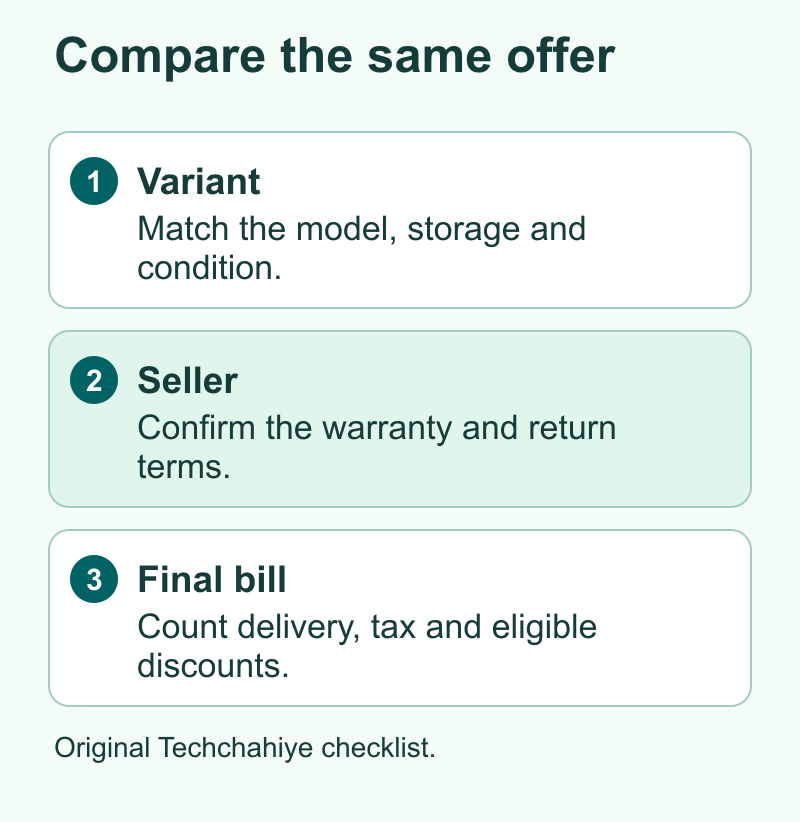
A short name on a sale tile is often shared by several configurations. Open each full listing and find the model number. Manufacturers may use a family name on the front page and a longer code in the specifications. If the listing leaves out the code, use a clear spec set to identify it or ask the seller to confirm. Take particular care with marketplace listings that combine reviews across variants.
For a phone, match storage, condition, the exact regional model, SIM support and carrier lock status. A locked phone may be useful if you intend to stay on its eligible carrier. The same lock can make it a poor choice for someone who uses two carriers or travels often. A used or renewed unit may also have a different battery guarantee or service plan. Compare it as a separate choice when condition differs.
For computers, match the whole processor, memory, storage, display and charging setup. Two laptop listings may both say 16 GB and still differ in the display panel or in whether you can add memory later. For a display, check the resolution and refresh rate the ports actually support with your machine. For headphones, check the connector version or generation and what is included in the box.
Open the offer details after you select a model. The seller, price, delivery and return terms can change with that choice. Save the colour or bundle and check it again in the cart. The page may list a U.S. model and an import. Compare these as two choices. Decide whether you would accept the differences at that price.
| Compare this | Where to check | Why it changes the deal |
|---|---|---|
| Exact product and variant | Model number, selected option and manufacturer specs | A lower price may buy less storage or a different generation |
| Condition and box contents | Item condition and seller description | Missing extras, wear and battery terms can add cost |
| Seller and warranty service | Offer details and manufacturer service terms | The same device can have different support by seller or market |
| Return path | Product-page policy and checkout details | A replacement-only offer fits a different risk than a refund option |
| Total payable | Final checkout, plus optional extras you need | Shipping, tax, finance costs or an eligible payment offer can change the comparison |
Read the Price History Before the Discount Badge
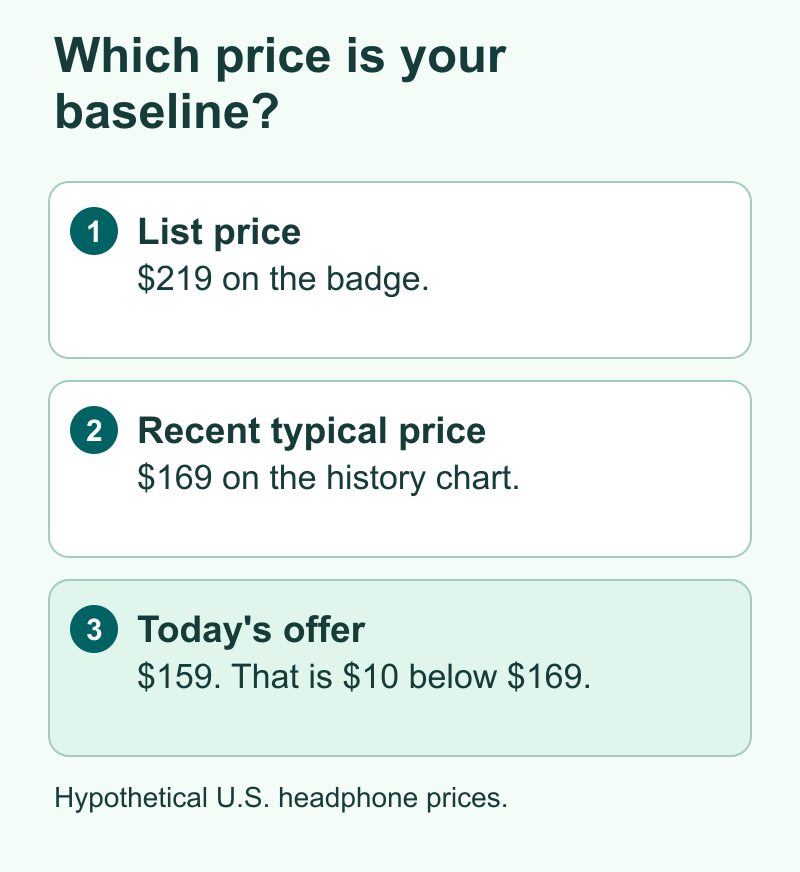
A sale badge gives a percentage relative to a stated baseline. Ask which baseline. A list price printed next to the offer tells you how the retailer presents the discount. A multi-week price chart can tell you whether the price just changed or the item spent a lot of time around the same amount.
Amazon updated its U.S. price history guide on November 16. It says eligible items can show prices from the past 30, 90 or 365 days. Amazon lists the U.S. and India among the markets with the feature. Look for a link by the price or ask Alexa for Shopping. Use the longest chart that shows prices for the model you want. A 30-day view can be enough for a new product.
Look for a recent range, a low and any long flat period. If an item was the same price for six of the last eight weeks, a large percentage badge should carry less weight than the long flat line. If the price briefly fell much lower once, ask whether that price was a short event that could return and how long you can wait. A history chart gives context. You still have to decide whether the current offer fits your needs at today’s cost.
Here is a hypothetical price comparison for a U.S. buyer. A pair of headphones is listed at $159 and the sale badge compares it with $219. The difference is $60. Suppose the same model was commonly available at $169 in the last eight weeks, and the last low was $149. Relative to the typical price you observed, today’s offer saves $10. If you would buy at $159, that can be a reasonable deal. If your ceiling is $150 and you can wait, the chart gives you a reason to set a target and move on.
Check what the chart covers. It may show prices on that site and leave out vouchers, trade-ins or subscriptions. Check the exact product page if you only see a chart for a different colour. You can also check other stores. A local shop might have a lower price or an easier return. The maker may include an accessory you would otherwise have to buy.
Compare Checkout Totals in the U.S. and India
Write down the amount you would actually pay and who must qualify. In the U.S., compare the same shipping destination and check whether tax and delivery are included in the displayed total. In India, include any delivery fee and check whether the listed discount assumes a certain card, a particular bank or a monthly payment plan. Verify the current conditions on the page that offers the benefit.
Some costs show up later. A store may display an exchange estimate before it inspects your old phone. A cashback offer may be subject to limits or arrive after the charge. An installment offer can include processing fees. Start by recording the pay-now amount. Keep a second figure for a later benefit if you meet its terms, and note how certain you are that you will get it. This lets you compare a clean price with a price that depends on other steps.
Here is a hypothetical pair of offers in India. Store A shows ₹29,999 and a ₹2,000 card offer you cannot use. Store B shows ₹28,699 with ₹300 delivery for your address. If everything else matches, Store B is ₹28,999 at checkout, ₹1,000 less than the amount you would pay at Store A. A larger number on Store A’s discount badge does not change that bill. If Store A gives you a longer refund window, decide how much you value that difference before buying.
Factor in the accessories required for your use. A low laptop price can need an adapter to connect your only monitor. A monitor deal may need an arm because the supplied stand is too short. Separate what you would buy anyway from what the offer makes necessary. It is easier to compare two devices when the total includes what it takes to start using either one.
Use that same habit for bundles. If a deal includes a case you would never buy, its listed value does little for you. If two products meet your needs, a warranty, flexible pickup or an easier return may be worth more to you than a modest price gap. Write down the reason so you can tell whether you chose the bundle for your needs or the timer on the page.
Verify the Seller and Return Path
Check who sells the product and who ships it. A retailer can deliver an item for another seller. Look for the terms on the actual listing. How long do you have to report a problem? Can you get a refund? See how you would send the item back or arrange a pickup if you need one.
For expensive tech, check the manufacturer’s support page for the country where you will use it. Read what the manufacturer says about proof of purchase and service on imported or secondhand products. If a seller’s warranty claim is unclear, ask for it in writing before you pay. Save the order and terms if you go ahead. An assistant’s summary is a way to find the question. The seller and manufacturer provide the terms you can point to later.
Read reviews as clues. To check a port, use the maker’s diagram for the exact model. Owners of that model may also mention weak call quality. If calls matter to you, look for a review with a mic sample. Check how you could return the headphones if they fall short. An assistant can identify a common complaint. You can decide how much it matters to you.
If you need the item by a certain date, check delivery at checkout. A charger that arrives after you leave cannot help on the trip. See whether you can pick up the item today and what that costs. If it costs more, check whether you can borrow one or buy something you can use in the meantime.
Use a Price Ceiling You Picked Yourself
Set three thresholds before you start browsing. First list the features you need. Then set the highest total you are willing to pay and the latest date you need the item. This small rule makes it easier to act quickly on an offer that meets the criteria and close the tab when a bigger bundle takes you past your budget.
Here is a practical example. If you need a portable charger for a weekend trip, specify the capacity you want, how many devices you need to charge and the connector on your phone. Pick a price ceiling that includes a cable if your setup needs one. Ask the assistant for a shortlist and open only the options that meet those requirements. If you cannot compare the offers before a countdown ends, use the next offer you can verify.
If the item is optional, you can use a price alert when your retailer or tool offers one. Amazon describes price alerts and automated buying features on its U.S. shopping help page. Check which controls are available in your account and market. A notification gives you a chance to review the seller and terms before you pay. If a feature can order automatically, read what price, variant, delivery address and payment method it will use before you enable it. Turn it off when you no longer want to buy the product.
You can keep a short note with the exact model, normal price range, your target and the last date you checked. That note lets you make the same comparison during the next sale without depending on a long chat. Include your source for any important detail so that you can check whether the offer changed.
Did You Know?
Two prices can be accurate and still refer to different offers. A product page might show the price for one colour while a checkout view brings up a different seller after you select the colour you want. Check the selected option and seller again before you treat the older number as your comparison baseline.
Conclusion
Let the AI shopping assistant help you find and compare offers. Then look at the same product variant, its price history, the final bill and the return terms. If those details meet your needs and your price ceiling, you can make a decision while the deal is active. If a detail you depend on is missing, use that as your next question before you pay.
FAQs
Can an AI shopping assistant tell me the cheapest price everywhere?
It can help find offers from the sources it can access. Check which stores the comparison covers and open the offers yourself. Your total can depend on your location, membership, payment method and the exact variant in stock.
Is a 30-day price history enough for Black Friday?
A short history is useful if it shows recent movement for the exact item. Use a longer window when available to see earlier sale periods and a steadier price range. A newly released model may have only a short useful history regardless of the chart options.
Can I use the same Amazon shopping features in India and the U.S.?
Check the controls on your local Amazon site and account. Amazon announced India’s rollout in November 2026 and says price history is available in both countries on eligible pages. Other assistant features and how they appear can differ by market and account.
How do I compare an exchange or cashback deal with a normal price?
Record what you pay today and what could come back later. Count an exchange or cashback benefit only if you meet the terms. Compare the two totals separately so you can see the cost even if the trade-in amount changes or you miss a card condition.
What should I verify before turning on automated buying?
Review the model, target price and which sellers can fill the order. Read the retailer’s terms for an order or cancellation. Check payment and delivery settings. If you want to approve the offer before you pay, check whether your account can send an alert.
