

Compare the full console cost
GTA VI runs on PS5 and PS5 Pro. Check storage, graphics support, game format and the cost of the console and accessories you would actually use.
Key Takeaways
- Grand Theft Auto VI runs on both PS5 and PS5 Pro. If you already have a working PS5, start there.
- A PS5 Pro gives you 2 TB of built-in storage and can improve the picture in games that support its extra features.
- PlayStation says the boxed PS5 version of GTA VI contains a download code. A disc drive can still matter for the rest of your games and movies.
- Compare the total price of the console, game and extras you need using local prices and warranty terms.
If you have a PS5 and want to play GTA VI, use the system you already own. You can decide whether to upgrade after checking what you would gain in the game and on the screen you use. If you are buying your first PlayStation 5, a regular PS5 gets you into GTA VI and gives you a choice of disc or digital hardware. The PS5 Pro makes more sense if you value more built-in storage and can benefit from enhancements in the games you plan to play.
Rockstar lists November 19, 2026, as the release date and says the game unlocks at midnight local time. PlayStation lists GTA VI for PlayStation 5 consoles. That leaves a choice about how much to spend on the setup around the game. Here is how to work out which console fits your TV, game library and budget before you take a sale offer.
Start With the Reason You Would Upgrade
Ask what you want to change. If you just want to start GTA VI on launch day and own a PS5, the first things to check are available storage, download time and account access. Those are things you can check today. A model upgrade adds steps for moving your library and setting up the new device. Set a budget for the improvement you want before you go shopping.
If you are coming from a previous console or shopping for someone new to PlayStation, weigh the whole library. Do you have PS4 discs that you want to keep using? Will you borrow a game or buy used discs? Do you keep several large games installed so different people in the house can play them? These answers can matter after you have finished your first run through GTA VI.
| Your current situation | First option to price | What could change your choice |
|---|---|---|
| You have a PS5 and enough storage | Keep it and buy the game | A documented display or game improvement you would pay for |
| You want your first PS5 and buy digital games | PS5 Digital Edition | An upcoming disc library or the extra storage of the Pro |
| You have several PlayStation discs | PS5 with built-in disc drive | Pro features and the cost of adding a compatible drive |
| You want more built-in space and a sharper 4K image in supported games | PS5 Pro | A regular PS5 plus a compatible SSD if space is the main concern |
Think about who uses the TV as well. A shared room may mean playing on a smaller second display. A family that uses a mix of digital games, older discs and Blu-ray films may get more value from the drive than from image enhancements in a few titles. If you want both a drive and the Pro, include both prices from the start.
What the PS5 Pro Can Change on Your Screen
PlayStation lists a more powerful graphics setup and PlayStation Spectral Super Resolution on the PS5 Pro. The short name for that feature is PSSR. It uses image processing to help a game produce a clearer picture. PlayStation qualifies its claims by game. A developer can use the extra capacity in different ways, so the results depend on the game version and the mode you select.
Think of three separate improvements when you read a console comparison. Image clarity affects details such as distant signs and thin lines. Frame rate affects the motion you see as your camera turns or the character moves. Lighting effects can change how a scene looks when light hits glass or water. A game can improve one of these while keeping the others about the same. A console spec page tells you what the hardware can support. Look to the game’s own information for the modes you can choose.
If you read a comparison that calls one console better, look for the specific improvement and the conditions. Was it on a 4K screen? Is the comparison based on the game you will play and the current update? Did the reviewer use the same mode on each console? If a screenshot compares a graphics mode with a performance mode, the choice of mode may explain some of the change.
Sony’s PS5 Pro page mentions frame rates and image features for compatible games. Those figures are for compatible titles. Use Rockstar’s and PlayStation’s GTA VI pages for claims about GTA VI and leave a specific frame rate out of your buying decision until you can check it. The game can also receive updates, so look at when a comparison was made if you read it well after launch.
Use the Display You Already Have
A 4K screen can show fine detail. How much you notice still depends on the screen size, how far away you sit and the picture that each title sends to it. Look up the model number of your TV or monitor and check the resolution and refresh rates it accepts on the HDMI port you use. A refresh rate is how many times the display can update its image each second. A game has to deliver the frames for you to see the benefit.
One useful way to make the decision is to test your current PS5 on the display you plan to keep. Take a game that offers two graphics modes and try both in a scene you know. Move the camera, look at small text in the distance and notice whether motion or clarity matters more to you. This is a way to learn your own preference. It does not establish what GTA VI can do in its modes or how a Pro would perform.
If you have a 1080p monitor you are happy with, count the extra cost of the Pro against changes you can enjoy now. You can prioritize the larger drive or improvements you have confirmed in other titles. If you already planned to replace the display, price it separately so you know how much the full setup will cost. The same logic applies to those considering a fast gaming display because of a number in a console advert. Check whether the games you play can use that speed.
At the store, look for exactly which settings a demo is using. An in-store screen can have a different picture setting or viewing distance from your living room. If someone can show you a concrete improvement in a game you play, make a note of the mode and display. That helps you compare the hardware on something more useful than a looping promotion.
Compare Built-In Storage and Upgrade Costs
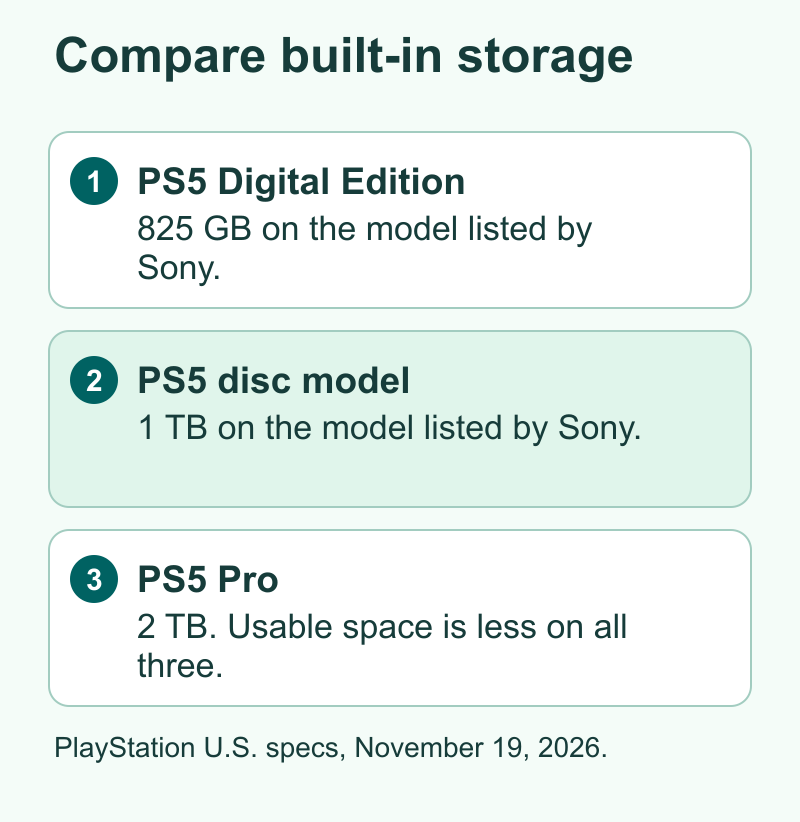
PlayStation lists 2 TB of storage in the PS5 Pro. At the time of this guide, its U.S. PS5 page shows a 1 TB disc console and an 825 GB Digital Edition. Listings can differ by region, model and retailer. Check the storage on the product you are about to pay for. Some space is reserved for the system, so the usable number you see on the console will be lower than the capacity on the box.
Before you shop for more space, open Settings and then Storage on your current PS5. Look at how much is free and which games are taking it. Keep a list of the games you use most and the ones you could download again. If your internet has a limit or a game takes all evening to download, that affects how valuable more storage is to you.
A compatible M.2 SSD is another way to add room. PlayStation’s M.2 guide lists the specifications and cooling requirements. Check the full drive model against the guide before ordering. A standard PS5 you own plus more storage can be a good choice if capacity is the reason you were considering the Pro. If you want the graphics features as well, compare the cost of an expansion drive against the cost of a Pro and any other gear you need for it.
Here is a hypothetical storage example. You have 220 GB free and want to keep four installed games. The game and its install step ask for more room than you have. Check the console’s storage screen for games you would be willing to download again and remove only the game files you want to free up. If that would be a regular problem, price a drive. If it happens once, make room and see how the new setup works first.
Download time matters too. Check your PlayStation’s actual connection and your broadband plan if you have a data limit. Start the download while you can leave the console to finish and give it time for updates. If you plan to use a wired connection, arrange the cable before starting. Buying a faster console does not change the speed your internet provider delivers.
Read the Box Before Buying a Disc Drive
For GTA VI, the physical PS5 version listed in PlayStation support is a code-in-box edition. PlayStation says it comes with the game download code and no disc. Read the package and retailer listing before buying, especially if this is a gift. Plan for a download, a PlayStation account and enough space for the game. Check the account and code requirements for the region of the copy you buy.
A drive remains useful if you play compatible disc games or watch Blu-ray films. A regular PS5 disc console comes ready for discs. PlayStation lists the add-on drive as compatible with specific slim Digital Edition model groups and PS5 Pro. Check the console and accessory model before assuming any drive will fit. Sony says it takes an internet connection to pair a compatible add-on drive with the console at setup.
If your PS5 games are all digital now, ask whether that is likely to change. A digital console might meet your needs at a lower price. If you regularly borrow or sell discs, count what it would cost to add the drive later and compare it with the out-of-box disc model. Include the cost of any movies or current games you want to play, since your library may matter more than the format of a single new game.
If the box is a present, give the code and receipt to the person who will use it. They can redeem it on the correct account after they check the region. Redeeming a code just to see whether it works can attach a game to an account where the recipient cannot use it as intended.
Compare the Real Price in the U.S. or India
Use listings from PlayStation’s regional pages and their local seller links as a starting point. In the U.S., compare the variant and final checkout cost with the same delivery address. In India, compare the actual retailer price and product model on the India buying page or a retailer you can verify. Check the receipt, warranty region and service path on a console sold as an import. Apply those same questions to used or refurbished units.
Start with the console you need and add the game, any disc drive, extra storage and the accessories that matter to you. Count setup extras such as a second controller only if you would buy it for your library. Verify the included game edition in a bundle. Check whether a store is offering the game, an upgrade, a code or an unrelated bundle. Each item should have a value you can explain before you pay.
Here is a hypothetical U.S. comparison. A regular PS5 setup costs $520 with the game and accessories you need. The Pro setup costs $750. The extra cost is $230. Decide what you would do with that money. You might spend it on more storage and games for the regular PS5. Or you might prefer the Pro’s image features and built-in space.
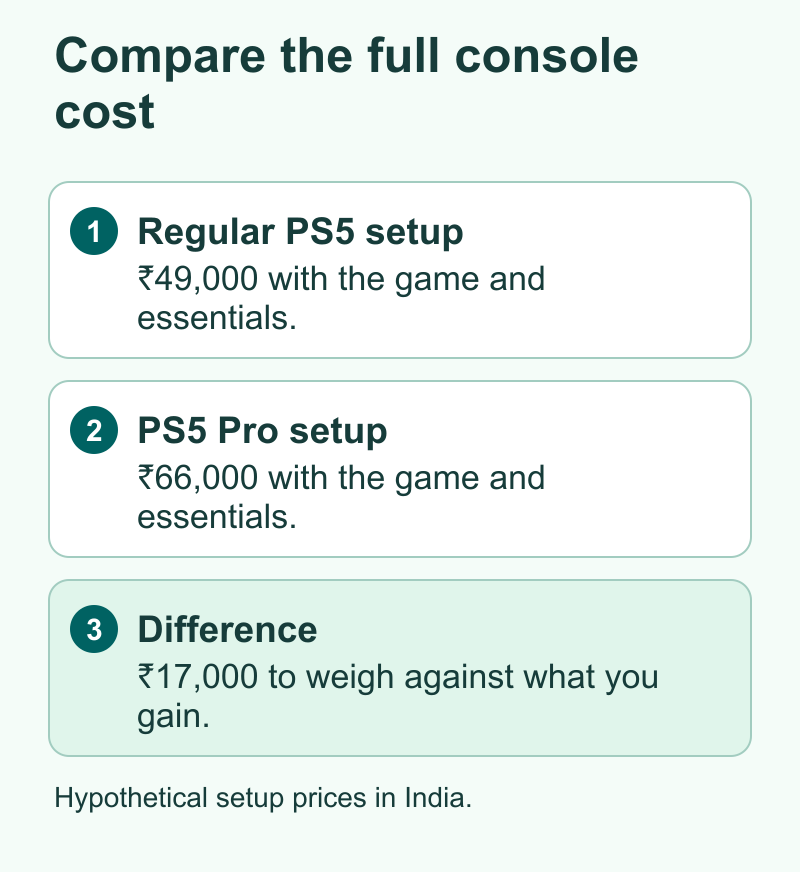
Use the same arithmetic in India. If two offers are ₹49,000 and ₹66,000 in a hypothetical comparison, that is a gap of ₹17,000. Use the exact local totals when you shop. If the gap depends on a bank or exchange offer, compare the amounts you qualify for. If it depends on a used import, include any difference in warranty and return terms. The price of having support in your country can matter to you as much as the savings up front.
Take a minute to check which part of the deal is time-sensitive. The game will still run on eligible hardware after a console sale ends. If you can use a console you already own, you can play while you learn whether an upgrade fits. If you cannot play until you buy a console, compare the earliest you can get a setup with how much you would save by waiting. That is an easier choice to make once you know which console and configuration you would buy at either price.
Decide what you would do with the current console
If you plan to replace a working PS5, check which games and saved progress each person needs. Plan to keep the current console available until you confirm those items on the replacement. If you will give the old one to someone else or sell it, count a trade-in only after you know its actual value and conditions. An estimate is useful in a comparison, but the purchase needs to make sense if the inspection changes that amount.
Did You Know?
The GTA VI retail box for PS5 may look like a physical game but PlayStation says the code-in-box version expects you to download it. This is one reason the right question for a disc drive is how you use your full library. Check the listing for this game and the drive support for your other games before counting a drive in the bill.
Conclusion
If you have a PS5, check storage and start with that console. If you are buying your first one, choose the regular PS5 model that fits how you buy and share games. Put the PS5 Pro on the shortlist if 2 TB of built-in space and enhancements in the games you play are worth the local price difference. Before checking out, confirm the exact console, the game format and which extras you will use.
FAQs
Do I need a PS5 Pro to play GTA VI?
No. PlayStation lists GTA VI for PS5 consoles, so a regular PS5 can run it. Check your storage and download setup to get started on a system you already have.
Is PS5 Pro worth it if I play on a 1080p monitor?
It depends on the supported game changes you value and how much you would pay for the built-in storage. Compare the same game and mode with your display in mind. Price a regular PS5 or a compatible SSD for your current PS5 if storage is your primary concern.
Does the PS5 box for GTA VI include a Blu-ray disc?
PlayStation says the GTA VI physical code-in-box PS5 release includes a download code without a disc. Check the format in the listing and plan for the download.
Can I add a disc drive to a PS5 Pro later?
PlayStation lists its detachable disc drive as compatible with PS5 Pro. Confirm the accessory is the right model, include its price in your decision and have an internet connection when you pair it.
Can I add storage to my current PS5 instead of buying the Pro?
Yes. A compatible M.2 SSD can add room for games on PS5. Use Sony’s published specifications and installation steps so that the drive and its cooling setup fit.
References
- Rockstar Support on GTA VI release and preload timing
- PlayStation GTA VI support on PS5, storage and code-in-box editions
- PlayStation U.S. PS5 variants and capacities
- PlayStation U.S. PS5 Pro hardware and feature limits
- PlayStation India console and retailer information
- PlayStation Support on compatible disc drives and setup
- PlayStation Support on M.2 storage for PS5
- Techchahiye’s guide to upgrading your PS5 storage
