

Before choosing a pack
Verify your account's offer and the exact game first. Compare the total bill with sessions you expect to use. The Insider preview and the announced November rollout are separate stages.
Key Takeaways
- Check your Xbox cloud gaming playtime offer before you pay. The current Insider test and the announced November rollout are different stages.
- Buying cloud time does not give you every game. Verify the title, edition, region and way to play.
- Compare the total pack cost with time you will use. A lower cost per included hour can still mean a bigger bill.
- Test your screen and controls. Check the connection before relying on cloud play.
Xbox cloud gaming playtime adds a new choice for people who want to stream games now and then. It also brings a new question for Game Pass users: how much cloud time will a month include? The preview is one stage. Xbox plans wider changes for November 2026.
The important step comes before choosing a pack. Check whether your account can use the offer and whether your game can stream. Then work out how much time you need. We checked this guide on October 25, 2026. It explains the published terms and includes our own labeled calculations. We have not tested the preview or measured its streaming performance.
Xbox Cloud Gaming Playtime: What Has Xbox Announced?
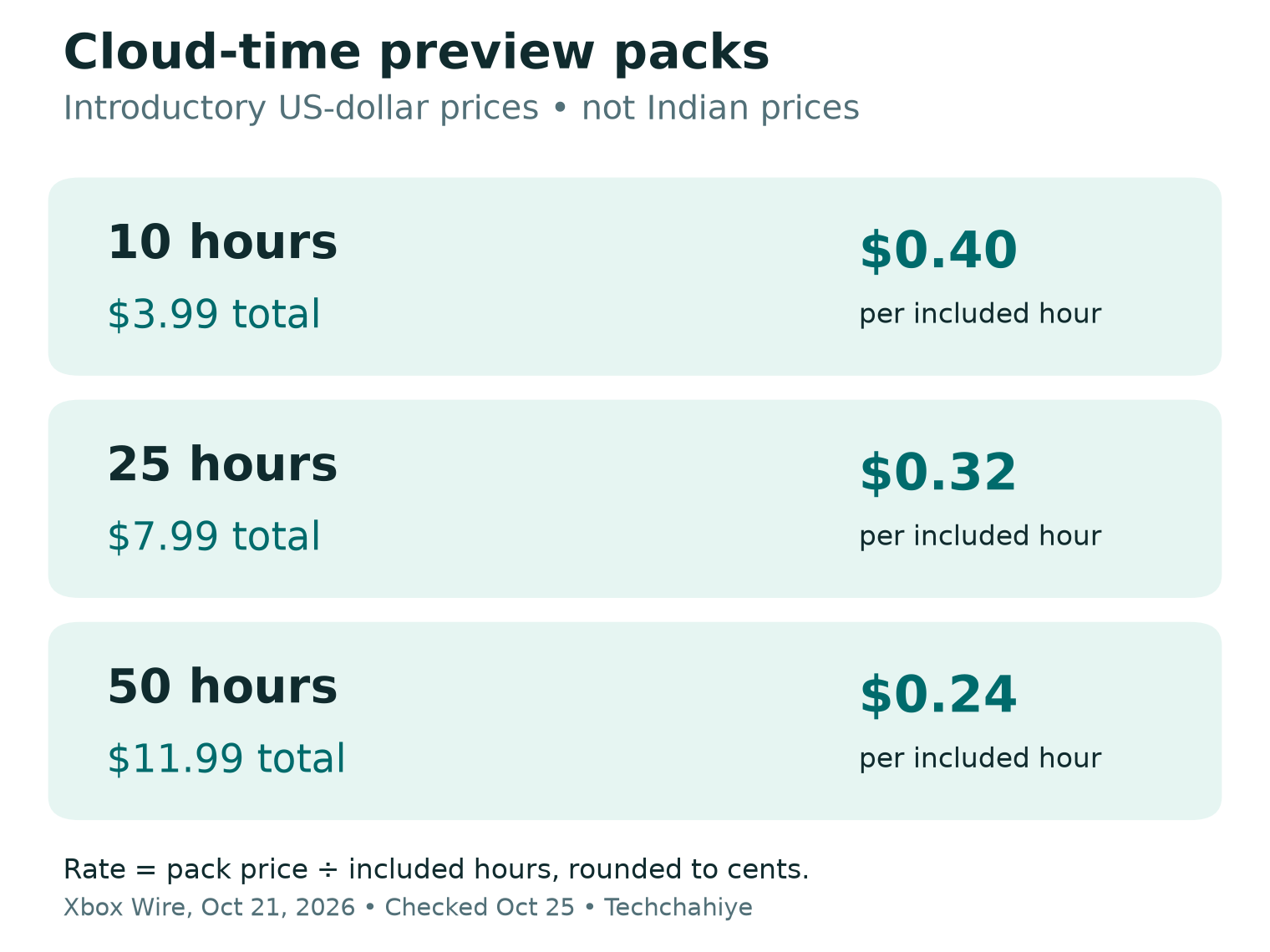
Xbox Wire announced the preview on October 21. It offers cloud-time packs to eligible Insiders. They must lack an active Game Pass plan. Its introductory US-dollar prices are 10 hours for $3.99, 25 for $7.99 and 50 for $11.99. Xbox says this paid preview is ad-free and unused pack time remains available until used. Access depends on the market, device, account and preview ring. The company plans a broader rollout in November.
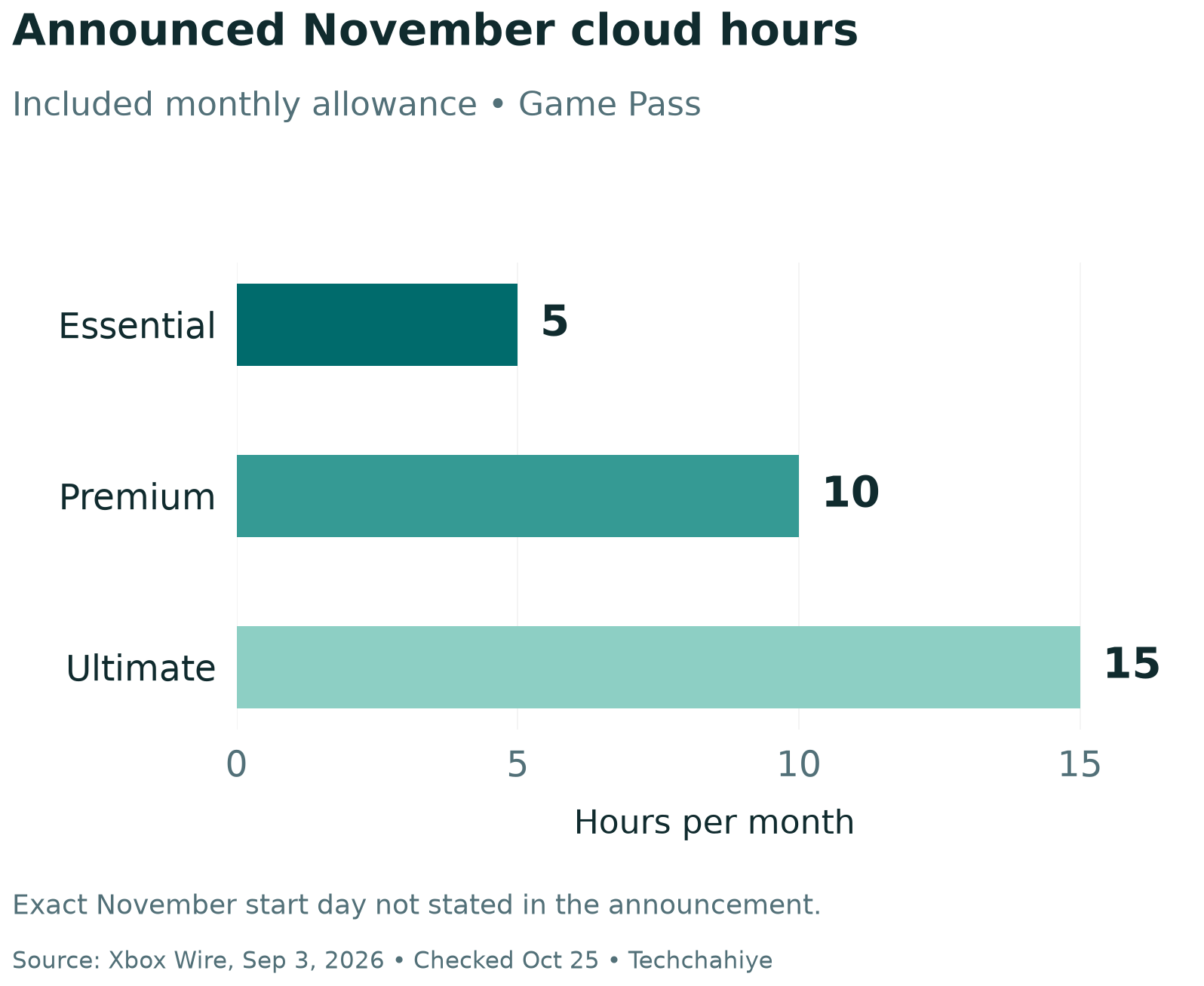
Its September 3 announcement separately sets out upcoming Game Pass cloud limits. From November, Essential will include five hours a month. Premium will include ten. Ultimate will include fifteen. Eligible subscribers can currently stream without those monthly limits. Xbox says extra cloud time will be available to buy after the allowance runs out. It has not named an exact November start date in that notice.
These are two dated announcements with different jobs. The first describes a test offer. The second explains a coming change to subscription benefits. Do not treat access to one as proof of access to the other. Follow the offer shown on your own account when the change reaches you.
If you see an old guide that promises unlimited cloud play, check its date. It may describe the service before the announced change. Save a copy of the terms shown when you buy. A short record of the date, market and offer makes later questions easier to resolve.
Cloud Time, Game Access and Hardware Are Separate
Think of the decision as three checks. You need a right to use cloud streaming. You also need access to the game. Finally, the screen and controls must support the way you want to play. Paying for one part does not settle the other two.
Xbox’s cloud-game gallery lists selected owned games that support streaming. A game in your library is not proof that every edition supports cloud play. Check the exact game’s current listing. A similar title, bundle or store page can lead to the wrong choice.
Start with the game you want to play tonight. Find its cloud listing through Xbox’s official site. Compare the edition with your receipt. Then check the account that owns it. A screenshot of a friend’s library cannot confirm the rights on your own account.
This matters most when a game comes in several versions. Write down the full title and edition before comparing offers. If you cannot confirm cloud access, stop at that point. Buying a larger time pack will not fix a missing game entitlement.
The same care applies to a subscription library. A game being part of one service is not a permanent promise that it will remain there. Xbox says its cloud catalog varies by region, plan and platform over time. Make the check close to the day you plan to play.
Xbox Cloud Gaming Playtime Prices: Compare the Packs
The table uses the preview prices in Xbox Wire’s October notice. These are US-dollar introductory pack prices, checked on October 25. They do not confirm Indian prices or a quote for every account. The final column is our calculation, rounded to the nearest cent.
| Included time | Pack price, USD | Calculated cost per included hour |
|---|---|---|
| 10 hours | $3.99 | $0.40 |
| 25 hours | $7.99 | $0.32 |
| 50 hours | $11.99 | $0.24 |
We divided each pack’s price by its included hours. The results are about $0.399, $0.3196 and $0.2398 per hour before rounding. These are comparison figures, not a claim that Xbox bills by the minute. The amount due, tax and local terms are the ones shown at checkout.
The largest pack has the lowest cost per included hour in this table. That does not make it the right first buy for everyone. The amount you spend today still rises as you move down the rows. Choose by planned use and verified access, rather than by the smallest unit-cost label.
Here is a made-up use case. You only expect to play for eight hours. Spending $11.99 to get a lower nominal rate costs more upfront than spending $3.99. You might use the extra time later, but that depends on your plans. Do not count future use as certain to justify a bigger pack.
Keep pack prices separate from Game Pass subscription prices. A prepaid time offer and a recurring plan pay for different sets of benefits. Comparing only one number can hide the reason you wanted the service in the first place.
Game Pass Cloud Hours: Plan a Real Month
A simple Xbox cloud gaming playtime plan can help. Start with sessions rather than vague ideas about being a light or heavy player. Note how often you expect to play and how long each session tends to last. Use estimates you can change after a week.
For a made-up example, six sessions of thirty minutes add up to three hours. Twenty sessions of forty-five minutes add up to fifteen hours. The second total comes from 20 × 45 = 900 minutes, then 900 ÷ 60 = 15 hours. These are planning examples, not observed user data.
| Made-up plan | Calculation | Planned cloud time |
|---|---|---|
| Six short sessions | 6 × 30 minutes | 3 hours |
| Eight one-hour sessions | 8 × 60 minutes | 8 hours |
| Twenty longer sessions | 20 × 45 minutes | 15 hours |
Leave room for a change of plans. A weekend event may make one month unusual. Travel may reduce your playtime the next month. Review the pattern before buying more. A plan that matches one holiday week may not match the rest of the year.
Do not guess what counts against the clock. The notices do not explain every detail of time tracking. Check the current time rules in your account. Look for how they treat idle time and queues. Find the display for hours left. We will not invent those rules to make the comparison look complete.
Keep a small note of sessions and the balance shown by the service. If the figures look wrong, record what the account actually displays. That gives support a specific issue to review. Do not assume that opening a browser starts the clock. Check the actual time rules.
Check Your Screen, Browser and Controls
Xbox Support’s current browser table covers specific operating systems and browsers. For example, it lists Edge and Chrome for supported Windows systems. It also lists Safari and Chrome for supported iPhones and iPads. Check the full current table for your device instead of assuming that any browser will work.
The same page lists mouse and keyboard web play on Mac and PC. It supports this through Edge or Chrome. That does not mean every game accepts that input. Check the game’s own controls before leaving a controller at home.
Use a screen you already own for your first check if possible. Confirm the device model and software version. Open the official play site through a supported browser. Pair or connect the input device, then check that the game detects it. Only after those checks should a new accessory enter the plan.
Pay attention to comfort as well as compatibility. A phone can be a useful travel screen but still feel cramped for small menus. Try to read a game’s inventory, map and settings at your usual viewing distance. A larger screen may help some games more than a higher time allowance would.
Check sound and chat if you use them. The guide flags party-chat audio issues on older Safari versions. The warning covers versions before 17. A game loading successfully is only the start of a useful test. The parts you use with friends deserve a check too.
Test the Connection Where You Will Play
Xbox lists a download speed of at least 10 Mbps. Some devices need 20 Mbps for the best quality. It recommends 5 GHz Wi-Fi. These figures are service guidelines. A fast speed test cannot promise smooth play. Xbox also notes that location, device and connection affect results.
Try the setup in the room and at the time you expect to play. A test next to the router can miss a weak spot in your usual seat. A quiet weekday morning can miss the demands of a busy evening. Keep those conditions in your notes so the results mean something.
Change one thing at a time if play feels poor. Compare a spot closer to the router with your usual spot. Pause a large download on your own device if one is running. If you try a wired connection, note that change too. Avoid changing several settings at once and then guessing which one helped.
Separate delay from picture quality in your notes. You may notice a sharp image but a slow response. You may notice quick controls but a soft image during movement. Those observations can guide a useful support question. They do not prove a fault in a particular network or server.
Check your data plan before a long mobile session. Streaming is a different use pattern from downloading a small app update. This guide does not estimate a fixed data use per hour because quality and service behavior can vary. Use your device or carrier’s actual usage record for your own setup.
US and India: Check the Offer in Your Market
The dollar figures above come from a US-facing Xbox notice. Do not convert them into rupees and call that an Indian price. Currency conversion cannot establish a local product offer, tax treatment or account eligibility. Indian readers should check the offer attached to their own market and account.
Xbox announced its cloud-gaming expansion to India in November 2025. That history does not prove that every later preview is open to every Indian player. A service can exist in a country while a specific test has narrower access. Treat the current preview conditions as a separate check.
For either market, begin with the account you actually use for games. Compare the store’s country, displayed currency and payment details before you commit. If the offer does not appear, use the official eligibility and support pages. A video from another country is not a reason to change account details to force it.
Do not buy a code from an unknown seller because the headline price looks low. First establish what product the code claims to provide and where it works. If those points are unclear, you cannot make a fair comparison with the official offer. The lowest visible number may be for a different product.
Choose Between Prepaid Time and a Subscription
Write down why you want Xbox cloud gaming playtime. You may want to finish one game while away from home. You may use a library of games throughout the month. Those are different needs. A good choice starts with that job, then compares the offers your account can actually buy.
Make a short comparison sheet. List the games you want, your expected sessions, the screen you will use and the total price due. Add whether the option renews. Do not add a benefit you will not use to make a plan seem better value.
For a weekend away, convenience may matter more than a large monthly library. For regular play, reliable access to your chosen titles may matter more than the lowest pack rate. Neither example decides the answer for everyone. They show why the right comparison depends on the reader’s actual routine.
Check subscription settings separately from cloud-time balances. Microsoft Support directs users to their account’s subscriptions page. Find the plan, then use its Manage option. If the page says Turn on recurring billing, it means renewal is off. Microsoft explains this in the same guide. Read the date and state shown for your own plan.
Keep the payment record after choosing. Note the product name, amount, currency and date. For a recurring plan, also note the next renewal date shown. Keep this record to review costs later. It is clearer than an old offer or a guess from memory.
Did You Know?
Xbox says included cloud hours do not stack across eligible Game Pass plans. The larger allowance applies. This matters if you already get a plan through a partner offer. Check the benefit that applies before counting two plans as twice the playtime.
A Short Checklist Before You Spend
Use this checklist while the offer is open on your own screen. It is a decision aid, not a claim that we have checked your private account. If one answer is missing, resolve that gap before moving to the payment step.
- Confirm the offer’s stage: preview access or the wider rollout.
- Check the title and edition in the current cloud catalog.
- Confirm which account owns the game or supplies library access.
- Check the device, browser, controls and country requirements.
- Read the amount due, currency, tax and time terms.
- Compare the pack with sessions you expect to use.
- Save the terms and payment record after choosing.
If a launch fails, keep the error message and time of the attempt. Note the device, browser and title. Try official support with those details. Do not share passwords, payment numbers or sign-in codes in a public thread. Clear technical facts are enough to start explaining the problem.
What to record for support
Note the date, game edition, device, browser, offer and exact error. Keep passwords and payment details private.
Conclusion
Xbox cloud gaming playtime is worth judging as a whole setup. Access, games, controls, connection and price all have to fit the job. Start with the dated announcement and the offer shown on your account. Confirm your game and plan a month of sessions. Choose the smallest commitment that meets that need.
FAQs
Can I buy Xbox cloud gaming playtime without Game Pass?
Xbox is testing that route with eligible Insiders who lack an active Game Pass plan. The company has announced a broader November rollout. Check your account’s current offer. Do not assume all players can buy it today.
Does a cloud-time pack include every Xbox game?
No. Check the specific game’s cloud listing and the way your account has access to it. Time and game rights are separate checks. Owning a different edition or seeing a title in an old list does not settle current access.
Is the largest pack always the best value?
It has the lowest calculated cost per included hour in the introductory table. It also costs more upfront. Compare the total bill with time you expect to use. A smaller first commitment may suit an occasional player better.
Will the US-dollar prices apply in India?
Do not assume that they will. Check the Indian offer, currency and account conditions when available. A conversion from dollars is an estimate of exchange value, not proof of a local Xbox price or preview offer.
What should I test before relying on cloud gaming?
Check your exact game, device, browser, controls and usual connection. Try the setup where you will use it. Note picture quality, response and chat separately. This guide reports published requirements; it does not claim a hands-on performance test.
References
- Xbox Wire — Cloud Playtime Now Available to Test with Xbox Insiders, October 21, 2026
- Xbox Wire — Upcoming Changes to Xbox Cloud Gaming, September 3, 2026
- Xbox — Cloud Gaming overview and current plan conditions
- Xbox — Stream your own game gallery
- Xbox Support — Supported browsers for cloud gaming and remote play
- Xbox Wire — Cloud Gaming expansion to India, November 26, 2025
- Microsoft Support — Cancel your Microsoft subscription
