• Microblog
  • News
    • Apps
    • Gaming
    • Internet
    • Security
    • Social Networks
    • Artificial Intelligence
    • Android
  • Gear
    • Audio
    • PC
    • Phones
    • Smart Home
    • Video
  • Guide
    • AI Tools Guide
    • WhatsApp Tips
    • Social Media Guide
    • Mobile Plans Guide
    • Android & iPhone Guide
    • Productivity Apps Guide
    • How To
    • Top
    • Best
  • Telecom
    • Mobile Plans Guide
    • Jio Fiber
    • Airtel
    • 5G
    • Recharge Plans
    • BSNL
  • Aetherfor Mac
  • Apollofor iPhone & iPad
  • About Us
  • Contact Us
  • Team
  • Disclaimer
  • Careers
  • Guest Post
  • Facebook
  • Twitter
  • Linkedin
  • Instagram
  • Google
Skip to content
  • About Us
  • Contact Us
  • Team
  • Disclaimer
  • Careers
  • Guest Post
  • Facebook
  • Twitter
  • Linkedin
  • Instagram
  • Google
Techchahiye

Techchahiye

Your Everyday Tech Guide

  • News
    • Apps
    • Gaming
    • Internet
    • Security
    • Social Networks
    • Artificial Intelligence
    • Android
  • Gear
    • Audio
    • PC
    • Phones
    • Smart Home
    • Video
  • Guide
    • AI Tools Guide
    • WhatsApp Tips
    • Social Media Guide
    • Mobile Plans Guide
    • Android & iPhone Guide
    • Productivity Apps Guide
    • How To
    • Top
    • Best
  • Telecom
    • Mobile Plans Guide
    • Jio Fiber
    • Airtel
    • 5G
    • Recharge Plans
    • BSNL
  • Aetherfor Mac
  • Apollofor iPhone & iPad
  • Microblog
Subscribe
  • Primary Topics:
  • AI & ChatGPTTools & safe use
  • WhatsAppTips & privacy
  • Social mediaAccounts & safety
  • Mobile plansJio, Airtel & OTT
  • Android & iPhoneUpdates & fixes
  • Productivity appsGoogle, Excel & more
Home » Google Chrome » Page 3

Tag: Google Chrome

Google Chrome should help you get a task done, rather than leave you searching through menus. This archive collects our guides to tabs, site controls, downloads and privacy. It also keeps past release news in view, so you can tell a current how-to guide from an early feature test.

Start with the problem you want to solve

For unwanted Chrome pop-ups, begin with our guide to blocking them without breaking useful sites. Google’s pop-up help makes an important distinction: a pop-up window and an alert from a site are different things. That is why one switch may not stop every message on your screen.

Chrome settings also cover your download folder and what sites can do. Before you change several controls, name the result you want. For example, saving a download in a new folder is a different task from stopping a site from opening a new window.

Manage tabs and check privacy choices

Our coverage of Chrome tabs includes groups, page previews and ways to reduce clutter. Chrome Memory Saver gets its own practical guide. Google’s performance help explains that Chrome can deactivate inactive tabs to save memory. Those tabs reload when you return. Check the desktop or mobile scope before following those steps.

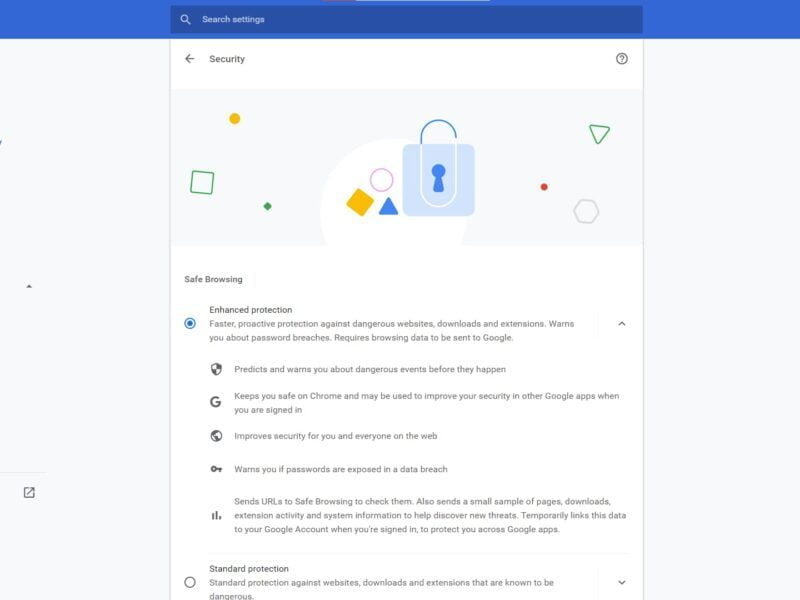
For Chrome privacy questions, browse the articles on site alerts, saved passwords and safer browsing. The Chrome Enhanced Protection archive focuses on that specific protection option. Read what a setting changes before enabling it, especially when a choice changes the browsing data Chrome shares.

Chrome extensions can add tools, but an extra tool is not always the first fix for a browser problem. Use the article that matches your task and check its date. An older guide may show menus that have since moved.

Explore the wider browser picture

Our Chrome browser features archive focuses on earlier tools and release changes, including page sharing and web apps. If you are comparing browsers, Firefox and Microsoft Edge provide other routes through the coverage. Compare the tasks and settings that matter to you instead of treating an old feature list as a speed test or a ranking.

Google Chrome 81 Releases with Web NFC Support
Posted inGoogle

Google Chrome for Android may get the Scrolling Screenshot Feature

by Sanjay Kumar MonuOctober 29, 2020October 29, 2020
Google Chrome Enhanced Protection Feature
Posted inGoogle

How to enable Enhanced Protection in Google Chrome?

by Sanjay Kumar MonuOctober 27, 2020October 27, 2020
Google Chrome 90 HTTPS at first
Posted inInternet

Chrome 85 Improves Tabs by introducing 7 new features

by Sanjay Kumar MonuAugust 26, 2020August 26, 2020
Chrome 80 Deep Linking
Posted inInternet

Google Chrome Tabs are now 10 percent faster

by Sanjay Kumar MonuAugust 26, 2020August 26, 2020
Chrome 85 to save Web Pages as Tagged PDF
Posted inInternet

Chrome 85 to save Web Pages as Tagged PDF

by Sanjay Kumar MonuJuly 30, 2020July 30, 2020
Google Chrome 81 Releases with Web NFC Support
Posted inInternet

Google Chrome 81 Releases with Web NFC Support

by Sanjay Kumar MonuApril 8, 2020April 8, 2020

Posts pagination

Newer posts 1 2 3 4 5 … 8 Older posts

Latest Article

How to Add a Border in Google Docs That Fits Your Text
How To

How to Add a Border in Google Docs That Fits Your Text

Choose a paragraph border, a table or a drawing, then check the finished page.
November 10, 2026November 10, 2026
How to Check Screen Time on Android and Read the Report
How To

How to Check Screen Time on Android and Read the Report

Find the daily view, compare the right numbers and choose one useful next step.
November 10, 2026November 10, 2026
How to Delete Bookmarks on Chrome, by Device
How To

How to Delete Bookmarks on Chrome, by Device

Find the right saved link, profile and folder before you clear your list.
November 10, 2026November 10, 2026
How to Restore Tabs on Chrome After a Restart
How To

How to Restore Tabs on Chrome After a Restart

Find the right window, closed tab or saved group before changing browser settings.
November 10, 2026November 10, 2026
Samsung Battery Protection: Choose Your Charge Limit
Phones

Samsung Battery Protection: Choose Your Charge Limit

Choose a supported limit, plan your day and understand a charging pause.
November 9, 2026November 9, 2026
  • Facebook
  • Twitter
  • Linkedin
  • Instagram
  • Google
Techchahiye

Your everyday tech guide. Clear explainers on apps, phones, plans and AI for readers in India.

Follow us

Guides

  • AI tools guide
  • WhatsApp tips
  • Social media guide
  • Mobile plans guide
  • Android and iPhone
  • Productivity apps

Sections

  • News
  • How to
  • Phones
  • Telecom
  • Security
  • Gaming

Company

  • About us
  • Contact us
  • Team
  • Privacy policy
  • Disclaimer
  • Write for us
© 2026 Techchahiye Powered by Newspack Privacy Policy