

Check the full model
The desktop RTX 3060 comes with 12 GB or 8 GB of memory and different bus widths. Compare the exact specifications, total price, fit and seller support. Judge gaming speed with matched tests.
Key Takeaways
- RTX 3060 12GB vs 8GB is more than a memory-size choice. The desktop versions also have different memory-bus widths.
- Compare the exact card model, condition, price and support. The family name alone does not identify the product on sale.
- More memory or a wider bus alone cannot predict gaming speed. Use tests that match your game, settings and PC when judging performance.
- Check fit, power and display connections before paying. Read a used card’s history and return terms before paying.
The RTX 3060 12GB vs 8GB choice starts with a detail many listings hide. NVIDIA lists both memory sizes under the desktop RTX 3060 name. Their memory interfaces differ too. A shop title that stops at RTX 3060 leaves out information you need before comparing prices.
This guide uses NVIDIA and MSI specifications checked on October 25, 2026. It explains the numbers and a buying process for US readers. It also covers buyers in India. We have not benchmarked these cards. The charts show published hardware figures and labeled calculations. They do not show measured frame rates or live deals.
RTX 3060 12GB vs 8GB: The Main Hardware Differences
NVIDIA’s desktop specifications list the RTX 3060 with 3,584 CUDA cores and GDDR6 memory. The two memory versions use 12 GB with a 192-bit interface, or 8 GB with a 128-bit interface. Both belong to the Ampere generation. Check a card maker’s exact model page for shipping details.
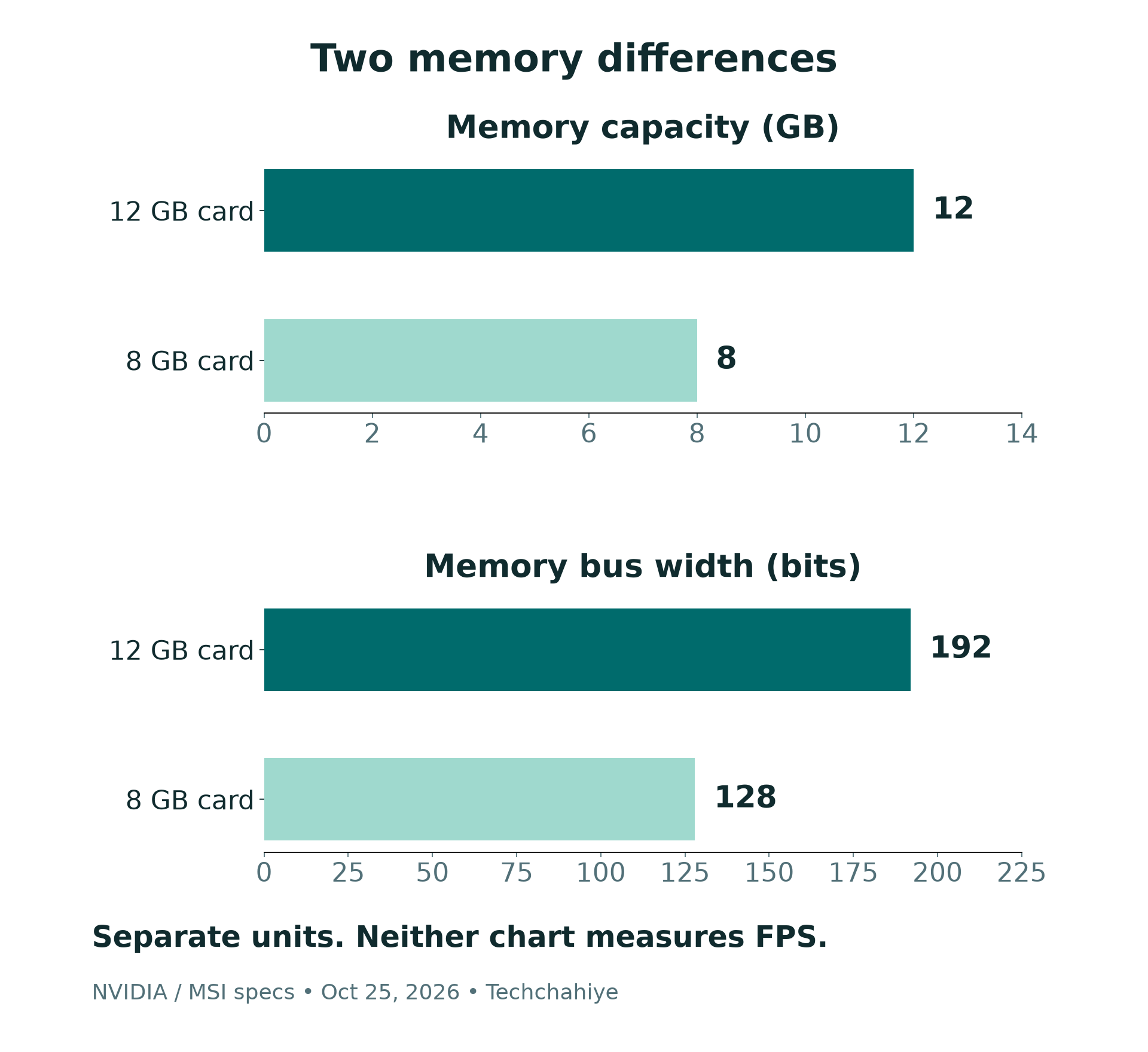
The table below compares MSI’s VENTUS 2X 12G OC and VENTUS 2X 8G OC. These are specific desktop cards. Other models may have different cooling, sizes or clocks. MSI lists the following figures for them.
| Specification | VENTUS 2X 12G OC | VENTUS 2X 8G OC |
|---|---|---|
| Video memory | 12 GB GDDR6 | 8 GB GDDR6 |
| Memory bus | 192-bit | 128-bit |
| Rated memory speed | 15 Gbps | 15 Gbps |
| CUDA cores | 3,584 | 3,584 |
| Listed boost clock | 1,807 MHz | 1,807 MHz |
The matching core and clock figures do not make the memory setups identical. Nor does the larger memory number turn a 3060 into another GPU. Treat the full specification as a set of facts. Avoid choosing one number and using it as a shortcut for every kind of workload.
RTX 3060 Memory: Capacity Is Space for Data
Video memory, often called VRAM, is the card’s local memory. Capacity describes how much it can hold. It is a different measurement from the speed of the GPU or the number of frames a game produces. Keep those ideas separate when reading a product comparison.
The capacity difference here is 4 GB. Our calculation is 12 − 8 = 4 GB. Relative to the smaller card, 4 ÷ 8 = 0.5, so the 12 GB version has fifty percent more listed VRAM. That is a capacity comparison, not a fifty percent gaming-speed claim.
Start with the work you want the card to do. For games, note the title, resolution and quality settings you want. For creative work, note the application, project size and features. Then check that software’s current hardware guidance and relevant tests. A general statement that an app uses a GPU is not enough.
Extra capacity can be useful when your work needs it, but a larger number alone cannot predict the result. A project that fits in memory still needs the rest of the system to process it. Do not read an app’s listed VRAM need as a complete performance recommendation.
RTX 3060 12GB vs 8GB: Memory Bus and Bandwidth
Memory-bus width describes the data path in bits. The MSI examples pair the same rated memory speed with different widths. Using those published inputs, we can calculate a theoretical bandwidth figure. This helps explain the hardware difference without pretending to have run a game.
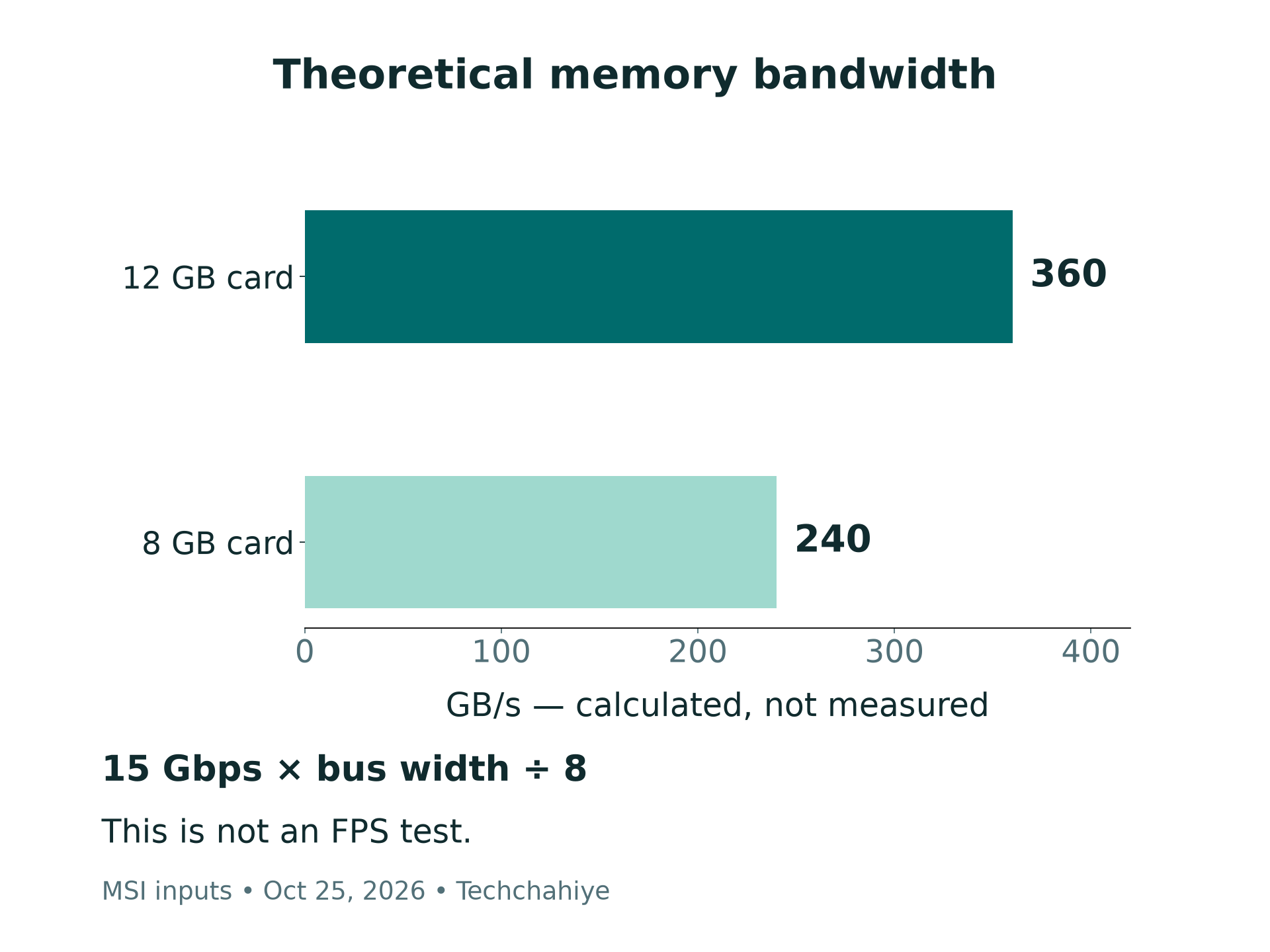
For the 12 GB model, 15 Gbps × 192 ÷ 8 gives 360 GB/s. For the 8 GB model, 15 Gbps × 128 ÷ 8 gives 240 GB/s. We divide by eight to convert bits to bytes. These are theoretical memory-transfer rates from the listed specifications, not observed application throughput.
The wider path is fifty percent larger by this measure: 192 ÷ 128 = 1.5. The calculated bandwidth has the same ratio because the rated memory speeds match. That ratio is not a frame-rate multiplier. A game’s demands and the rest of the PC still matter.
Read chart labels carefully. A bar measured in GB is not a bar measured in GB/s, and neither is FPS. If a comparison turns one of those units into another without a test, it has skipped evidence. Our visuals keep capacity and theoretical bandwidth separate for that reason.
RTX 3060 vs 3060 Ti: Do Not Mix the Listings
NVIDIA lists the RTX 3060 Ti separately from the RTX 3060. Its family table gives the Ti 4,864 CUDA cores and a 256-bit memory interface. The Ti’s 8 GB label does not make it the same card as an 8 GB RTX 3060. Read the full model name.
The same caution applies to laptop listings. This guide compares desktop add-in cards. A laptop with a similar GPU name is a different product and system. Keep laptop tests and desktop tests separate. Use the group that matches your own PC.
Ask a seller for the exact maker and model code. Match it to the label on the card and the maker’s specification page. Compare the memory amount too. A photo of the box front may not settle which version is inside, especially with a used listing.
If the title, photos and written description disagree, resolve that before paying. Save the seller’s answer and the original listing. You should not have to infer which product you bought from a vague promise about RTX performance.
Check DLSS Features by Name
NVIDIA lists DLSS support in a hardware table. The RTX 30 series supports Super Resolution, Ray Reconstruction and DLAA. It does not list DLSS Frame Generation for RTX 30-series cards. The RTX brand does not grant every new feature to every card.
Check the named feature and the game’s support together. A game may support several DLSS tools. Each can have its own hardware needs. Read the current feature table. A version number alone does not explain which tools you get.
This also matters when comparing test videos. Note whether the test uses upscaling, generated frames or a native-resolution render. Keep those choices visible in your notes. Otherwise the two numbers may describe different render settings. That would not be a fair test of the cards.
An unofficial claim about unlocking features is not a replacement for that check. Choose hardware based on supported behavior. Do not pay more for vague claims about future drivers or mods. Base the choice on what the card supports today.
RTX 3060 Power Requirements and Case Fit
MSI lists both example cards at 170 W power consumption. Each uses one eight-pin power connector. The recommended power supply is 550 W. Each measures 235 × 124 × 42 mm. Those figures apply to the named VENTUS models. Use your exact card maker’s page for another version.
The graphics-card power figure is not the whole PC’s demand. The recommended PSU figure also needs context from the system. Check your power supply’s exact model, available connectors and the rest of the build. A wattage printed in a shop title is not a full compatibility check.
Measure the space the card will occupy. Look at length, height and thickness, plus nearby parts and cables. A card can meet a case’s nominal length limit yet still face a real obstruction in your build. Use the case and card manuals together before ordering.
If you are unsure about power cables or installation, use a qualified PC technician. Avoid improvising cable combinations to make a connector fit. This guide compares buying choices; it is not a wiring diagram or a reason to open a power supply.
Check your display connection as well. MSI lists HDMI and DisplayPort outputs on the examples. Match the actual card’s ports to your screen, cable and intended display mode. A peak output specification is not a promise that a game will run at that resolution and refresh rate.
Buying a Used RTX 3060: Ask for Evidence
With a used card, identify the product before discussing a discount. Ask for clear photos of the model label, card and ports. Keep full serial numbers out of public reposts. The goal is to match the item to the description and understand its condition.
Ask about prior use, repairs and changes. A seller’s answer is useful context, not independent proof. A clean-looking card does not establish its history. Likewise, a claim that it only handled light work does not replace a useful test and clear return terms.
Request a demonstration of the exact card if the sale allows it. Note the PC, driver, game or app, settings and duration. Look for stable output and any errors during the task. Do not turn a short successful demo into a guarantee of long-term reliability.
Read the return and warranty position before paying. Ask who handles a fault and what receipt is available. For a private sale, the practical support route may differ from a store’s. Compare the total risk and cost, not only the advertised price.
If a seller will not identify the version, treat that missing fact as part of the decision. A low price does not resolve it. You can wait for a clearer listing rather than spending money to find out which card arrives.
Keep a useful buying record
Save the model code, listing, total price, test conditions and return terms. Keep private serial numbers out of public posts.
RTX 3060 12GB vs 8GB: Compare the Total Price
Use prices for the exact versions and condition you are considering. Include delivery, tax and any needed parts. Compare return terms too. A new card may have clear support. A used card may have no return route. Include that difference in the price decision.
Here is a made-up US example. One 8 GB card costs $140 and a comparable 12 GB card costs $170. The difference is $30. That is about twenty-one percent of $140, since 30 ÷ 140 × 100 is about 21.4. We made up these prices. They are not live listings.
The example does not establish which card offers more FPS per dollar. We have no matched benchmark to divide into those prices. It asks a simpler question. How much extra do the memory and wider bus cost? For this example, assume the other sale terms match.
Our buying judgment favors the 12 GB version when the price gap is small. Condition, fit and support must be close too. That judgment follows the extra capacity and wider memory path. It is not a claim that it wins every workload by a fixed margin.
If the gap is large, compare alternatives at the total price you would pay. Do not limit the search to two old listings because their names match. A different card or buying later may suit the job better. Use current evidence for those other cards. This guide does not rank the whole market.
For India, build the comparison in rupees from local offers. Check the invoice and warranty provider. Ask who supports that unit. Converting a US example cannot establish an Indian price or a local warranty. Keep those market differences visible.
Verify the Card and Driver After Buying
NVIDIA’s Control Panel guide explains how to open System Information. Use the Help menu or the link at the lower left. Use it to inspect the graphics hardware and driver details. Compare the card with your order and the maker’s specs. Keep the box while you check.
Keep a record of the model and driver version when you first test. If the details do not match, keep a record. Then contact the seller for a return or support. Do not begin changing firmware to make the card match a description that was wrong.
NVIDIA explains its driver choices on its driver page. Game Ready drivers target game-launch support. Studio drivers target reliability in creative work. It says either can support games and creative apps. Choose a supported driver for your card and operating system. Use the official source and read the release notes.
You do not need to install an unknown driver utility to identify a card. Keep the process simple and use the maker’s tools. If a system builder manages the PC, check its support guidance too. A driver update and a GPU firmware flash are separate actions. They serve different purposes.
Make Your Own Comparison Fair
If you already own a card, write down the problem before deciding to replace it. A particular project will not fit your workflow, or a game misses the settings you want. Define the task in terms you can test. A generic desire for a bigger number does not give a useful buying target.
For a fair test, keep the game version and PC the same. Match resolution and quality settings too. Record the driver and any upscaling setting. Note visible problems as well as average speed. A smooth-looking average can miss the part of a task that actually bothers you.
Change one setting at a time when testing your existing setup. For example, compare the same scene at two texture settings and note the result. Label it as your own observation, with the conditions attached. Do not use it to claim a universal difference between every 8 GB and 12 GB card.
Keep the evidence beside the buying decision. Your notes should explain why a specific card meets your job at a specific total cost. That gives you a clear basis for spending. A chart without test conditions cannot do that. Neither can a vague promise about future software.
Did You Know?
MSI’s two VENTUS examples have the same listed size, boost clock and core count. Yet their memory amounts and bus widths differ. That is why the outer design is not enough to identify the variant. Read the model and memory specification even when two cards look alike.
Conclusion
For RTX 3060 12GB vs 8GB, compare the full card rather than one label. The 12 GB model has more VRAM and a wider memory bus, but those facts do not supply a fixed FPS gain. Check your task, exact model, total price, fit and seller support before choosing.
FAQs
Is the RTX 3060 12GB fifty percent faster than the 8GB?
The listed memory capacity is fifty percent larger. In the examples, the bus width and calculated bandwidth have that ratio too. Those are hardware comparisons, not game benchmarks. A frame-rate claim needs a matched test.
Is an 8GB RTX 3060 the same as a 3060 Ti?
No. NVIDIA lists them as different GPUs with different core counts and memory interfaces. Match the full model name before comparing a listing or test result. Memory size alone does not identify the GPU.
What should I ask a used-card seller?
Ask for the exact model and memory version. Check its condition and repair history. Request a useful demo too. Read the return and warranty terms. Check the seller’s claims. They do not prove long-term reliability.
Does the RTX 3060 support every DLSS feature?
No. Check NVIDIA’s current hardware matrix and the game’s support. The RTX 30 series supports several DLSS tools, but the matrix does not list DLSS Frame Generation for it. Keep that feature separate from Super Resolution.
Which RTX 3060 version should I choose?
If price and sale terms are close, our specification-based preference is the 12 GB version. Check fit, power and your workload too. A large price gap or poor condition can change the decision. This guide does not rank the whole market with tests.
References
- NVIDIA — RTX 3060 and RTX 3060 Ti family specifications
- MSI — RTX 3060 VENTUS 2X 12G OC specifications
- MSI — RTX 3060 VENTUS 2X 8G OC specifications
- NVIDIA — Current DLSS feature and hardware matrix
- NVIDIA — Control Panel System Information help
- NVIDIA — Official drivers and Game Ready versus Studio guidance
- Techchahiye — Gaming coverage and guides
