


Plan a clear exit from WhatsApp
Follow the steps on Android or iPhone. Save the chats you need. Review any group or channel role before you close the account.
Key Takeaways
- Use WhatsApp’s in-app account controls on your primary phone. Removing the app is a different action.
- Account deletion is permanent. Decide what to keep and who needs a new way to reach you first.
- Deleting your account does not erase the copies of messages other people already have.
- A new phone number calls for a different plan if you want to keep using the account.
- Review any groups or channels you manage before you leave.
To delete your WhatsApp account, open the app on your primary phone. Go to Settings, then Account, then Delete my account. Read the warning, enter your full phone number, and follow the deletion prompts. Make this choice only when you mean to close the account permanently.
Before that final step, take time to plan what happens next. You may need a copy of a chat or a file found only on your phone. Your family may need a new way to reach you. Closing the account and saving what matters are separate tasks.
This guide explains how to delete a WhatsApp account on Android or iPhone. It also helps you decide whether you need a full account exit, a phone change, or a smaller step that fits the problem.
Start with the outcome you want
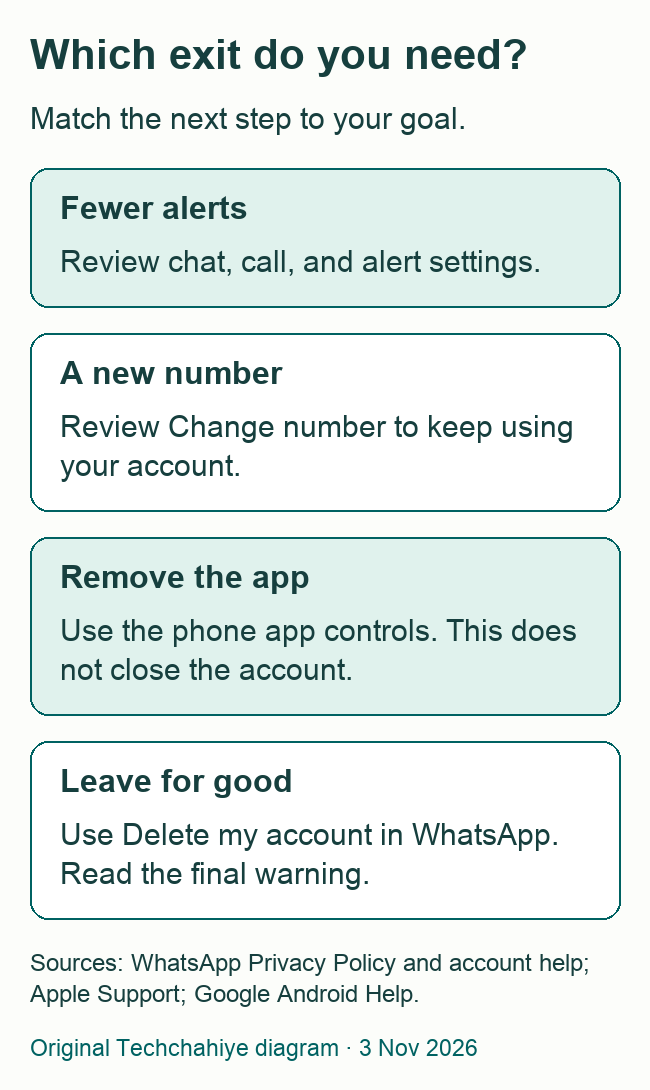
Put the goal into one plain sentence. “I want to stop using this account” is different from “I want fewer alerts.” “I have a new number” is different from “I want my old messages gone from every phone.”
This small step makes the app’s choices easier to read. Do not choose a permanent account action as a quick test of whether an error goes away. A problem with one chat, one contact, or one device may call for a narrower step.
| Your goal | What to review first |
|---|---|
| Leave WhatsApp permanently | The in-app Delete my account controls |
| Keep WhatsApp with a new number | Change number before closing the old account |
| Get fewer interruptions | Call, chat, and notification choices |
| Remove the app from one phone | The phone’s app removal controls |
| Keep a readable copy of one chat | Export chat before closing the account |
For example, imagine that a busy group is the reason you want to leave. You can still choose to close the account. But first ask whether that one group is the whole problem. A choice about one conversation does not have to become a choice about all your contacts.
If you have made a clear decision to leave, use the rest of this guide to carry it out with fewer loose ends. You do not need to justify the choice to each person who messages you. You do need to know what the final screen will do.
Delete a WhatsApp account on Android
WhatsApp’s account-deletion help directs you to its primary phone app. Check that you are looking at the account you mean to close. This matters if you use more than one account or help another person with their phone.
- Open WhatsApp on the primary phone.
- Open More options, then Settings.
- Tap Account, then Delete my account.
- Read the warning. Enter your phone number in full international format.
- Follow the reason and confirmation prompts to delete the account.
Pause before the last confirmation. This is the point to check the phone number, not the point to begin deciding what you still need from the app. If you are unsure about an item, leave the deletion screen and check it first.
Keep the country code and phone number consistent with the account on screen. A friendly name in your address book is not enough. Check the number in the account itself. Use the app’s own details rather than a number you copied from a recent message.
If someone is helping you, hold the phone and make the final choice yourself. A helper can read directions without taking over your account. Do not share a registration code, PIN, or backup key to make this process easier for them.
Delete a WhatsApp account on iPhone
Use WhatsApp’s settings, rather than beginning with the iPhone’s Delete App menu. The app’s current layout may put settings behind your profile picture. Look for Account and the account-deletion option.
- Open WhatsApp on the primary iPhone.
- Open Settings or your profile picture.
- Tap Account, then Delete my account.
- Read the warning and enter the full phone number for this account.
- Follow the on-screen prompts and confirm only when you are ready.
Do not confuse deleting the app with deleting the account. Apple’s current app-removal guide describes Remove App, then Delete App. Those controls remove software from the phone. WhatsApp gives a different route in its Privacy Policy. To close the account, use the controls inside WhatsApp.
This distinction also matters if you hand a phone to someone else. Removing an icon, closing an account, and preparing a phone for a new owner are separate jobs. Finish the task you mean to do, then use the device maker’s instructions for any wider phone handoff.
What account deletion changes
WhatsApp’s deletion guide describes an irreversible account action. It removes your account and message history. You leave your groups. The change affects the account across devices. Do not treat it as a reversible sign-out.
For an Android account, the same guide says it deletes the Google Account backup. Do not plan to close the account now and use that backup later as a way to undo the choice. A saved backup and a permanently deleted account are different issues.
Think through the effect on everyday arrangements. A school group may be where you learn about a change to pickup time. A sports group may hold the only address for this weekend’s game. A relative may know only your WhatsApp contact route. Note what you need to move before you leave.
You do not need to copy every old message. Start with what you still need. That might be a document, a date, a contact, or a chat you want to keep. An exit plan should reduce confusion, not create a second archive that you never intend to use.
Keep the choice tied to this account. You may use other chat apps. Closing WhatsApp does not tell people how to find you on them. Tell the people who matter which route you will actually check.
What deletion cannot erase
WhatsApp’s Privacy Policy makes an important distinction. Other users may hold details about you. Closing your account does not remove those copies. Their copies of your messages can remain.
A screenshot, a downloaded photo, or a note someone copied out of a chat is not under the same control as your account. Closing the account is not proof that all copies are gone. Some may remain online or on other people’s devices.
If your goal is to limit a specific shared item, address that item as a separate task. Start by identifying where it is and who has it. Avoid sending it to more people while asking how to remove it; that can make more copies of the thing you want to limit.
Here is a hypothetical example. You shared an old address in a group. Closing your account does not update the copy other members read. A separate message to the right people may be needed if you want them to use a new address. Keep that message limited to what they need to know.
The same principle applies to business records. A company may already have its own copy of an order conversation. Leaving the chat app is not the same as resolving an order or asking that company about its records. Use the company’s official contact route for that separate issue.
Keep a useful record before you leave
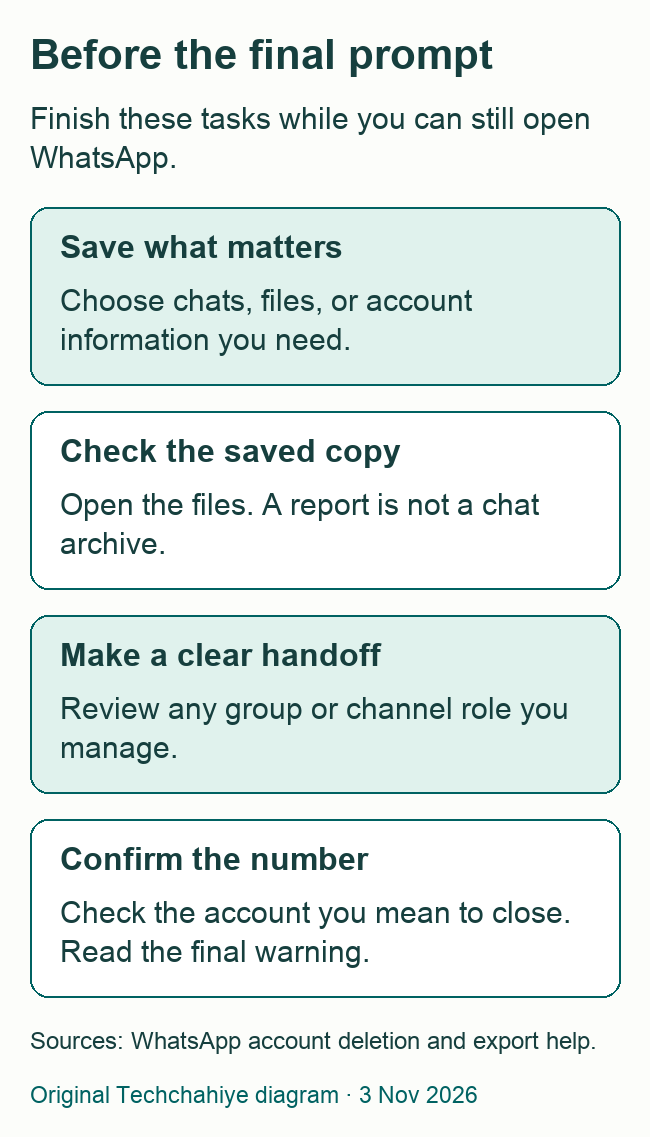
Decide whether you need a readable chat, a file, or a report about the account. These are different kinds of information. A folder full of files may still be missing the one document you need, so give each saved item a clear name.
WhatsApp’s export help explains how to export a conversation. The result is a readable record, not a file you can import as live WhatsApp chat history. Use that route if you want to read a chat outside the app later.
Choose where to store the record with care. It may contain another person’s private messages as well as your own. A personal folder with suitable access is a better place than a public share link created in a hurry.
Open the saved file before you delete the account. Can you read it? Does it cover the conversation you wanted? Are the files you need present? Finding an attachment in the old chat is different from proving that your new copy includes it.
Do the same with photos or documents you save separately. Check the actual files, not only the folder name. If you intend to keep them on another device, open a sample there. This takes less time than discovering later that you kept only a shortcut or a blank export.
An account report is not a chat archive
WhatsApp’s Request account info feature produces a report about account information and settings. Its help says the report does not contain your messages. Do not request that report and assume it has saved your conversations.
If you want the report, request it while the account is still available and wait for the app’s stated ready date. Download it and check the result before closing the account. Keep that private report out of public folders. Do not put its contents in support screenshots.
The order matters. WhatsApp says deleting the account voids a pending report request. Changing its number also voids that request. If you want that record, wait until it is ready, download it, and check the saved copy first. Starting a request is not the same as having the report in your files.
The report, exported chats, and individual media each have a different purpose. A simple list can help you keep them straight:
- Account report: review account information and settings.
- Chat export: keep a readable conversation.
- Saved media: keep a particular photo, video, or document.
Choose only what you need. There is no need to send every report to a friend to prove that you are ready to leave. If someone helps, explain the task without handing over the private contents.
After saving anything, note where you put it. A short private note with the folder name and purpose is often enough. Do not put passwords or recovery codes into a document you plan to share with other people.
Review groups and channels you manage
Before closing an account that helps run a group, consider what the other members need. A family, volunteer, or work group may depend on you for practical details. Tell the relevant people about a handoff while you still have access.
Keep a handoff clear and limited. Name the person who has agreed to take over, the task they will handle, and where shared files will live. Do not assume that sending someone a document gives them the app role needed to manage a group or channel.
Channels need their own review. WhatsApp’s account-deletion guide explains the effect of other admins. If they exist when you leave, ownership passes to one of them. It names the admin who has followed the channel longest.
If you want the channel to continue, review the current admin list first. Want to close the channel too? Follow its own steps first. Then close your WhatsApp account. Do not assume that every channel update disappears from followers’ phones.
Separate a quiet exit from an unwanted surprise for a team. For example, a volunteer may choose to leave. The group still needs a way to post meeting details. A short handoff gives the remaining people a chance to check their access. You do not have to keep your own account open forever.
If you only want a break or a new phone
For a break, start by naming what you want less of. Fewer alerts, fewer group messages, and less temptation to open an app are different goals. Choose the controls that fit your goal rather than testing permanent deletion.
Removing an app is a phone-level action. On Android, Google points to the Play Store’s app controls. Look for Uninstall there. Apple’s iPhone guide shows Remove App, then Delete App. Check your chat-preservation plan before using either route.
If you use any paid app feature, check its billing separately. Apple warns that deleting an app does not automatically cancel an in-app subscription. Do not treat a missing app icon as a receipt that a recurring charge has ended.
A new phone needs a move plan, not necessarily a new account. Keep the old phone intact until you have checked the new setup. Use WhatsApp’s supported transfer or restore process for your devices. A phone trade-in deadline is a good reason to plan earlier, not to skip the checks.
If the phone number itself is changing, review Change number. WhatsApp’s policy points to that in-app route for transferring the account to a new number. Do not close the old account first if your goal is to keep it with a new number.
After a number change, make and check a new backup. WhatsApp warns about old backups in its number-change help. A backup made with the old number cannot restore your data after the change. Keep the number change and its new saved copy together in your move plan.
What the deletion timeline means
WhatsApp’s deletion help says processing can take up to 90 days. That is time to process the data. It is not an undo period. Do not plan to return within 90 days to reverse the choice.
WhatsApp says it may keep some data. Legal duties and steps to prevent harm are among the reasons. Closing an account does not mean all related records vanish at once. Some may remain in other systems. The Privacy Policy explains its retention approach.
Keep those provider statements separate from the result you can observe. You can read the app’s confirmation and note when you completed the step. You cannot inspect every internal storage system from the screen on your phone.
If a contact still sees an old chat with your name, that alone does not show that the deletion failed. Their chat history is a separate copy. Ask what exactly they see before assuming that an account is still active.
Do not keep trying the deletion flow from different phones because a friend has a stale view. Start with the result on your primary device and the official help for the issue you can describe. Repeated actions do not make a permanent choice easier to reverse.
A final check before confirmation
Read your plan once more before the final prompt. Have you saved the items you chose to keep? Can the people who matter reach you? Have you made any group or channel handoff you need?
Then check that the number on the account is the one you intend to close. This is especially important if you use separate personal and work numbers. A familiar profile picture is a useful cue, but the number is the account detail to verify.
If one task remains, stop and deal with it. You can take time to open a saved file. You can tell a relative how to reach you. Account deletion remains your choice. A deliberate final step is easier to understand than a rushed set of app changes.
Once you complete the action, keep any private record you need in a place you control. Remove private account details from screenshots you share when asking for help. Describe the result in plain words. Keep your number, report files, and chats private.
Did You Know?
Deleting an app from an iPhone does not automatically cancel an in-app subscription. Apple states this in its app-deletion guide. If you pay for a feature, check its billing too. Closing an account and removing an app are separate tasks.
Conclusion
Use your primary phone to delete the account. In WhatsApp, go to Settings, Account, then Delete my account. Save what you need and make any handoff first. Check the number before the last prompt. Treat this as a permanent choice. Other people may still have copies of your past messages.
FAQs
Does uninstalling WhatsApp delete my account?
No. WhatsApp’s Privacy Policy distinguishes app removal from its in-app account-deletion feature. Use the account controls when you mean to close the account. Before you remove the app, decide which chats and files you need. Check the copies you choose to keep.
Can I delete the account from WhatsApp Web?
Use the primary phone. WhatsApp says you cannot delete the account from a linked device. Open the app on the phone that holds the account. Check the number. Read the final screen. Do not share your login codes with someone offering to do it for you.
Will my old messages disappear from other people’s phones?
No. WhatsApp makes this clear in its Privacy Policy. Other people can keep their copies after you close the account. Treat a shared message, saved photo, or screenshot as a separate record. Closing your account is not proof that others have removed what you sent.
Can I use an account report to save all my chats?
No. WhatsApp’s account information report does not contain messages. Export a chat to keep a readable copy. Open the file and check it before you close the account. An export is also different from a restorable backup. Decide which type of record serves your purpose.
Should I delete the account when I change my number?
Review Change number first if you want to keep using WhatsApp with your existing account. The service points to that route for a number change. Full account deletion serves a different goal. Plan the number and phone move while you can still open the old setup.
References
- Techchahiye: WhatsApp Tips and Privacy Guide. Related account privacy and safety hub.
- WhatsApp Help Center: How to delete your account. Account-deletion steps and limits.
- WhatsApp: Privacy Policy. Account deletion, app removal, other users’ copies, and retention.
- WhatsApp Help Center: How to request account information. Account reports and their limits.
- WhatsApp Help Center: About changing phone numbers. The separate route for keeping account continuity with a new number.
- WhatsApp Help Center: How to export your chat history. Readable chat exports and restore limits.
- Apple Support: Delete apps on your iPhone or iPad. App removal and subscription checks. Updated September 14, 2026.
- Google Android Help: Delete apps on your Android device. Android app removal controls.
