Now on the App Store
Your interests.
Your reading.
Your space.
An RSS reader for iPhone and iPad, built around what you choose. Follow your favorite sources. Save a story for later. Give your documents, highlights and notes a place to belong with Apollo Companion.
Free to download · Optional Pro purchases
iOS 17+ and iPadOS 17+ · No account needed to start
A home for curious minds
A little more order.
A lot more possibility.
A place to collect your reading, spend time with your own documents, and keep the ideas you want to return to. Here is what that looks like in Apollo.
01 / Your library
Good reads.
Within reach.
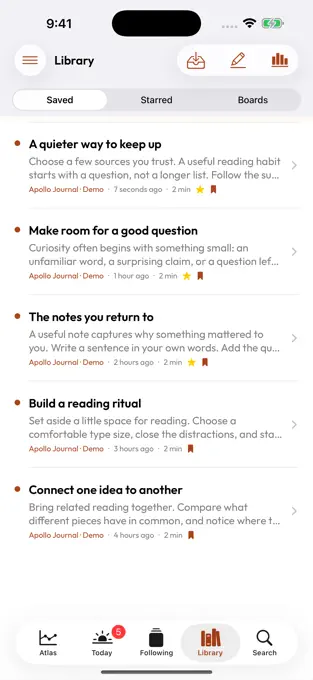
Bring saved reading together. Keep an item for later, star a favorite and return when you have a moment.
02 / Your reading
Make room
for a good idea.
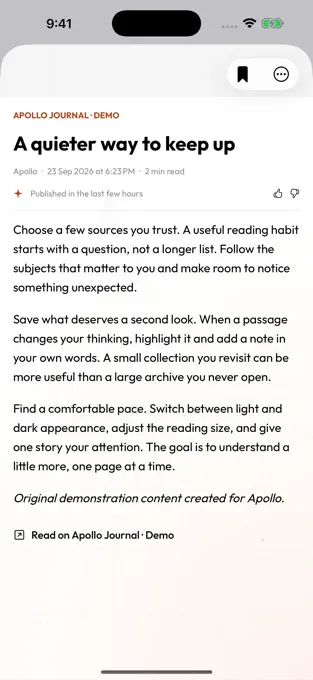
Settle into your local documents. Web feed stories open on the publisher’s website so you can read the original.
03 / Your notes
Keep the passage.
Add your thought.
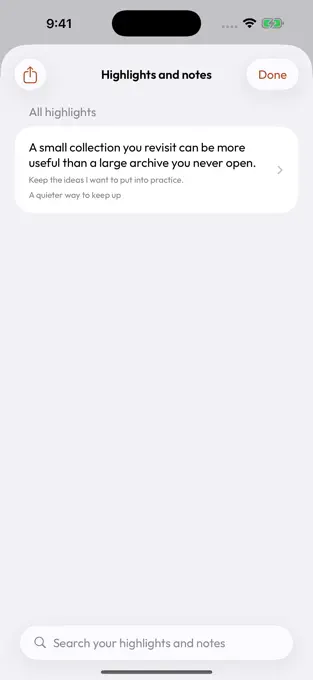
Highlight a useful line in a local document. Add a note in your own words, then find it again in Highlights and notes.
Actual iPhone screens from the Apollo App Store listing · Original demonstration content
How your reading comes together
Two ways in.
One personal library.
Follow the web for new stories. Bring your own documents when you want to read, highlight and keep notes inside Apollo.
Web feeds save titles and links, not full article copies. Publisher access rules still apply. Offline reading and content tools apply to local documents you are permitted to use.
Make something of what you read
A useful thought
deserves a home.
A sentence that explains a hard idea. A note for your next project. Keep useful passages from your local documents close to your own thoughts.
- Highlight passages and add notes.
- Bring related reading together in a project.
- Keep guest and signed-in libraries separate.
Your library stays on your device. Signing in with Google or Apple does not automatically sync it to another device.
Read how Apollo handles your data ↗Apollo Free + Apollo Pro
Start with curiosity.
Add more room later.
Start with Free. If you want more capacity and advanced tools, explore Pro inside Apollo. Choose a monthly, annual or one-time purchase.
Follow feeds · Save story links · Highlight local documents and add notes
Monthly
Try Pro in your everyday reading routine. Renews monthly until cancelled.
Explore Pro in the appAnnual
Make room for a year of reading. Any trial offer and your eligibility are shown in the app before purchase. Renews until cancelled.
Explore the annual planLifetime
Choose Pro without a recurring Apollo subscription. Pay once through Apple’s in-app purchase.
See Lifetime in the appPrices shown are from the US App Store, checked November 6, 2026. Prices in India and other regions may differ. Download Apollo first; purchases happen inside the app. Apple displays your current local price, trial eligibility and renewal terms before you confirm. Cancel subscriptions in your Apple Account settings. Pro does not include publisher subscriptions or third-party AI charges. Full web-article extraction is unavailable on every plan.
Frequently asked questions
A few things
worth knowing.
Straight answers before you download.
Need a hand? Get support ↗
What is Apollo Companion?
Apollo Companion is an independent RSS reader and reading app for iPhone and iPad. Follow feeds, save story links and organize local documents, highlights and notes in a personal library. RSS is a way for websites to share updates that you can follow in a reader.
Is Apollo free to use?
Yes. Apollo is free to download and use, with optional Pro purchases. Start with feeds, saved links, and highlights and notes for local documents. Check the app for current plan limits and the tools included in each plan.
Can I read full articles and save them offline?
Web feeds in this release store article titles and original links. Open a link to read the full article on the publisher’s website. Apollo does not extract full web articles or bypass paywalls. Offline reading and highlighting apply to local documents you own or are allowed to use.
Does Apollo work on both iPhone and iPad?
Yes. Apollo requires iOS 17 or later on iPhone, or iPadOS 17 or later on iPad. The current App Store listing is in English.
Do I need to create an account?
No. You can start as a guest. Google and Sign in with Apple are available if you want an Apollo account. Each account and the guest session have separate libraries on the device.
Will my library sync automatically?
No. Signing in does not automatically sync your feeds, notes or library between devices. Apollo keeps libraries locally; transfer and export tools are separate from signing in.
How do the Pro trial and subscriptions work?
If a trial is available, Apple shows the offer, your eligibility and the local price before you confirm. Monthly and annual plans renew until cancelled. Manage or cancel them in your Apple Account subscription settings. A lifetime purchase is a separate one-time option.
Are AI services and publisher subscriptions included?
No. Optional online AI uses your own supported provider account or key and may cost extra. Your selected questions or content are sent to that provider when you use it. Publisher subscriptions are separate too. You do not need online AI for basic reading.
How do I restore a purchase or get help?
Use Restore Purchases in Apollo with the Apple Account that made the purchase. For help, visit Apollo Support or email [email protected].
Your next good read starts here
Give your curiosity
a place to land.
Download Apollo Companion. Add a favourite feed.
Start building a reading space that feels like yours.
Free to download · iPhone and iPad · Optional Pro